
Unity Watch
A live Unity pane for Claude Code. See your editor's state, test runs with progress and ETA, builds, console errors and git while Claude works on your game. Missing the Unity CLI, the Pipeline package or the right Unity version, or Unity is closed? It fixes it in one click. Run tests, build Android, recompile or stop a run from the pane.
claude plugin validate to auditGuide →Writes files, executes local shell processes, or programmatically drives Claude.
Statically scanned from hooks & source. Learn how to audit
Unity Watch


A Claude Code mod that keeps your Unity editor in view while Claude works on your game: whether the editor is up, compiling or in Play mode; test runs with progress, ETA and history; builds; console errors; and git. When something is missing (the Unity CLI, the Pipeline package, the project's Unity version, or the editor isn't open), the pane says so and fixes it in one click.
Install · What you see · Use · What it can reach · Configure · Troubleshooting
Install
Inside Claude Code (2.1.289 or later):
/plugin marketplace add TheoGegout/claude-unity-watch
/plugin install unity-watch@claude-unity-watch
/reload-plugins
Then, in a Unity project, type unity (or /unity).
From the terminal, or from a clone
claude plugin marketplace add TheoGegout/claude-unity-watch
claude plugin install unity-watch@claude-unity-watch
Or load it straight from a clone, for one session:
git clone https://github.com/TheoGegout/claude-unity-watch
claude --plugin-dir ./claude-unity-watch
Mods are an early-access Claude Code feature and their API can change between releases. If something breaks, see Troubleshooting.
What you see
| Part | Shows |
|---|---|
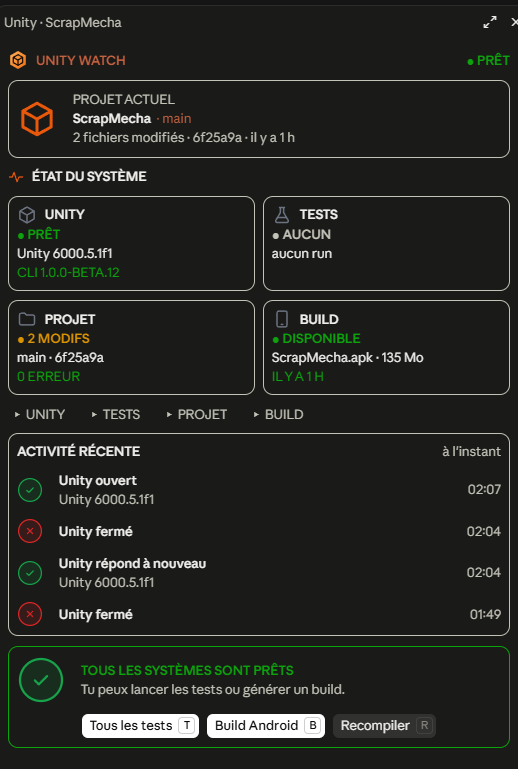
| Header | the editor's state: ready, compiling, in Play, starting, not responding, closed |
| Project | name, branch, changed files, last commit and its age |
| Unity card | the editor version, the Unity CLI version, whether the Pipeline package is there |
| Tests card | the running suite with a progress bar and the time left (from the longest run seen), or the last result, and the last 12 runs as ■ |
| Project card | branch and commit, console errors |
| Build card | the build in progress, or the newest .apk/.aab in Builds/ with its size and age |
| Details | ▸ Unity / Tests / Project / Build open each card's details: paths, the last runs with their dates, the last commit, console errors, the last build's result |
| Failed tests | each failed test by name, after a run with failures |
| Recent activity | what happened and when: project loaded, Unity opened or closed, tests started and finished, builds, failed compiles, the buttons you pressed |
| Action block | the one thing that matters now and its button: install what is missing, open Unity, stop a run, unblock a stuck runner, or run the tests and build when all is ready |
| Unity closed | Starting | Ready |
|---|---|---|
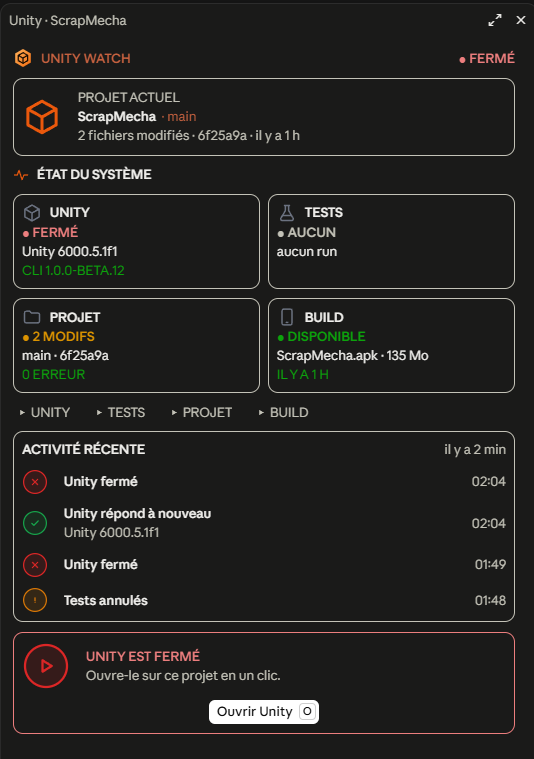 | 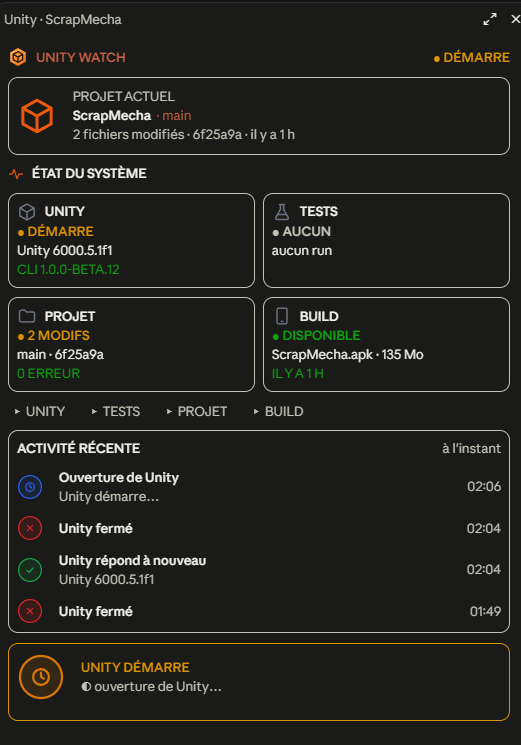 | |
It draws with your Claude Code theme's own colours, light or dark, in the desktop app, VS Code, the phone and the terminal. Where the surface draws SVG it adds icons; the terminal shows the same pane in text.
The pane refreshes itself: the editor, tests and build every 5 seconds, git, the console and the toolchain every 30. Toasts tell you when a run or a build ends, a compile fails, or the editor stops answering, and the status line carries a one-line summary.
Use
| Command | Does |
|---|---|
unity or /unity | opens the pane (in a Unity project; elsewhere unity is a normal prompt) |
| Button | Key | Does | Shown when |
|---|---|---|---|
| Install the Unity CLI | runs Unity's official install script | the CLI is missing | |
| Install Unity <version> | installs the exact editor version the project asks for | it is not installed | |
| Install the Pipeline package | adds com.unity.pipeline, which the CLI drives the editor through | the project lacks it | |
| Open Unity | o | starts the right editor on this project; never a second one | the editor is closed |
| Run all tests | t | starts the PlayMode (or EditMode) suite | the editor is up and idle |
| Build Android | b | builds Builds/<project>.apk | the editor is up and idle |
| Recompile | r | refreshes assets and recompiles scripts, for edits made while Unity was in the background | the editor is up and idle |
| Stop the tests | s | cancels the running suite; press twice within 5 seconds, so a stray click never throws away a long run | a suite is running |
| Unblock | u | cancels a stuck runner, reopens the first build scene, deletes leftover InitTestScene files | the runner is stuck, or test scenes stayed behind |
While a suite or a build runs, nothing that could disturb it is offered: no recompile (a domain reload under the test runner can take the editor down), no second run, no build.
What it can reach
Everything stays on your machine.
| It | What |
|---|---|
| reads | the project's ProjectSettings/ProjectVersion.txt, Packages/manifest.json and editor log; lists Assets/ (leftover test scenes) and Builds/ |
| runs, on its own | unity --version, unity editors --installed, unity cmd editor_status / test_status / build_status / console / recompile_status, git status, git log -1, and tasklist or pgrep to tell a busy editor from a closed one |
| runs, when you press a button | the editor itself, unity install, unity pipeline install, Unity's install script (downloaded from Unity's CDN), and the unity cmd behind each button |
| stores | per project: the last 12 test results and the longest run's length, for the ETA |
It never sends your project anywhere, never runs tests or builds by itself, and calls no model. claude plugin validate . prints exactly what it hooks and calls.
Configure
In /config, or under pluginConfigs["unity-watch"].options in settings.json:
| Option | Default | Meaning |
|---|---|---|
language | auto | en, fr, or your system's language |
openOnStart | true | open the pane when a session starts in a Unity project |
statusLine | true | the one-line summary in the status line |
testMode | playmode | which suite Run all tests starts: playmode or editmode |
buildTarget | Android | off hides the build button |
Troubleshooting
The pane says the folder is not a Unity project. Start Claude Code in the project's folder (the one with Assets/ and ProjectSettings/) or a folder right inside it.
"Not responding". The editor is busy (importing, a dialog open) or stuck. The pane checks that a Unity process still holds the project before it says "closed", and comes back by itself once the editor answers.
Tests stuck on "running". The pane notices a run that claims to run while the editor sits idle with a silent log, and offers Unblock.
Something else. Look in the transcript for a dim line starting unity-watch:; it names the hook that failed. Please open an issue with it, your claude --version and your Unity version.
Windows is the most tested. macOS and Linux paths (the CLI under ~/.unity or ~/.local/bin, opening the editor, the install script) are supported but less exercised.
How it works
The pane talks to the editor through the Unity CLI and the com.unity.pipeline package, which runs a small server inside the editor.
| File | Holds |
|---|---|
hooks/register.tsx | the hooks, the polling, the buttons' actions and the drawing |
hooks/core.ts | every decision as pure functions: how a reading merges with what the buttons wrote meanwhile, what each card and the action block say, which buttons a state allows, how the CLI's and git's answers parse |
hooks/strings.ts | every word, in English and French |
hooks/art.ts | theme colour keys and the SVG icons |
types/index.d.ts | the state contract |
tests/ | 22 tests: the pure decisions, and the pane drawn over a fake Unity project (ready, closed, running tests, failed tests, missing CLI, package or editor) on the terminal and the desktop |
State lives in $.state atoms and every read is merged over defaults, so a missing or older field never breaks the pane.
Develop
claude --plugin-dir .            # load it; edits hot-reload
claude plugin validate .
claude plugin test .
npx -p typescript tsc -p .       # after the first load, which writes .claude-plugin/types/
See CONTRIBUTING.md. Changes are listed in CHANGELOG.md.
License
Details
- Author
- @TheoGegout
- Sub-category
- Games
- License
- MIT
- Surfaces
- terminal
- Added
- 1 months ago
- Last synced
- 1 day ago
- Events hooked
session.startcommand.runprompt.submitui.render
Weekly Mods Digest
Top new Claude Code mods and install commands, once a week. No fluff, unsubscribe anytime.


