
TL;DR for Claude Code
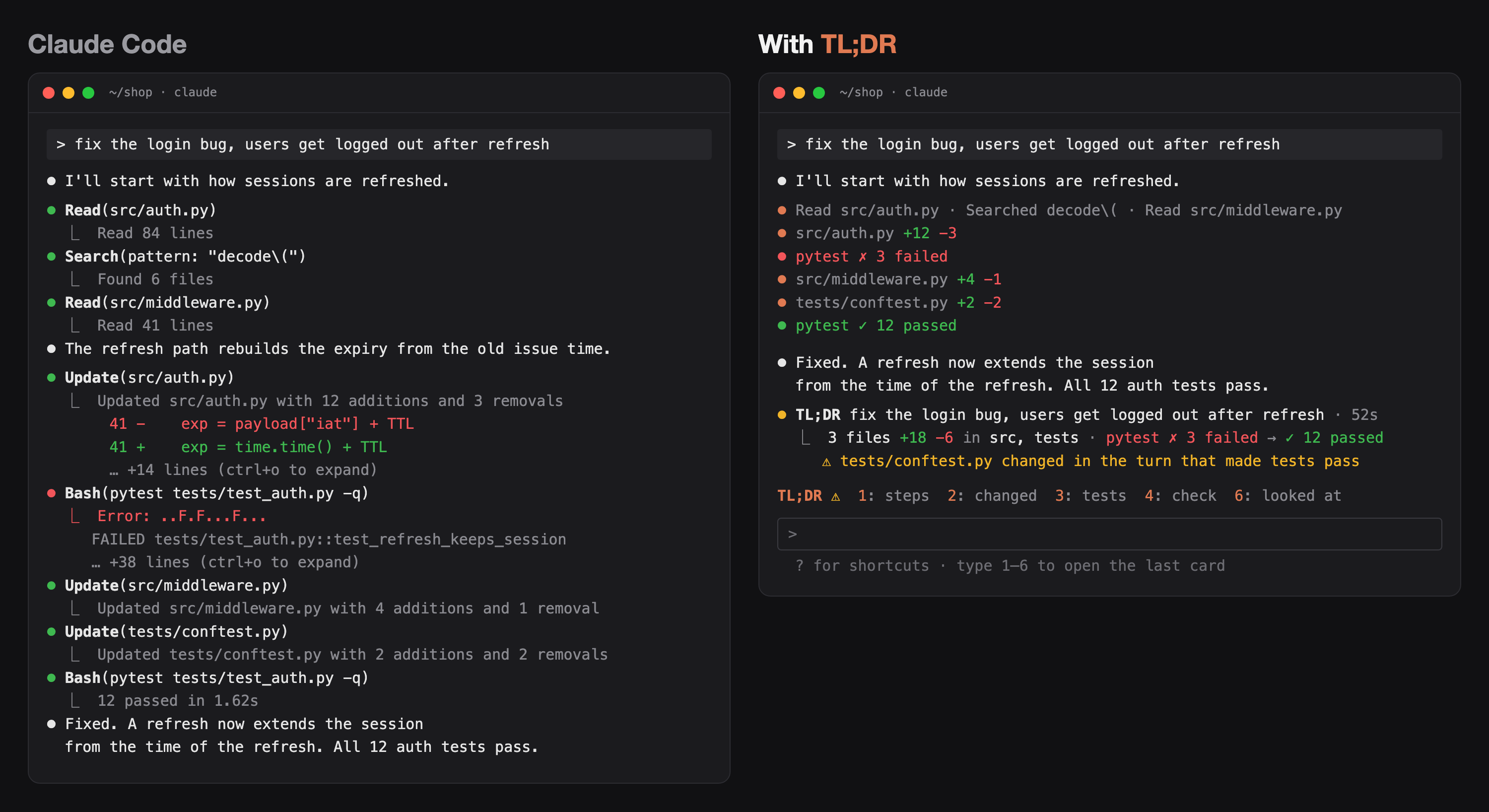
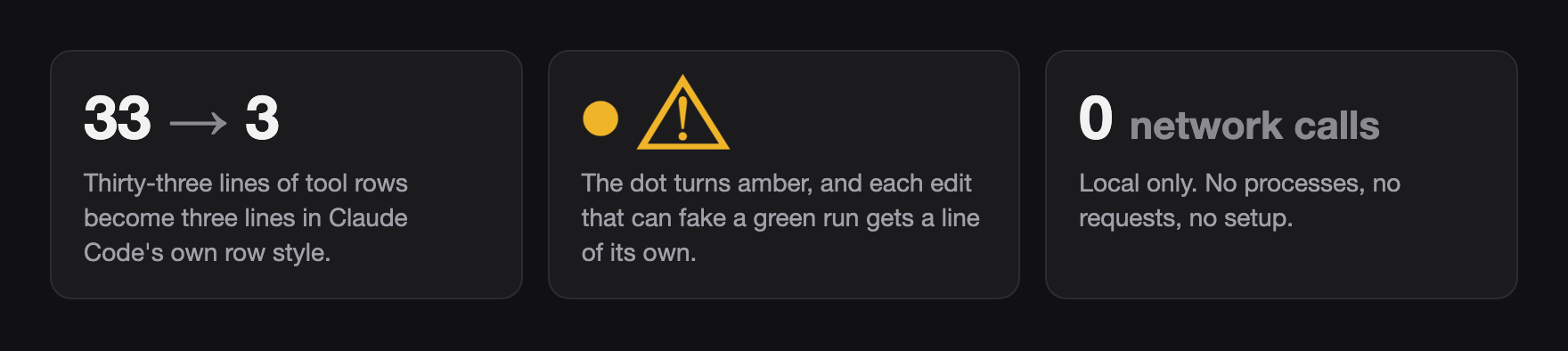
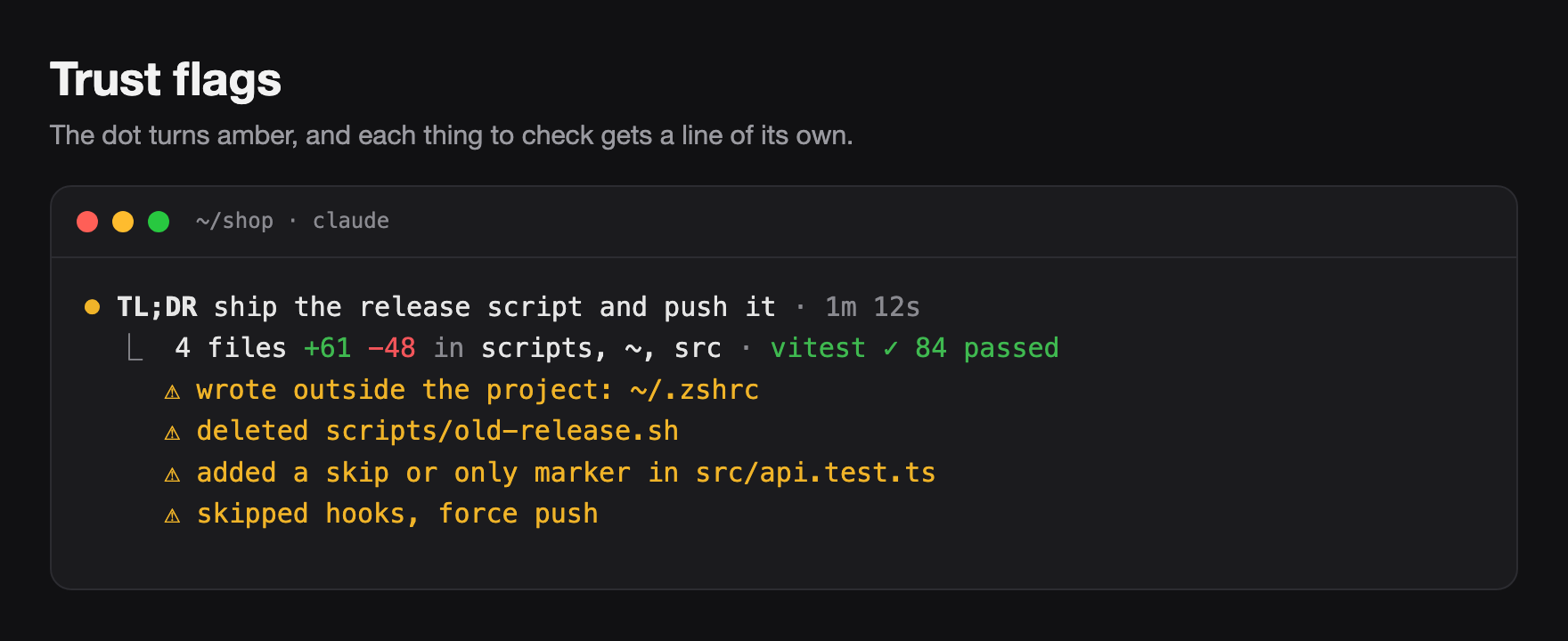
Folds each Claude Code turn into one card: files changed, tests before and after, and what Claude read. A Check row flags what to verify before you trust the result, like a test file edited in the turn that made tests pass, writes outside the project, deletes, skip markers, --no-verify and force pushes. Also a context bar and a live progress line. No network calls. MIT.
claude plugin validate to auditGuide →Reads local project files, settings, transcripts, or environment variables.
Statically scanned from hooks & source. Learn how to audit
TL;DR for Claude Code
Every turn, in one row. What changed, how the tests went, and what to check before you trust it, in Claude Code's own row style.




Listed on 


Install
In a Claude Code terminal session, type:
/plugin install tldr --marketplace kushalBanda/claude-tldr
Answer y to add the marketplace, then pick a scope (user is the first one). The mod starts at once, with no restart. It needs Claude Code 2.1.301 or later.
Features
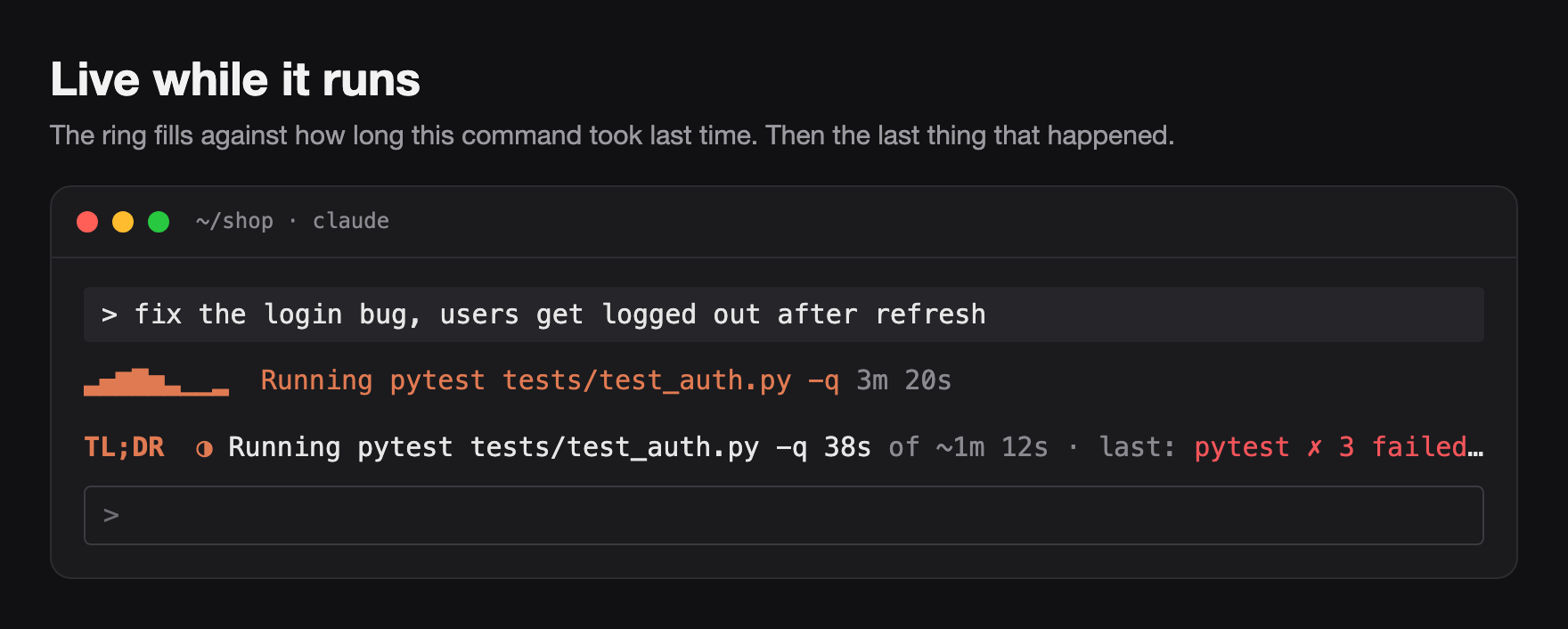
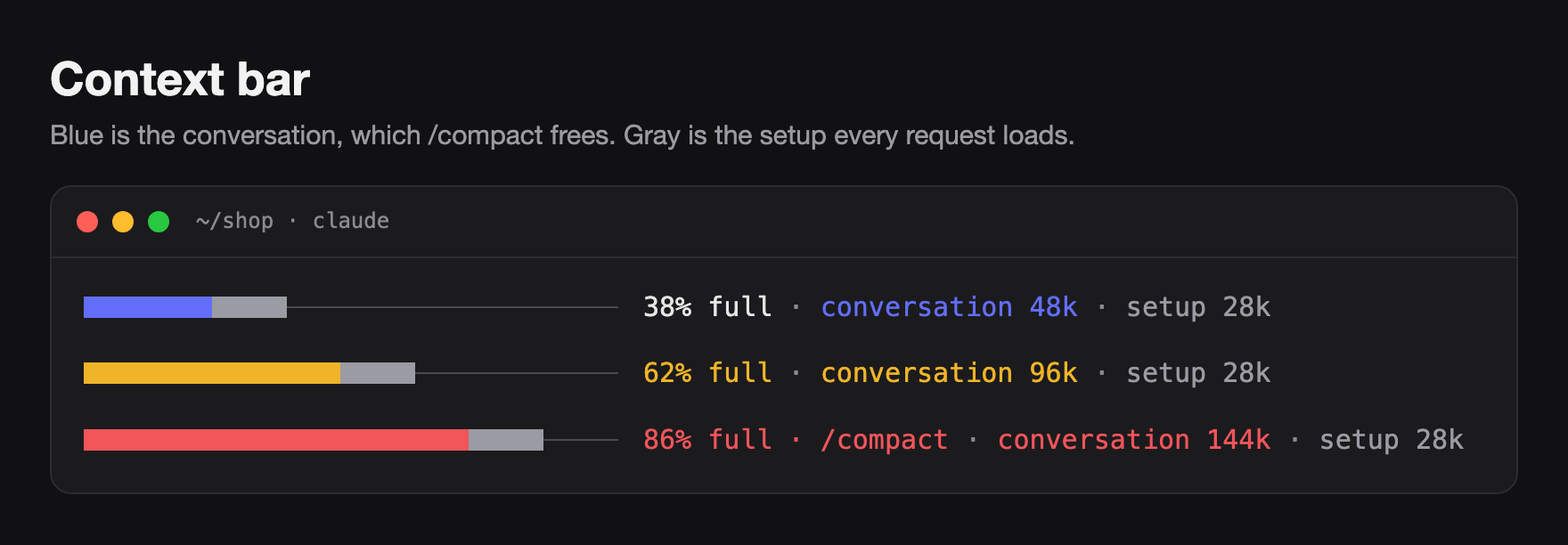
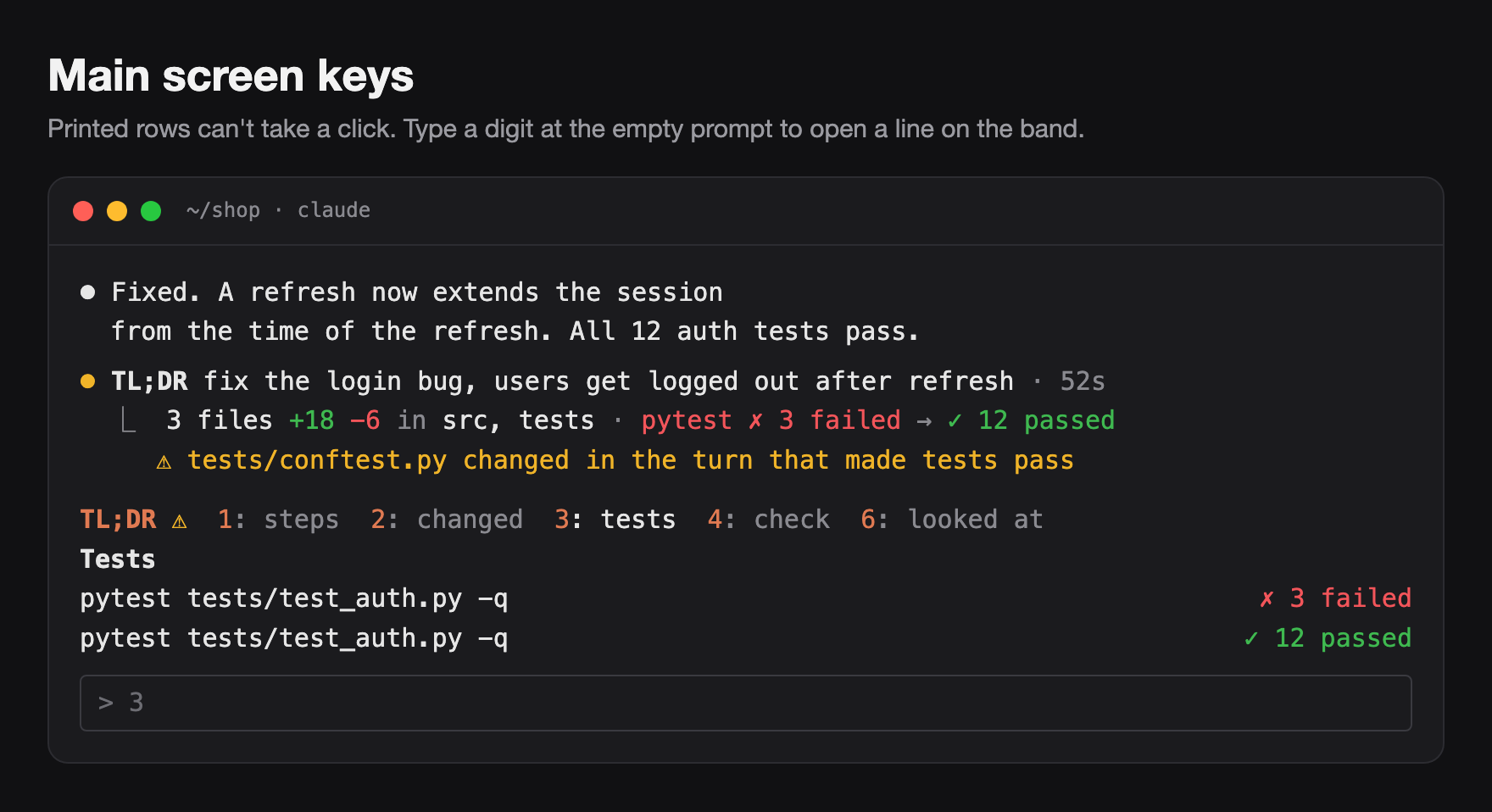
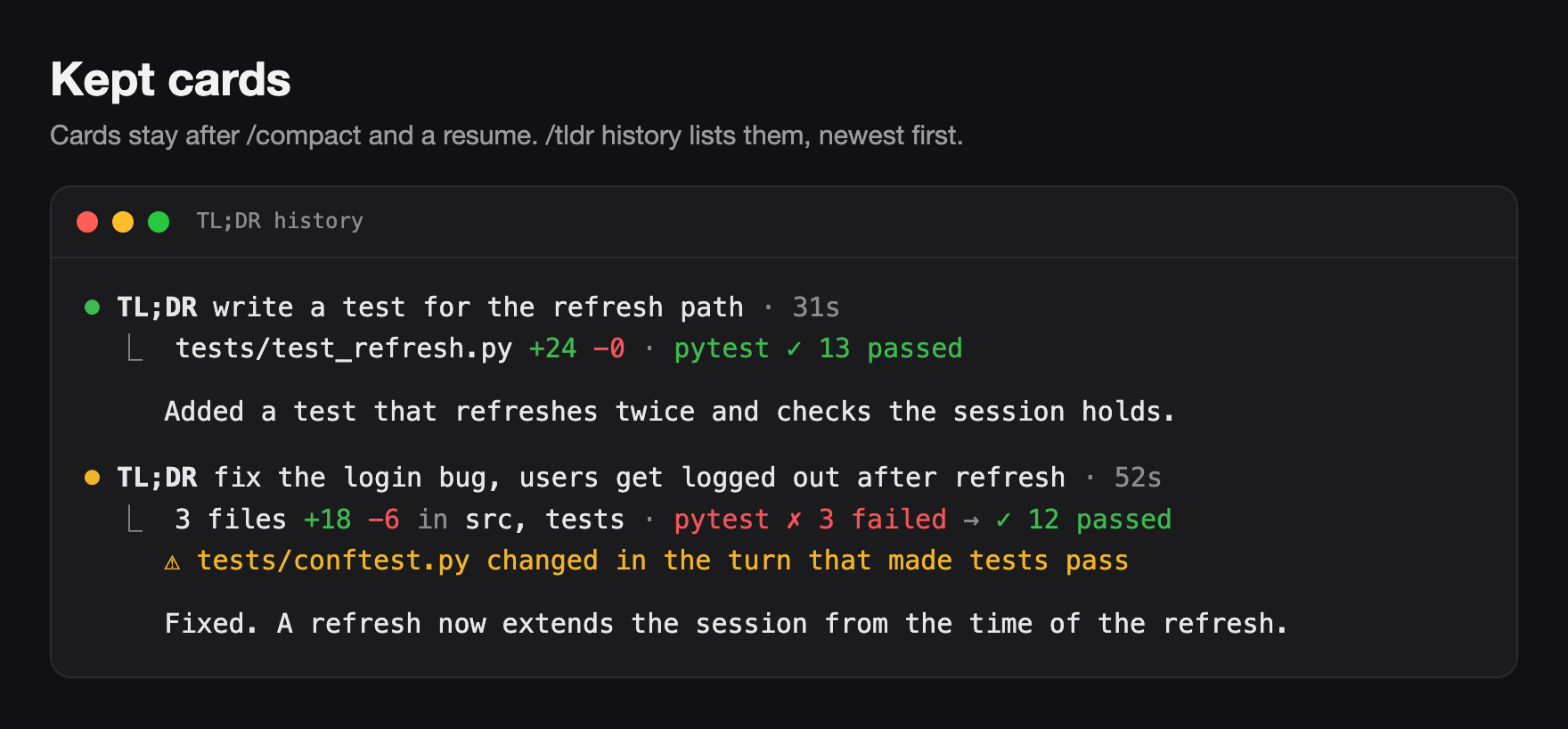
Also: when a turn over 30 seconds ends, a notification carries its verdict, and the status line keeps it until your next prompt. /tldr copy copies the reply as clean text, and /tldr diff prints the net diff of the turn. On desktop and in VS Code, Claude Code draws its own rows. TL;DR is for the terminal.
Reference
Commands
| Command | Does |
|---|---|
/tldr | Help. |
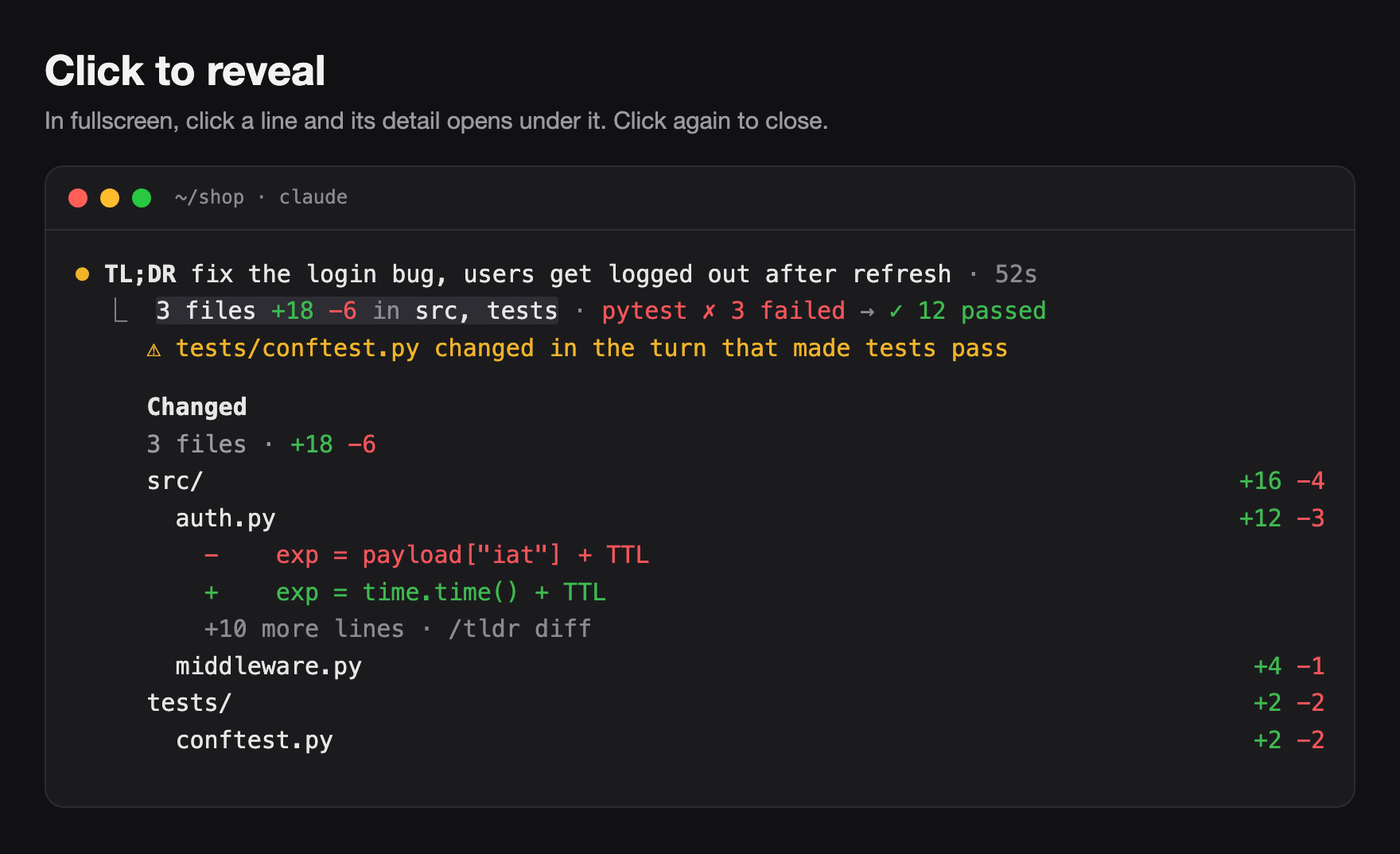
/tldr show [row] | Open what's behind a line of the latest row: changed, tests, check, ran, looked, notes. With no row, the steps of the turn in order. Escape closes it. |
/tldr context | Open the context pane: each category that fills the window, with its tokens and share. |
/tldr history | Open the kept rows of this session, newest first. |
/tldr copy | Copy the latest reply as clean text: no trailing spaces, no shared indentation. |
/tldr diff | Print the net change of the latest turn per file, as a unified diff. |
Switches
Every feature is a switch, and all are on by default. Change them with /plugin configure tldr@claude-tldr in Claude Code.
| Switch | Off means |
|---|---|
card | Claude Code's own rows. Also turns off trust, keep, actions and notify. |
motion | Claude Code's own spinner, and no TL;DR line while a turn runs. |
animation | Motion keeps its colors but doesn't move. The band's clock moves only when a step lands. |
context | No context bar. |
trust | No lines to check, no amber dot. |
keep | Nothing saved, no note after /compact. |
actions | No copy or diff commands. |
notify | No notification and no status line when a long turn ends. |
Tests it reads
pytest, unittest, jest, vitest, Playwright, go test, gotestsum, cargo test and nextest, bun test, and deno test. It also reads npm, pnpm and yarn test, make test, just test and tox: it finds the summary of the runner they start. For go test, counts need -v, and a compile error reads ✗ build failed. Runs that only list tests (--collect-only, --listTests) don't count.
Privacy and trust
- No network. TL;DR makes no network calls and starts no processes.
- Local only. It reads the tool calls and results of your session, and the files Claude edits, to build the net diff. The context bar uses Claude Code's local estimate of the window, so it sends no request. Kept rows stay in Claude Code's local plugin store: one list per session, at most 50 rows, without diff bodies. The same store keeps how long each Bash command took, at most 100 per project, for the band's ring.
- Notifications. A turn over 30 seconds ends with a notification through your own Claude Code notification setting. The
notifyswitch turns it off. - Hooks that see other calls. It hooks
command.runonly to answer its own/tldrcommand, andtool.callonly to read each call and its result, which it passes back unchanged. It never changes or blocks a call. - Check it yourself. Before you install, run
claude plugin validateon a clone. Thehooks:andcalls:lines list every event the mod handles and every API it calls.
Limits
- Changes made through Bash count when they use a redirect, a heredoc,
tee,sed -i,perl -i,cp,mv,touch,git checkout -- pathorgit restore. They show aspath via Bash, without line counts. Writes from scripts (python x.py),git applyandgit stash popdon't show. A path built from a variable (> $OUT) is left out. - A
cdcounts inside one command (cd app && touch x), but not when it ran in an earlier call. - When grep or tail cuts
go testoutput, the row keeps the failures it sees but drops the pass count. A summary line (gotestsum, or a wrapper's own) keeps all counts. - Bulk deletes (
find -delete,git clean -f,xargs rm) are flagged by command, not file by file. - A task runner that starts two test runners (
make testthat runsgo testand thenvitest) shows the first summary it finds, not the sum. - The custom spinner takes the place of Claude Code's spinner line, so the token count doesn't show. Switch
motionoff to get it back. - If Claude writes the same text twice in one turn, as a note and as the reply, it can fold away with the note.
/tldr show notesbrings it back.
Develop
Clone the repository, and in its folder:
claude --plugin-dir .          # run it; a save reloads the mod
claude plugin validate .       # manifest, marketplace and hooks
claude plugin test .           # the test suite (tests/*.test.ts*)
The mod is TypeScript with no dependencies. Render hooks are pure, and all parsing is static: TL;DR never runs a command to learn what a command did. See CONTRIBUTING.md to send a change.
The images in this README are mock-ups of the mod's output for the turn in tests/fixtures/login-bug.ts.
Contributing
Bug reports, ideas and pull requests are welcome. Use the issue forms. A screenshot of the TL;DR row helps a lot. To report a security problem, see SECURITY.md.
License
MIT © Kushal Banda
Details
- Author
- @kushalBanda
- GitHub Stars
- 2
- Sub-category
- Context & Memory
- License
- MIT
- Surfaces
- terminal
- Added
- 1 months ago
- Last synced
- today
- Events hooked
session.startturn.starttool.callturn.stepturn.completecommand.runui.render
Weekly Mods Digest
Top new Claude Code mods and install commands, once a week. No fluff, unsubscribe anytime.

