
Swift Concurrency Auditor
Swift Concurrency Auditor is a Claude Code plugin that checks every Swift file Claude edits for concurrency bugs like data races, missing @MainActor isolation and leaking tasks, without blocking the edit. The /concurrency pane lists findings with a Fix button that sends an agent to fix one issue, then re-audits the file to confirm it is gone. /concurrency-report shows a Swift 6 readiness score with severity counts and writes an HTML report.
claude plugin validate to auditGuide →Writes files, executes local shell processes, or programmatically drives Claude.
Statically scanned from hooks & source. Learn how to audit
Swift Concurrency Auditor
A Claude Code mod that soft-checks every Swift file Claude edits for concurrency bugs. Nothing is blocked: after each Edit or Write to a .swift file, Claude reads a short note with any findings and can fix them in the same turn, and you see a summary on the status line.
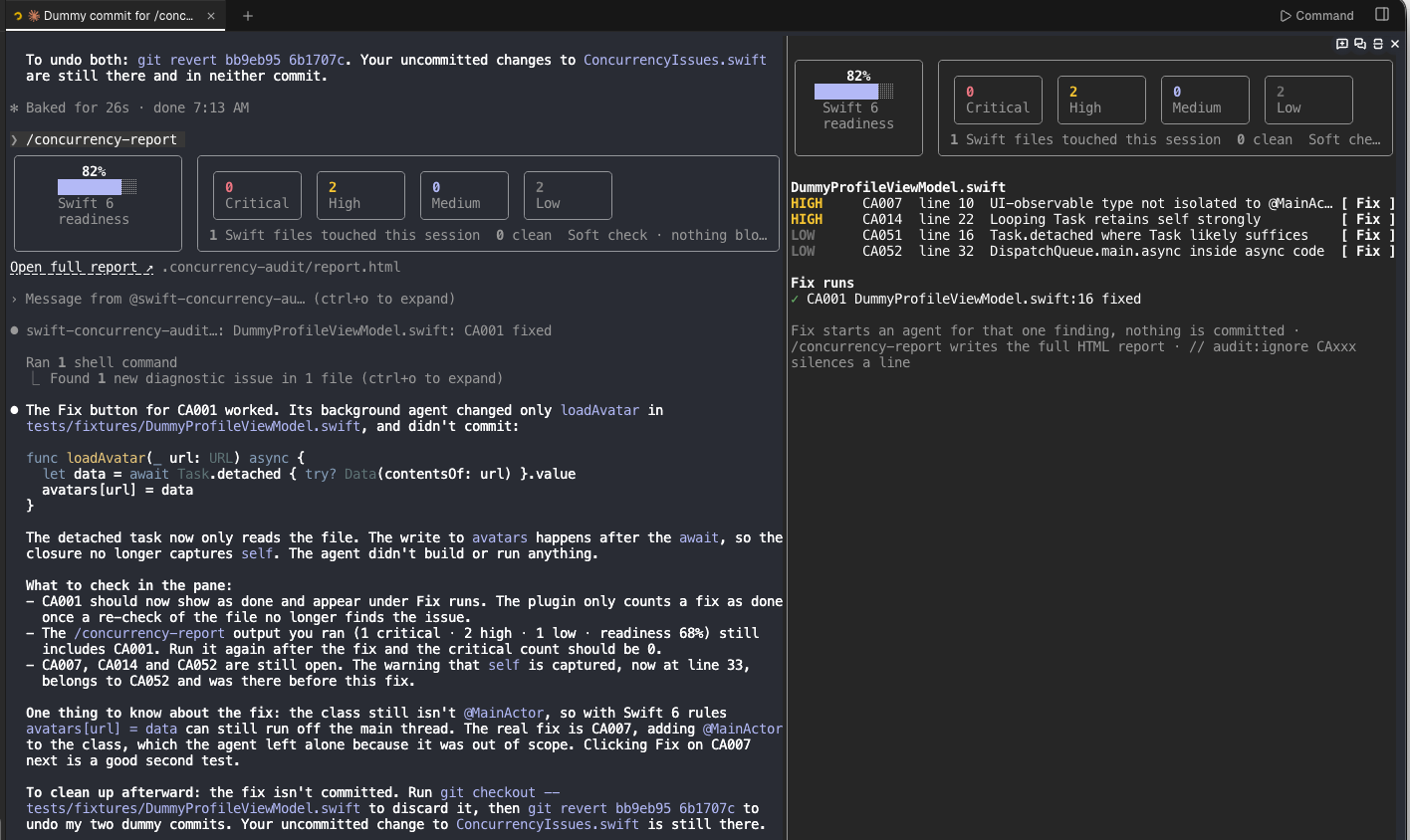
Left: /concurrency-report draws the readiness card and severity tiles inline. Right: the /concurrency pane, with a Fix button per finding and finished runs under Fix runs.
Try the plugin without installing it: the interactive explainer simulates the pane and its Fix buttons, includes a readiness calculator, and lets you browse every rule. Open the file locally in a browser, or use the hosted version.
Requires Claude Code 2.1.287 or later.
How it works
flowchart LR
    A["Claude runs Edit / Write<br/>on a .swift file"] --> B["Soft audit<br/>(nothing is blocked)"]
    B --> C["Note to Claude<br/>+ status line"]
    B --> D["/concurrency pane, band<br/>and HTML report refresh"]
    D -->|"press Fix"| E["fixer agent edits<br/>that one finding<br/>(never commits)"]
    E --> F["Re-audit the file"]
    F -->|"finding gone"| G["✓ listed under Fix runs"]
    F -->|"still reported"| H["✗ button shows Retry"]
Install
At the prompt of a terminal session:
/plugin install swift-concurrency-auditor --marketplace badrinathvm/swift-concurrency-auditor
From a shell:
claude plugin install swift-concurrency-auditor --marketplace badrinathvm/swift-concurrency-auditor
Answer y to add the marketplace, then pick a scope (user scope loads it in every session).
In the desktop app: click + next to the prompt box, then Plugins, Add marketplace with badrinathvm/swift-concurrency-auditor, then Add plugin.
What it checks
| ID | Severity | Rule |
|---|---|---|
| CA001 | critical | Task.detached that mutates self (likely data race) |
| CA007 | high | @Observable / ObservableObject class not isolated to @MainActor |
| CA014 | high | Looping Task that captures self strongly |
| CA021 | medium | @unchecked Sendable or nonisolated(unsafe) |
| CA030 | medium | TaskGroup children that never check cancellation |
| CA042 | low | Blocking calls (semaphores, Thread.sleep, DispatchQueue.main.sync) in async code |
| CA051 | low | Task.detached where Task likely suffices |
| CA052 | low | DispatchQueue.main.async inside async code |
The checks are fast pattern matches, not the compiler, so expect some false positives. Silence one on a line with // audit:ignore CA014.
Swift 6 readiness score
The pane, the band and the report all show one readiness score. It starts at 100, each open finding subtracts points by severity, and it never goes below 0 (hooks/report.ts):
| Severity | Points per finding |
|---|---|
| critical | −15 |
| high | −8 |
| medium | −4 |
| low | −1 |
In the screenshot above, 2 high and 2 low findings give 100 − 16 − 2 = 82%. Fixing a finding raises the score the next time the file is audited.
To see every rule fire, run /concurrency-audit tests/fixtures/ConcurrencyIssues.swift and then /concurrency-report: the sample trips all eight rules once each, and its one // audit:ignore line stays silent.
Commands
/concurrency— live pane of findings for every Swift file touched this session. Each finding has a Fix button that starts a background agent (swift-concurrency-auditor:fixer, with the swift-concurrency skill preloaded) to fix that one finding. The agent can only read and edit files, so it never commits or pushes. The button reads Fixing… while the agent works and Retry if it fails. A fix counts as done only when re-auditing the file shows the finding gone. Finished runs are listed under Fix runs. One fix runs per file at a time; other buttons on that file show Wait meanwhile. Esc closes the pane; fixes already running carry on in the background./concurrency-report— writes.concurrency-audit/report.html, the full HTML dashboard, and shows a visual summary in a band above the prompt: a Swift 6 readiness card beside Critical / High / Medium / Low tiles, one compact row per finding, an Open full report ↗ link and Open pane / Dismiss buttons. The command's own output row draws the readiness card and severity tiles inline with the Open full report ↗ link; Claude reads it as one summary line with the report'sfile://link./concurrency-audit path/File.swift— audit any file on demand; the same band and report follow
Every Edit/Write to a Swift file that changes its findings also refreshes the report and the band, and logs one summary line with the link. Open the report from the band's link, or with open .concurrency-audit/report.html.
Develop
claude --plugin-dir ./swift-concurrency-auditor   # load from source, hot-reloads on save
claude plugin validate ./swift-concurrency-auditor
claude plugin test ./swift-concurrency-auditor
Details
- Author
- @badrinathvm
- Sub-category
- Interface
- Surfaces
- terminal
- Added
- 1 months ago
- Last synced
- 3 days ago
- Events hooked
session.startagent.offerturn.completetool.callcommand.runui.render
Weekly Mods Digest
Top new Claude Code mods and install commands, once a week. No fluff, unsubscribe anytime.


