
smart-compactor
smart-compactor is compacting your session at task boundaries instead of mid-task or when the window is full. A Sonnet judge reads your next prompt, decides whether a new task is starting, and compacts with a handoff summary while the cache is still warm. It learns from your 👍/👎 and adds a live cost & cache panel. In a replay of my own sessions it cut cost by ~33%.
claude plugin validate to auditGuide →Writes files, executes local shell processes, or programmatically drives Claude.
Statically scanned from hooks & source. Learn how to audit
smart-compactor
A Claude Code plugin that compacts your session at task boundaries, when you have finished one piece of work and are about to start the next. The summary is written as a handoff for the next task, and a cost & cache panel shows what each turn costs.
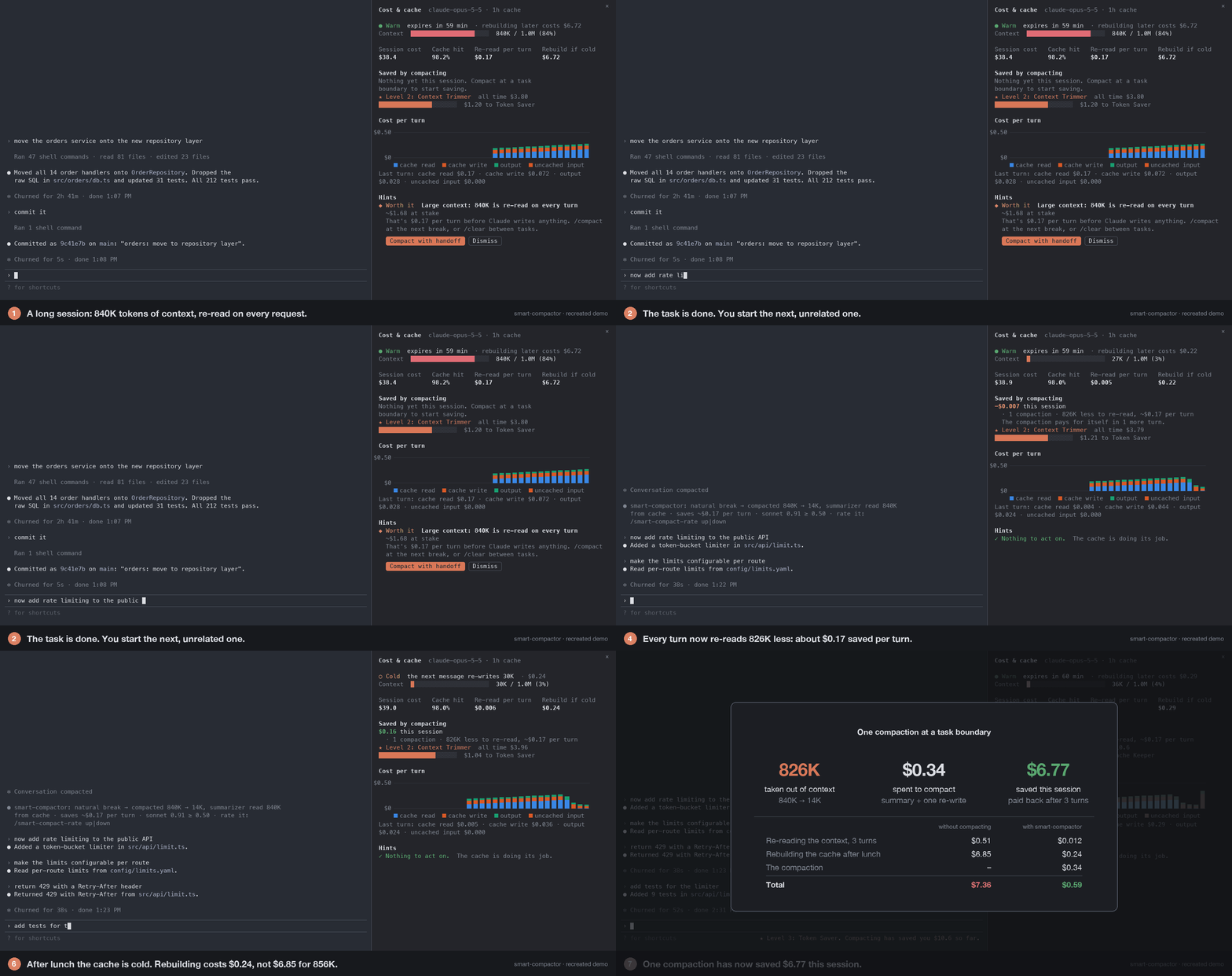
Claude Code re-reads the whole conversation on every request, so a large context carried into an unrelated task is paid for again on every turn. Compacting mid-task saves money but loses what the task still needs. The plugin aims for the point in between: right after the work is done.
The plugin lives in plugin/smart-compactor/.
Why I built this
I looked at where my Claude spend went. Very little of it paid for Claude writing code:
| Where the money went | Share of cost |
|---|---|
| Cache reads: re-reading the conversation on every request | 56% |
| Cache writes: writing the conversation to the cache, and again after each break | 30% |
| Output: what Claude writes | 15% |
About 85% of the bill paid for carrying context, not for doing work. And the cost follows the 80/20 rule: a few sessions and a few requests drive most of it.
- The top 10% of sessions made 83% of all cache reads. The top 5 sessions alone made 57%.
- Requests with more than 500K tokens of context were 12% of requests and 38% of cost.
- Writing the cache again after an idle break of more than 5 minutes was 14% of cost.
- What gets re-read is mostly old work: Claude's earlier answers (45% of cache reads) and output from Bash and Read (25%). My own prompts were under 1%.
The expensive sessions had the same shape: one long conversation that moves from task to
task and carries everything from the earlier tasks into every request of the next one. I
rarely compacted them, because /compact at the wrong moment loses what the current task
still needs, and the right moment, just after a task is done, is easy to miss.
smart-compactor watches for that moment. Most sessions are cheap already, so the plugin
only steps in once the context is large (150K tokens by default), where the 20% that costs
80% lives.
The shares are computed at list price from my local Claude Code transcripts.
What it would have saved
Had the plugin run over those sessions, the replay study puts the saving at:
| Judge | Net saving |
|---|---|
| Claude Sonnet 5.5 (the default), right every time | 33% |
This uses the default minTokens of 150K and counts the cost of the summaries and the
judge calls. The plugin compacts 42 times and never mid-task.
See Why these defaults for the other policies the study compared.
What it looks like
A session in the Claude Code CLI: the transcript on the left, the cost & cache panel on the
right. The user asks Claude to commit, and the plugin compacts as soon as that turn ends.
That is auto mode with judge=off; items 7 and 8 say what the default Sonnet judge does
instead (see also How it decides).
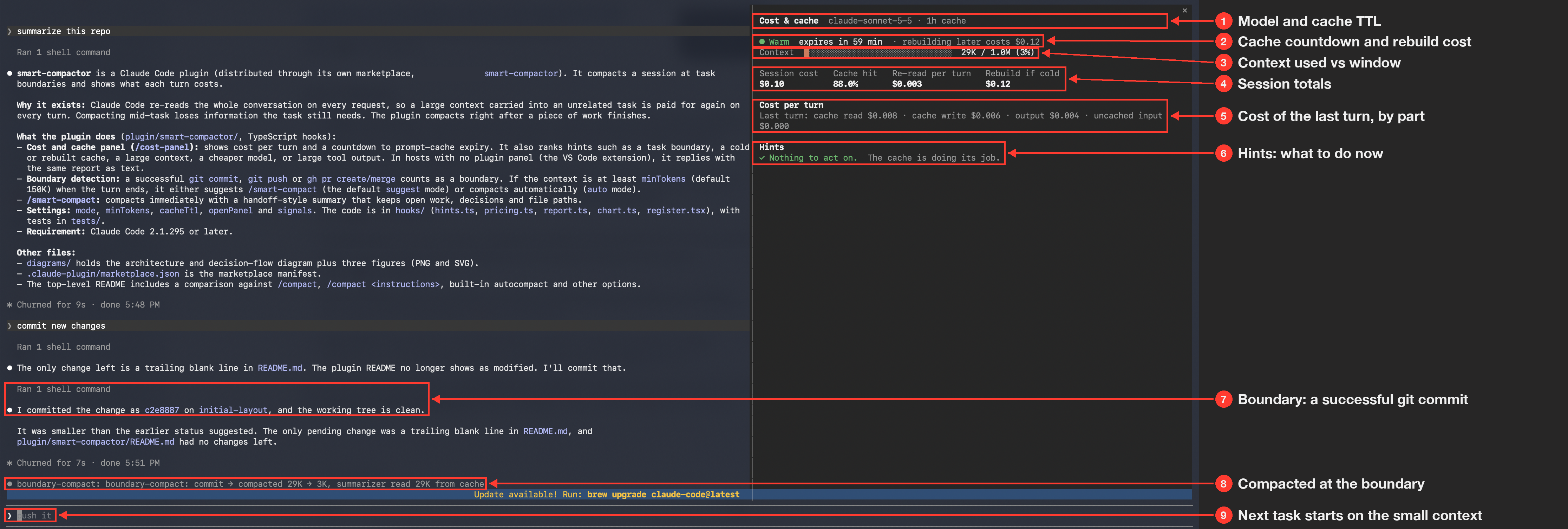
The cost & cache panel:
- Header: the model of the main conversation and the cache TTL (the
cacheTtlsetting). - Cache countdown: whether the prompt cache is warm, how long until it expires, and what it costs to write the context to the cache again if you come back after that.
- Context: tokens in the context against the model's window (here 29K of 1M).
- Session totals: cost so far; cache hit, the share of input read from the cache; re-read per turn, what the current context costs on every request; rebuild if cold, the cost of writing it to the cache again.
- Cost per turn: the last turn split into cache read, cache write, output and uncached input.
- Hints: ranked suggestions such as a task boundary, an expiring cache or a large context. Here there is nothing to act on.
The task boundary, as judge=off handles it:
- Boundary signal: Claude runs a successful
git commit. Withjudge=offa commit, push or PR marks the end of a task. With the default Sonnet judge it doesn't compact by itself: it only arms the compaction before the cache expires, in case no prompt follows. - Compaction: when the turn ends, the plugin compacts with a handoff summary. The context drops from 29K to 3K tokens, and the summarizer reads the 29K from the cache, which costs much less than reading it fresh. With the judge, this happens when you send the next prompt and the judge sees a natural break.
- Next task: the next prompt ("push it") runs on the 3K summary instead of the full 29K.
The screenshot comes from an earlier build named boundary-compact, from before the judge
existed, with a low minTokens so that it compacts a small session. The notice at 8 carries
the old name; the current plugin prints smart-compactor: commit → compacted …. The defaults
are auto mode, the Sonnet judge and 150K tokens. In the VS Code extension the panel replies
as text instead (see CLI and VS Code).
Saved by compacting
The panel right after one compaction on Claude Opus 5.5:
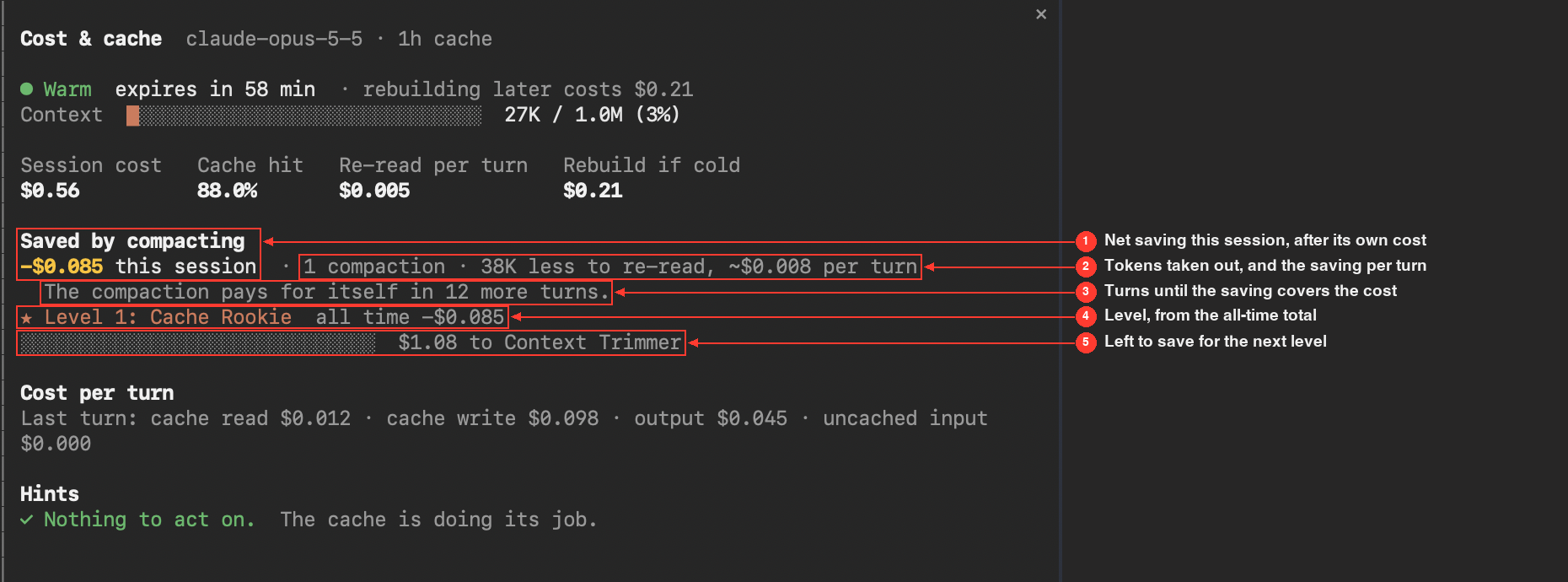
- Net saving this session: what the compactions saved, minus what they cost. The cost is the summarizer's request plus writing the smaller context to the cache. Right after a compaction it is negative, here −$0.085.
- Per-turn saving: the compaction took 38K tokens out of the context. Each later turn no longer re-reads them, which saves about $0.008 a turn.
- Payback: how many more turns until the saving covers the cost, here 12. After that the net turns positive.
- Level: the all-time total across sessions sets the level, from Cache Rookie to Compaction Legend.
- Next level: the bar and how much more to save to reach it. Context Trimmer starts at $1, so $1.08 is left from −$0.085.
Coming back after a break
When you return to a session, Claude Code shows its own notice. This one is from the VS Code extension:

- Idle time: how long since your last message, here a day and two hours.
- Cache expired: the prompt cache lasts for its TTL (5 minutes or 1 hour), so after a longer break it is gone.
- Re-cache: your next message writes the whole context to the cache again. A cache write costs many times a cache read: 40 times on Claude Opus 5.5 with the 1-hour TTL.
The notice counts tokens. The plugin's cache countdown and its Cache is cold hint put a
price on them, and suggest /clear if you are starting something new. For a 133K context on
Claude Opus 5.5 they read:
○ Cold: the next message re-writes 133K ($1.06)
◆ Cache is cold (~$1.06 at stake). Your next message re-writes 133K ($1.06). Starting
  something new? /clear and restate the task instead.
Install
The plugin works in the Claude Code CLI and in the VS Code extension. Both need Claude Code 2.1.295 or later. The VS Code extension draws no plugin window, so the cost & cache panel shows there as a text reply instead (see CLI and VS Code).
1. Update Claude Code to 2.1.295 or later
Claude Code CLI
claude --version
If the version is lower and you installed with Homebrew, switch to the claude-code@latest
cask. The plain claude-code cask lags behind (2.1.286 at the time of writing), and the
two casks can't be installed side by side:
brew uninstall --cask claude-code
brew install --cask claude-code@latest
claude --version        # 2.1.295 (Claude Code) or later
Later updates: brew upgrade --cask claude-code@latest. If you used the native installer
instead of Homebrew, run claude update.
VS Code extension
The extension ships its own copy of Claude Code, so Homebrew doesn't update it. Open the
Extensions view (Cmd+Shift+X), find Claude Code and update it. The extension's version
is its Claude Code version, so it must be 2.1.295 or later.
2. Install the plugin
Claude Code CLI
From a shell:
claude plugin install smart-compactor --marketplace Eslamanwar/smart-compactor
or inside Claude Code:
/plugin marketplace add Eslamanwar/smart-compactor
/plugin install smart-compactor@smart-compactor
This adds the marketplace and enables the plugin in ~/.claude/settings.json.
VS Code extension
Run the same shell command in VS Code's integrated terminal (this needs the CLI from step 1).
The extension reads the same ~/.claude/settings.json, so the plugin is enabled there too.
Open a new conversation in the extension to load it.
3. Set options (optional)
The CLI and the extension share these settings. The defaults (auto mode, the Sonnet judge,
150K tokens) work without any settings. To change them, either pass --config when installing:
claude plugin install smart-compactor --marketplace Eslamanwar/smart-compactor \
  --config mode=suggest --config minTokens=100000
or run /plugin configure smart-compactor@smart-compactor inside the CLI, or edit
~/.claude/settings.json by hand. Add the pluginConfigs block next to the keys already
in the file; don't replace the file:
{
  "pluginConfigs": {
    "smart-compactor@smart-compactor": {
      "options": {
        "mode": "suggest",
        "minTokens": 100000
      }
    }
  }
}
The key is <plugin>@<marketplace>, which is smart-compactor@smart-compactor. Start a new
session for changes to take effect. All options are listed in the
plugin README.
4. Use it
Run /cost-panel for the cost & cache report, or /smart-compact to compact now. In
auto mode (the default) Claude Sonnet reads each new prompt once the context is large.
If the prompt starts after a natural break, the plugin compacts first and then sends the
prompt. After each automatic compaction, a band above the prompt asks 👍 Yes or
👎 No, I was mid-task, and the judge learns from your answers. In suggest mode the
plugin tells you when a git commit, push or PR is a good moment to compact.
The panel also keeps score: Saved by compacting shows what your compactions have saved this session after their own cost, and an all-time total across sessions earns levels (Cache Rookie → Compaction Legend), as in Saved by compacting. See the plugin README for how it is counted.
CLI and VS Code
| Feature | Claude Code CLI | VS Code extension |
|---|---|---|
| Cost & cache panel | a window that opens when a session starts and on /cost-panel, with a live cache countdown and Compact / Dismiss buttons | no window: /cost-panel replies with the same report as text; run it again to refresh |
Task-boundary suggestion (suggest) | a toast, the status line, and /smart-compact offered in the prompt | /smart-compact offered in the prompt box (press Tab to take it); no toast |
Compaction (auto, /smart-compact) | compacts with the handoff summary | runs /compact with the same handoff instructions |
Compaction at natural breaks (auto) | Sonnet judges each prompt; 👍 / 👎 above the prompt, or /smart-compact-rate up|down | not yet: the extension's prompts can't be held back, so git commit/push/PR signals decide, as with judge=off |
openPanel setting | opens the window at session start | has no effect |
To get the window inside VS Code, run claude in the integrated terminal instead of the
extension's chat view.
How it decides
In auto mode (the default):
- You send a prompt and the context is at least
minTokens(default 150K). - Claude Sonnet reads a short digest: how the session started, your last two prompts, the files edited since, the start of the last answer, and the new prompt. It answers whether this is a natural break, with a confidence. One check costs well under a cent.
- At a break with enough confidence, the plugin holds your prompt back, compacts with a handoff summary that keeps open work, paused work and why it stopped, decisions with their reasons, and file paths, and then sends the prompt.
- You rate the compaction 👍 or 👎. Each 👎 raises the confidence the judge needs, and every rating becomes an example the judge reads from then on, in that project only.
The judge can only decide when you send a prompt, so on its own it would compact after a long break, with the cache already expired. Then the summarizer reads the whole context at full price instead of the cache-read price. With the 133K context from the Cache is cold example, on Claude Opus 5.5 and the 1-hour cache, that is about $0.17 for a warm compaction against up to $1.20 for a cold one. So after a turn with a git commit, push or PR, if no prompt follows, the plugin compacts 5 minutes before the cache expires (1 minute before with the 5-minute cache). A prompt before then cancels this, and the judge decides as usual.
A commit doesn't mean the work is done: you may commit half a migration and pause the rest. So if your last three prompts, or the answers since, say work is paused, on hold, blocked or waiting, no git signal compacts automatically. The summary is where "why we stopped" would get lost, so that compaction is left to you.
In suggest mode, a successful git commit, git push or gh pr create/merge on a large
context makes the plugin suggest /smart-compact. With judge set to off, auto mode
compacts on those signals instead.
See the decision flow for the full picture.
How it compares
| Option | When it runs | Summary |
|---|---|---|
/compact | when you type it | general history of the conversation |
/compact <instructions> | when you type it | steered by your instructions |
| autocompact (built in) | when the context nears the window limit | general |
| idle compaction (built in) | after about 55 min idle, context ≥ 200K | general |
/clear, new session | when you run it | none; only CLAUDE.md and memory remain |
| smart-compactor | at a natural break, before the next prompt, context ≥ minTokens | handoff for the next task |
The plugin uses the same compaction engine as /compact. It runs it with handoff
instructions, at a moment you would otherwise have to notice yourself. Autocompact waits
until the window is nearly full, so on a 1M-context model you pay for a very large context
on every turn before it fires, and it often fires mid-task. Idle compaction depends on time,
not on work. The plugin compacts right after a piece of work is done, earlier than either,
and keeps the open work, decisions and file paths.
The trade-off: the judge is sometimes wrong, so some automatic compactions land mid-task.
How often is not measured yet (see Why these defaults). Rate them,
and the judge becomes more careful. Set mode to suggest if you would rather confirm each
one.
Use /clear when the next task needs no history, and leave autocompact on as a safety net.
Why these defaults
From a replay of my own sessions (read these as hypotheses). The study's scripts and data aren't published, because they are built from private transcripts:
| Finding | Value |
|---|---|
| Share of cost from cache reads (re-reading context) | 56% |
| Share of cost from requests with context > 500K | 38% (12% of requests) |
| Saving from compacting only at true natural breaks (context ≥ 150K) | ~33% |
| Saving from compacting on git commit/push/PR signals | ~15%, but 82% of those compactions happen mid-task |
| Saving from a Claude Haiku 5.5 check at prompt time (confidence ≥ 0.8) | ~16%, 4 of 11 compactions risky, ~$0.0002 per check |
No free signal (git, deploy, tests, builds, finished todo lists) marked a natural break more
often than chance, so the default auto mode lets a model decide instead. The judge is
Claude Sonnet 5.5, the model the study used as its reference: compacting where it saw a
break saved about 33%. Its own error rate is unknown, because the study had no labels to
check the reference against. Your 👍 and 👎 are those labels: the plugin learns from them,
and they show how often the judge is right for you. Switch to suggest mode if mid-task
compactions cost you more than they save.
See the judge's flow. Set judge to haiku
for the study's cheaper detector: it starts at confidence 0.8, compacts less often, and
saved about 16% in the replay.
Repository layout
smart-compactor/
├── plugin/
│   └── smart-compactor/           # the plugin
├── diagrams/
│   └── architecture.md            # plugin decision flows (Mermaid)
├── images/                        # screenshots
└── .claude-plugin/marketplace.json
Privacy
The plugin makes no network calls of its own. The judge runs through Claude Code with the
model you pick. The plugin keeps its ratings and savings totals in its own store under
~/.claude, on your machine (see the
plugin README for what each one holds).
Limitations
- Prices are list prices as of 2026-10. Other pricing changes the absolute numbers, not the ranking of policies.
Contributing
Issues and pull requests are welcome. To work on the plugin from a clone, see Develop.
License
Details
- Author
- @Eslamanwar
- GitHub Stars
- 7
- Sub-category
- Context & Memory
- License
- Apache-2.0
- Surfaces
- terminal
- Added
- 1 months ago
- Last synced
- 3 days ago
Weekly Mods Digest
Top new Claude Code mods and install commands, once a week. No fluff, unsubscribe anytime.


