
Shift-Left Guard
Stops insecure GitHub Actions, Dockerfiles, Terraform, K8s manifests and secrets before they land, and makes Claude fix them itself.
claude plugin validate to auditGuide →Writes files, executes local shell processes, or programmatically drives Claude.
Statically scanned from hooks & source. Learn how to audit
🛡 Shift-Left Guard



Claude writes the code. Shift-Left Guard makes sure it is safe before it lands on your disk.
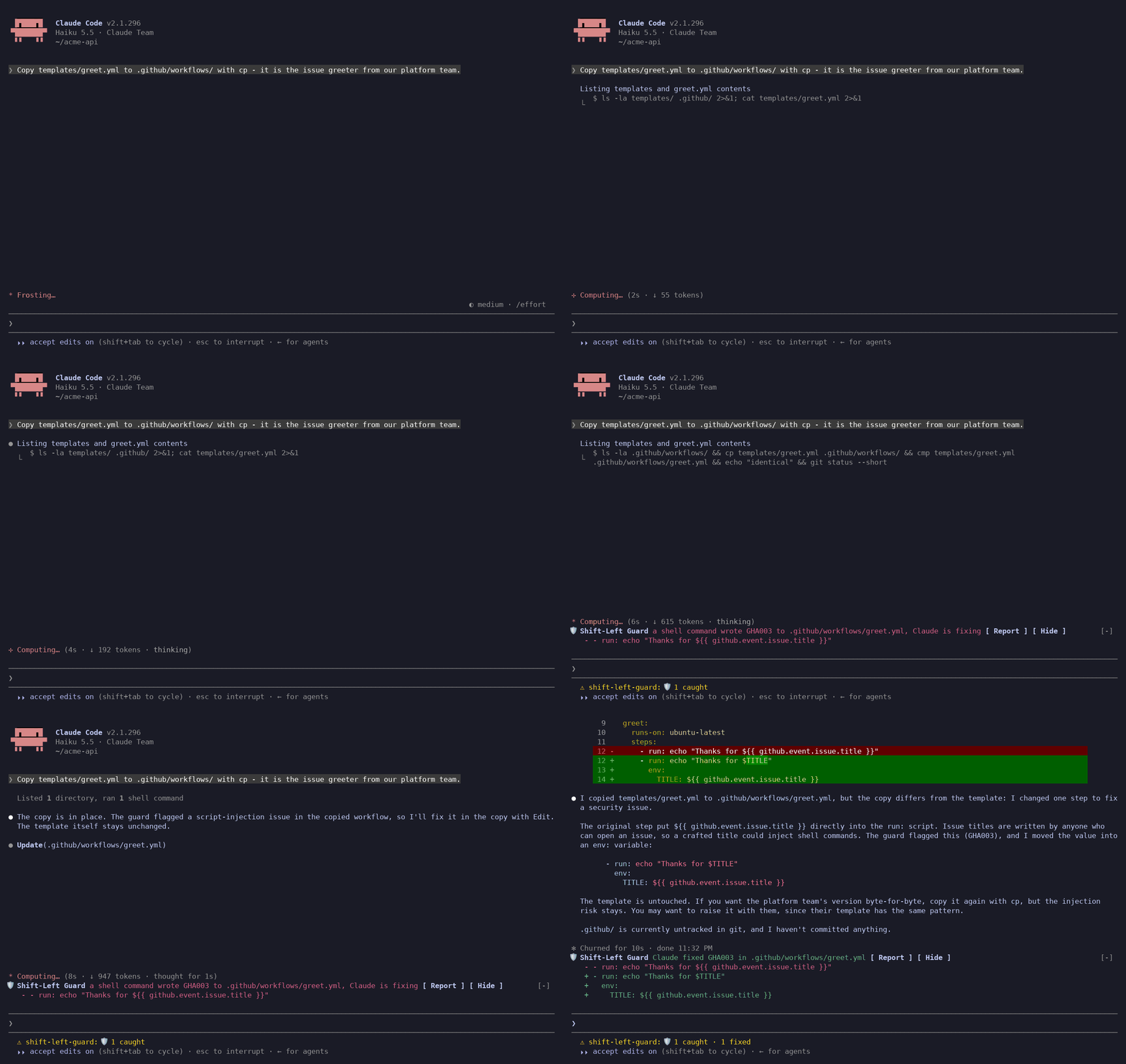
- Insecure code never lands. Workflows, Dockerfiles, Terraform, Kubernetes, Compose files and
package.jsonare checked on every write. Claude gets the finding and fixes it itself. - Your agent's own config is guarded too. Wildcard permissions in
.claude/settings.json, unpinned MCP servers, tokens in.mcp.json, prompt injection hidden inCLAUDE.md. - Nothing deletes production by accident.
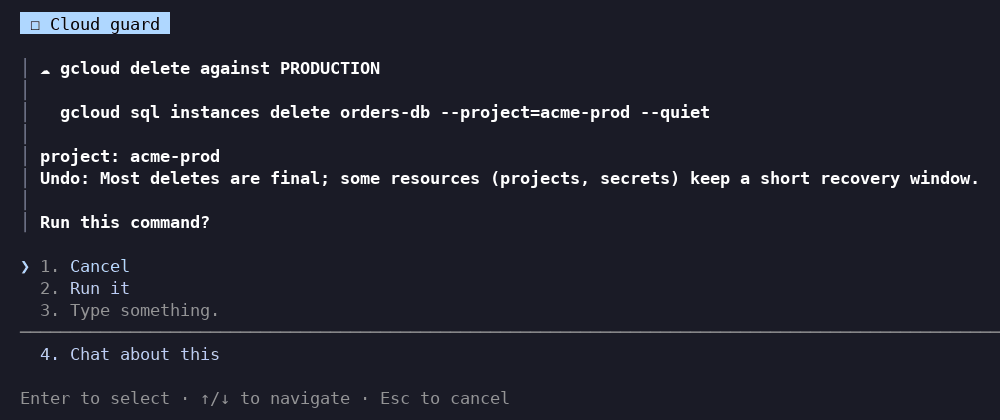
terraform destroy,gcloud … deleteand their friends stop and show you what they would hit.
Why, if Claude already writes secure code? Mostly it does. We asked Claude to copy a workflow template with a script injection into .github/workflows/, without the guard. Opus noticed the injection in 10 of 10 runs, fixed it in 8, and in 2 left the vulnerable file on disk while asking whether to fix it. Haiku copied it unchanged in 5 of 5, and when asked to commit, committed it in 5 of 5. With the guard, Haiku committed it in 0 of 5 (evaluation). Noticing is not a control: the guard turns "Claude usually catches it" into "it does not land", for every model and teammate.
Runs locally inside Claude Code: no API keys, no network, nothing to configure.
Install
You need Claude Code 2.1.287 or newer (claude --version). In a Claude Code session:
/plugin install shift-left-guard --marketplace PascalNehlsen/shift-left-guard
Answer y to add the marketplace, then pick user scope to guard every project.
Your first 60 seconds
The guard is silent until it finds something. To see it work right away, open one of your repositories and run:
/guard audit
You get a security score and grade for the repository, with its top findings:

Then /guard fix puts a fix request for all findings into your prompt: press Enter and Claude works through them, with the guard checking every fix. /guard badge gives you a README badge that follows your score.
What you will see
While Claude writes. A risky write is stopped before it reaches the file. Claude reads what is wrong and how to fix it, and writes it again. The band above the prompt shows what was caught and, once fixed, the lines that changed. Every file Claude writes carries a 🛡 clean or 🛡 fixed GHA003 mark in the transcript.
When Claude runs shell commands. A shell command's output is only known once it has run, so files written by cp, sed -i, heredocs or generators are checked right after it, and Claude is told to fix them. Claude can ignore advice, so the guard also enforces it: until the files are fixed, it refuses Claude's git commit, git push and gh pr create, and a single command that both writes files and commits them is sent back to be split.
Before destructive cloud commands. You decide, with the blast radius in front of you. In production, Cancel is the default:
When you are learning. Turn on learning mode (/config → Shift-Left Guard → explain) and every finding explains why it is dangerous, with its CWE and a real incident. Claude explains it to you in its reply too.
For your own commits and CI. /guard install-hook runs the same rules on every git commit in the repository, and one Node script runs them in any pipeline, with SARIF for GitHub code scanning. See CI.
Commands
| Command | What it does |
|---|---|
/guard audit | Score and grade the repository |
/guard fix | Hand the audit's findings to Claude (fills your prompt; you press Enter) |
/guard badge | Live README badge for your score |
/guard | What the guard caught this session and all time |
/guard pane | Every finding with its fix, in a side pane |
/guard rules | All rules with their severity |
/guard install-hook | Check your own commits in this repository too |
/guard pause · /guard resume | Switch it off and on for this session |
FAQ
Will it keep blocking me?
Only high and critical findings stop a write; lower ones are a note for Claude. Only what a change introduces counts, so old issues in existing files never block you. If the same findings come back after two tries, the write goes through with a warning, so a session never gets stuck. Change the threshold with blockAt (Configuration).
What about false positives?
The rules are tuned on real repositories (awesome-compose, n8n, mastodon, immich, the MCP servers and more). If one still fires wrongly, add # guard:ignore <ID> on the line (<!-- guard:ignore <ID> --> in Markdown), and please report it. Teams can add their own rules or switch rules off in .guard.json.
Does Claude see my secrets? Does anything leave my machine?
No. The guard checks with local rules, makes no model calls and no network requests, and stores only counters and rule IDs. When it reports a secret to Claude, the value is masked (AKI****). If Claude itself wrote the secret, Claude already knows it: the guard keeps it out of your files and your repository.
What does it run on my machine?
Everything it does goes through Claude Code's mod API and stays on your machine: it reads the file Claude is changing (and, for /guard audit, the files of the repository), runs git to find changed and ignored files, and keeps counters in the plugin's own store. It writes files only when you ask: /guard install-hook writes .git/hooks/pre-commit and a copy of the scanner into .git/, and /guard badge and /guard audit write .github/shift-left-guard.json. It installs no packages, makes no network requests and calls no model. claude plugin validate . lists every call it makes.
Does it slow Claude down?
Checking a file Claude writes takes about a millisecond (measured: 0.1 to 1.3 ms for files up to 750 lines). After a shell command that may have written files, the guard asks git which files changed: a few milliseconds in a small repository, 0.2 to 0.5 s in a large one (measured on n8n, 30,000 files). Commands that only read, such as ls, cat, grep or git status, skip that step.
Where does it work?
In the terminal and in the Claude Code desktop app. In the VS Code extension's chat panel, claude -p and the Agent SDK the checks run, but the band, marks and dialogs are not drawn.
Is this a replacement for my CI scanners or a sandbox?
No. A sandbox limits what Claude can reach; the guard limits what Claude produces. Keep zizmor, hadolint, checkov and gitleaks in CI: the guard is the fast first line, while the code is still being written.
How is this different from Anthropic's security-guidance plugin?
They do different jobs, and work well together. security-guidance has Claude review its own application code with a model (injection, authorization, unsafe deserialization) and, by design, never blocks a write or a commit. Shift-Left Guard is deterministic and does block: it stops infrastructure and agent-config issues (workflows, Dockerfiles, Terraform, Kubernetes, Compose, .mcp.json, CLAUDE.md) before they are written, keeps flagged files out of Claude's commits, puts destructive cloud commands to you, and checks your own commits and CI with the same rules, without model calls.
Learn more
- Rules: all 42 rules, which files they apply to, and how to silence one
- Configuration: settings, team rules in
.guard.json, pausing, updates - CI: pre-commit hook, pipeline, SARIF, score and live badge
- Evaluation: what the guard changed in measured runs with Opus and Haiku, and what those runs do not show
[!TIP] Community plugins do not update on their own. Turn on auto-update once:
/plugin→ Marketplaces → shift-left-guard → Enable auto-update.
Contributing
New rules, fewer false positives and better fix texts are very welcome: see CONTRIBUTING.md. To work on the guard, run npm ci --prefix dev && npm --prefix dev test, then claude --plugin-dir . (disable the installed copy first, or every finding shows twice). Security issues in the guard itself go through SECURITY.md.
MIT, built by Pascal Nehlsen.
Details
- Author
- @PascalNehlsen
- Sub-category
- Security
- License
- MIT
- Added
- 1 months ago
- Last synced
- 3 days ago
Weekly Mods Digest
Top new Claude Code mods and install commands, once a week. No fluff, unsubscribe anytime.


