
Session Meter
A live strip above the Claude Code prompt showing session cost, a draining prompt-cache countdown and input / output / cache-read token stats, with hover card details. Six small animated pixel Clodies run while Claude works, rest in a row, sleep when the cache goes cold, and one of them changes with your reasoning level. For anyone who wants to watch spend and cache expiry at a glance.
claude plugin validate to auditGuide →Reads local project files, settings, transcripts, or environment variables.
Statically scanned from hooks & source. Learn how to audit
session-meter
See what your Claude Code session costs, when the prompt cache dies, and where your tokens go. A live strip above the prompt, a hover card with the details, and seven little pixel Clodies in different costumes that run while Claude works.




Features
The strip
| Segment | What it shows |
|---|---|
IN | All input tokens for the session, as the API counts them: new + cache read + cache write |
OUT | Output tokens |
CACHE | Tokens read from the prompt cache |
$ | What the session has cost so far |
| bar + clock | The prompt cache draining to zero — 1 hour by default, /meter 5m for the 5‑minute cache |
CTX | Context used, as used/limit in thousands of tokens, e.g. 123/600k. The limit follows your /autocompact setting for the current model and falls back to the model's whole window (e.g. 1000k) when none is set; it updates as soon as you change it. Marker green → yellow → red |
5H / 7D | Time until your 5‑hour and 7‑day usage limits reset (3:26 / 3d03h). When both are known, one readout turns like a wheel: 5H stays for 2:30, then 7D for 30 s, and back; the whole plate scrolls down as one and the next face arrives from above. The marker beside it runs smoothly from green through yellow to red as that limit fills. Shown only when your account reports the limit |
Numbers are abbreviated as K / M / B. Every segment has a fixed width, so nothing jumps when the numbers change. The countdown runs inside the picture, so the strip is never redrawn on a timer.
Hover for the full picture
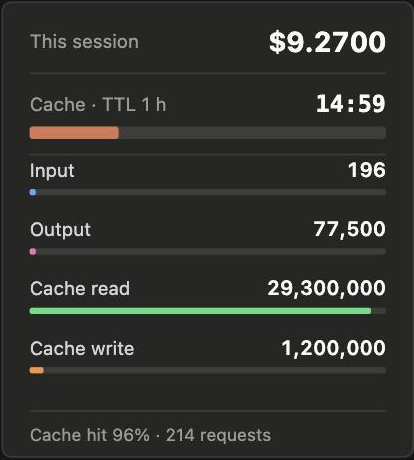
Hover the strip and a card opens above it with exact counts, cache‑write tokens, cache hit rate, the number of requests and how much of the 5‑hour and 7‑day limits is used. /meter shows the same card in a pane.
Lo‑fi button
At the right end of the strip there is a ▶ button. Press it and a menu opens upwards with eight long-running 24/7 live streams, each with its YouTube preview:
| Stream | Channel |
|---|---|
| lofi hip hop radio | Lofi Girl |
| Claude FM | Claude |
| synthwave radio | Lofi Girl |
| sleep/chill radio | Lofi Girl |
| jazz lofi radio | Lofi Girl |
| lofi hip hop radio | Chillhop Music |
| Chillhop Radio | Chillhop Music |
| sad & sleepy beats | the bootleg boy |
Pick one and it plays in the background – sound only, no window, no video. The button turns into ■; press it to stop. The music also stops when Claude Code closes.
The stream's picture plays beside the prompt. A small borderless video window (224×126, no sound of its own) opens in the empty corner to the right of the prompt, level with it, and moves with the Claude window. It stays on top while Claude is the app in front and steps back when you switch to another app. Claude's own interface has no place a mod can play video in, so this is a window of mpv's own; /meter video off turns it off (on brings it back). Hover the picture and a − appears at its top right: click it to hide the picture for this track while the music plays on.
The Clodies dance while it plays. Whenever they are standing – or as soon as they come to rest after Claude has worked – they dance to one beat: bobbing, pumping their arms, stepping from foot to foot, each with a move of its own (a sway, a side step, a squash); the footballer juggles his ball and music notes rise over a few of them. The music also keeps them from dozing off when the cache goes cold.
The music starts the moment you pick: while the menu is open, the last stream you picked and the first two are already loading, paused, and the pick just unpauses one; the others start in two or three seconds. The previews load in the background as soon as a session starts (all at once, in about half a second), then the streams' addresses.
Playback starts a few segments behind the live edge and keeps up to a minute read ahead, with a fresh connection per segment and automatic reconnects, so it does not stall. The volume starts at 60 (about −13 dB); change it with /meter volume 0–100.
It plays through mpv with yt-dlp; if they are missing, the button tells you to install them:
brew install mpv yt-dlp
Themes
The ▶ menu has two pages, Music and Themes – click the tabs at its top, or scroll the mouse wheel over it (down for themes, up for music). A theme puts a picture behind the conversation and tints the whole app to match (Claude Code Desktop):
| Theme | Scene |
|---|---|
| Pixel Hill | a dithered pixel-art sunset: a striped sun sinking behind snowy violet mountains, pine hills, a lake with the sun's path on it, a cottage with a lit window and a smoking chimney, fireflies, and the little orange Clodies on the meadow path |
| Sakura | blossoming cherry branches under a large moon: five-petal flowers, buds and young leaves, mist over far hills |
| Standard | the app's own look |
The pictures are still SVG scenes (no animation, the same on every redraw, so nothing restarts or flickers), under a light veil in the theme's color with no blur. Your pick is remembered and set again in every new session.
Clodies
Seven pixel Clodies live on the left of the strip, in an evenly spaced row.
- Working – they run to the right in a line, one after another, and re‑enter from the left.
- Done – they keep walking, slowing down smoothly, and settle into an even row.
- Standing – each has its own routine: a double jump, waving in turns, swaying, stretching, a turn‑around with a little heart.
- Cache gone cold – they fall asleep.
- The footballer – the seventh Clodie wears a blue kit. He dribbles a ball while the others run, and when standing he kicks it out to a neighbour and lets it roll back.
- They react to what happens:
- a tool fails → they droop, a tear falls;
- tests pass, or a round sum ($10, $20 …) is spent → they hop, cheer and throw confetti;
- a tool call runs long (8 s+) → one of them opens an umbrella;
- your prompt says find / search / grep → one gets a magnifier; fix / bug → one gets a hammer (until the answer ends);
- the footballer scores a goal after every successful answer, and keeps the score (
×Nabove him).
- Time of day – nightcaps (and a moon) from 22:00 to 06:00, coffee mugs in the morning, party hats on Friday evening.
- Five idle minutes – they pass a wave along the row, and shimmer in turn once a minute.
The sixth Clodie shows your reasoning level

Install
In a Claude Code session:
/plugin install session-meter --marketplace grosa787/claude-session-meter
or from a shell:
claude plugin install session-meter --marketplace grosa787/claude-session-meter
Open sessions need a restart to pick it up.
Updating
Every push to this repository is a new version. To get it, run /plugin marketplace update and then /plugin update session-meter (or turn on auto-update for this marketplace in /plugin), and restart open sessions.
Commands
| Command | Does |
|---|---|
/meter | Opens the stats card in a pane |
/meter 1h / /meter 5m | Sets the cache lifetime used for the countdown |
/meter reset | Resets the token counters |
/meter video on / /meter video off | Shows or hides the stream's picture beside the prompt (on by default) |
/meter volume 40 | Sets the lo‑fi volume, 0–100 (60 by default); applies at once and is remembered. /meter volume alone shows it |
Good to know
- The strip, the Clodies and the card are SVG, so they appear in Claude Code Desktop. On a terminal the mod falls back to a plain text line and hover card, without the Clodies.
- Reasoning level is read from your settings and from each request. Max is not stored in settings, so it shows once
effortLeveldisappears from them or after the first request following the switch. - Ultracode is detected from the
ultracodesetting, or from the wordultracodein a prompt (for that turn). Claude Code does not expose the mode to mods in any other way. - The find / fix reactions also recognise a few Russian words (найди, поиск, почини, баг).
- Token counters are kept per session in the mod's store, so they survive a full restart of Claude; the cost is read from the session itself.
- The lo‑fi button lives in each session's strip on its own: pressing it in two sessions plays the stream twice.
How it works
The mod is a single hooks module (hooks/register.tsx). It listens to model responses for token usage and to session measurements for cost, keeps them in the mod's state, and draws the strip into the band above the prompt. All animation is SVG/SMIL, so the only redraws happen when something actually changes.
License
MIT © grosa787
Details
- Author
- @grosa787
- GitHub Stars
- 1
- Sub-category
- While You Wait
- License
- MIT
- Surfaces
- terminal
- Added
- 25 days ago
- Last synced
- today
Weekly Mods Digest
Top new Claude Code mods and install commands, once a week. No fluff, unsubscribe anytime.

