
Prismantis
Colorful, themeable Claude Code replies: tables, code, diagrams, charts and tool rows in 15 themes, with copy buttons. A Claude Code mod.
claude plugin validate to auditGuide →Writes files, executes local shell processes, or programmatically drives Claude.
Statically scanned from hooks & source. Learn how to audit

Sees 16 colors. Your terminal only had 8.





Install · Other hosts · FAQ · Docs · Changelog
Claude Code prints mermaid as source, tables as pipes and tool calls as walls of text. prismantis draws them: real charts and flowcharts, colored tables and code, chat bubbles and quiet tool rows, in 18 themes. Built for Claude Code, and it also runs in OpenCode, Codex and Antigravity.
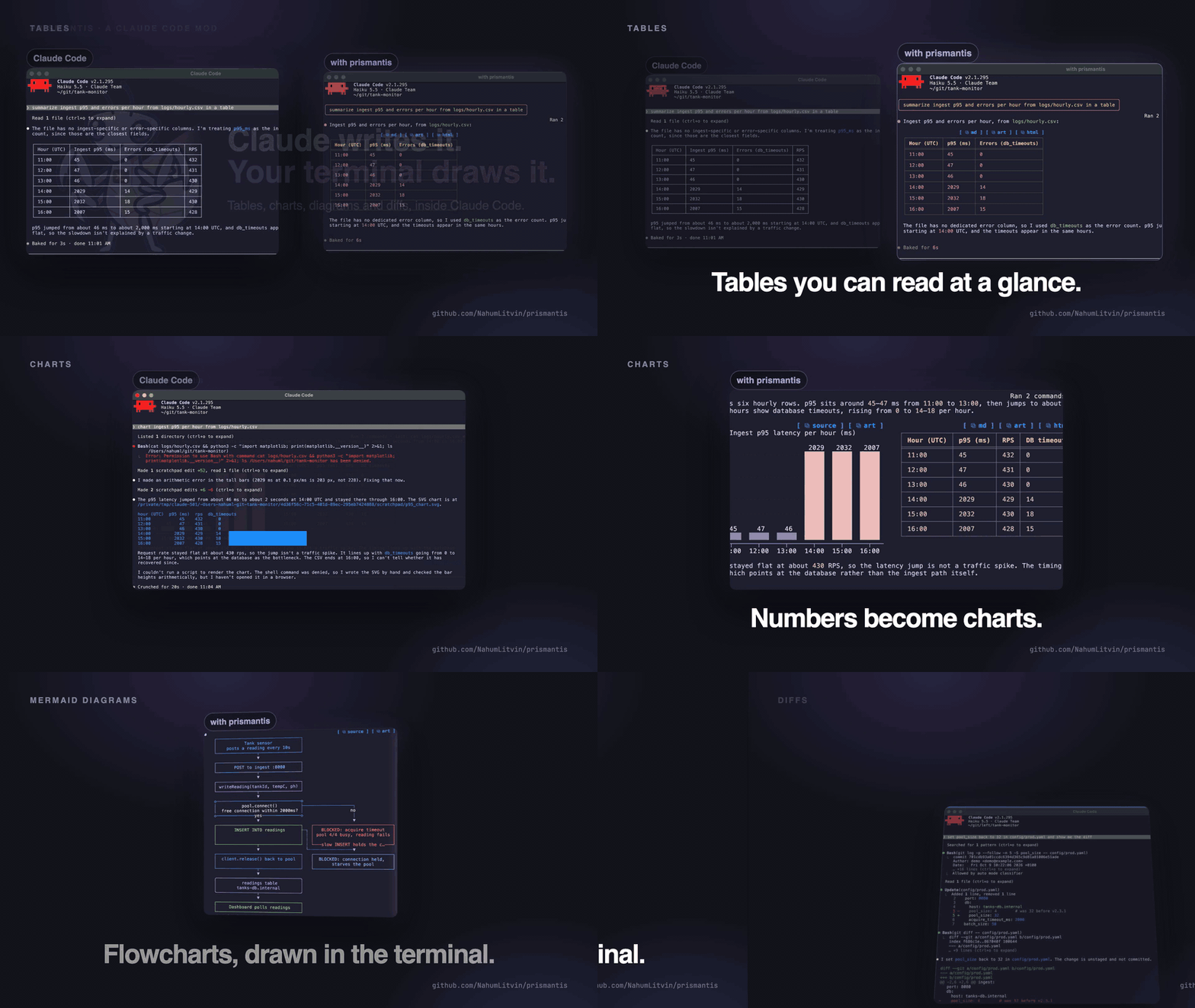
One real reply: Claude Code's plain markdown, then prismantis. ▶ This clip as video · ▶ The 1:44 film
Install
In Claude Code 2.1.287 or later:
/plugin marketplace add NahumLitvin/prismantis
/plugin install prismantis@prismantis
Then /prismantis setup picks a theme and the five main styles from drawn samples, and /prismantis demo shows every feature.
What you get
- Charts and diagrams from mermaid: flowcharts, sequence, state and ER diagrams, bar, line and pie charts, gantt and more, one color per box.
- Tables with colored headers, aligned numbers and rules, sized to the terminal.
- Code with a language header and Prism highlighting in two dozen languages.
- Chat layout: your prompts on the right in a bubble, Claude's replies on the left.
- Tool rows that say what Claude did,
Ran npm test,Read src/app.ts, with diff cards for edits. - Copy buttons on tables, code, diagrams and replies: markdown, text art, HTML or PNG.
- Also figures, LaTeX math in kitty and Ghostty, right-to-left text and full desktop app themes.
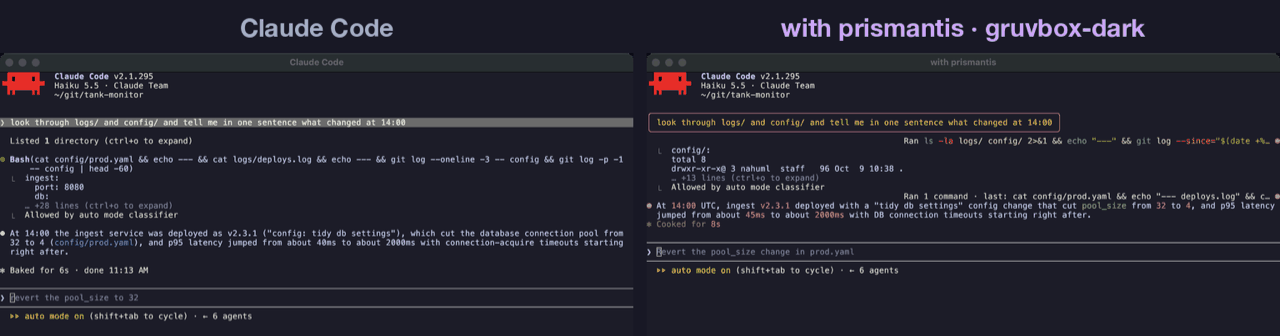
All 18 themes, thirteen dark and five light
Also runs in
Claude Code gets everything. The other hosts draw replies themselves, so prismantis tells the model what the host can draw (tables, diagrams, figures) and adds what each plugin API allows:
| Host | What prismantis adds | Install |
|---|---|---|
| OpenCode 2.2.5+ | figures in color, the mermaid charts OpenCode leaves as source, themes for code and prose | opencode/README.md |
| Codex 0.169.0+ | themes for code, prose, tables and diagrams; figures as text pictures | codex/README.md |
| Antigravity | a /prismantis demo; no themes, Antigravity keeps its own colors | antigravity/README.md |
Side by side: docs/compatibility.md.
Make it yours
/prismantis setup walks every style with a preview. The options most people change:
| Option | Default | What it does |
|---|---|---|
theme | catppuccin-mocha | one of 18 palettes, mono or random; /prismantis theme nord switches on the spot |
promptStyle | bubble | your prompts on the right like a chat app; also framed, wide, bar, chevron or off |
tableStyle | box | box, rules, grid or minimal |
toolOutput | full | quiet hides what reads and searches returned; rows also hides the output of calls that worked. Both keep edit diffs and errors |
diagramHints | true | tells Claude the terminal draws charts, so it reaches for them (about 630 tokens per prompt) |
desktopColors | off | match paints the whole desktop app Code tab in the theme (2.1.324+) |
Set them in /config, or under pluginConfigs["prismantis@prismantis"].options in ~/.claude/settings.json. All 80 options: docs/configuration.md.
FAQ
Does it send my data anywhere? No. prismantis makes no network calls. It runs a program in two cases only: the clipboard helper when you click ⧉ html or ▣ png, and RaTeX's renderer once you turn LaTeX on. The full list: what it runs, reads and changes.
What does it cost in tokens? With diagramHints on (the default), about 630 tokens of model-only context per prompt, plus about 35 on your first prompt and every tenth after it for the issue hint. Set diagramHints and issueHint to false to drop both. Breakdown: docs/model-hints.md.
Will it slow Claude Code down? No. prismantis lays out the full demo reply in about 5 ms cold and 1 ms warm on an M4 Pro. Check it on your machine with npm --prefix scripts run bench.
Which terminals work? Any terminal Claude Code runs in; CI tests on macOS, Linux and Windows. The desktop app, VS Code and mobile use the same mod API. LaTeX math needs kitty or Ghostty outside tmux; round pies draw as an image there and as text elsewhere. A diagram too big for the window falls back to its source, never to garbage.
How do I update, turn it off or remove it? Update with the command below, then /reload in each open session. Turn it off in /plugin and Claude Code's own renderer comes back at once. Remove it with claude plugin uninstall prismantis@prismantis.
claude plugin marketplace update prismantis && claude plugin update prismantis@prismantis
Something drew wrong? Troubleshooting covers the common cases. Otherwise open an issue with the markdown that broke.
Docs
Appearance (themes, prompts, code, text, lists, RTL) · Tables · Diagrams, figures and math · Copy buttons · Tool output · Model hints · Configuration · Troubleshooting · Develop and other mods · Roadmap
For LLMs and agents
To change the code, read AGENTS.md instead.
- What it is: a Claude Code mod (function hooks in TypeScript) that redraws assistant replies, slash-command output, tool rows, the turn footer and user prompts. With
diagramHintson (the default) it also adds model-only notes to each prompt; docs/model-hints.md lists them and their cost. - Install:
/plugin marketplace add NahumLitvin/prismantis, then/plugin install prismantis@prismantis. Needs Claude Code 2.1.287+. Changes apply after/reload. - Configure: every option is a key under
pluginConfigs["prismantis@prismantis"].optionsin~/.claude/settings.json, documented in docs/configuration.md; the machine-readable source isuserConfigin plugin/.claude-plugin/plugin.json. - Side effects: no network. Programs it runs: the
⧉ htmland▣ pngclipboard helper (/usr/bin/osascripton macOS,powershell.exeon Windows,copyqon Linux for⧉ htmlonly, only on a click, with a 5 second timeout (15 on Windows) that grows with the copy size up to 30), andratex-renderwhilelatexis on. WithdiagramHintson, it adds about 630 tokens of model-only context (about 710 whilelatexis on) to each prompt you type and each prompt another plugin sends, as broken down under Diagram hints. WithkeyPointHinton, it adds about 80 more. - Turning it off:
"enabled": false, or disable the plugin in/plugin."surfaces": "terminal"keeps it in one app. - For other mods:
$.prismantis.markdown({ surface, text, columns }), see docs/development.md.
Author
Built by Nahum Litvin, who writes about running untrusted code in production at catchkill9.dev. Contributions welcome: see CONTRIBUTING.md.
License
MIT. Bundled third-party code is listed in THIRD_PARTY_NOTICES.md.
Details
- Author
- @NahumLitvin
- GitHub Stars
- 516
- Sub-category
- Interface
- License
- MIT
- Surfaces
- terminal
- Added
- 1 months ago
- Last synced
- today
- Events hooked
engine.createui.rendertool.callsession.startconfig.setcommand.runturn.completeturn.startturn.step
Weekly Mods Digest
Top new Claude Code mods and install commands, once a week. No fluff, unsubscribe anytime.

