
claude plugin validate to auditGuide →Makes outbound network requests, calls MCP servers, or requests auth handles.
Statically scanned from hooks & source. Learn how to audit
Claude Code mods
English · Русский · 简体中文 · 日本語 · 한국어 · Español · Português · Deutsch · Français
plan-progress
Live progress bars above the Claude Code prompt. Claude splits a task into stages and steps, and the bar fills as it works. The subagents for each task are listed under its bar.
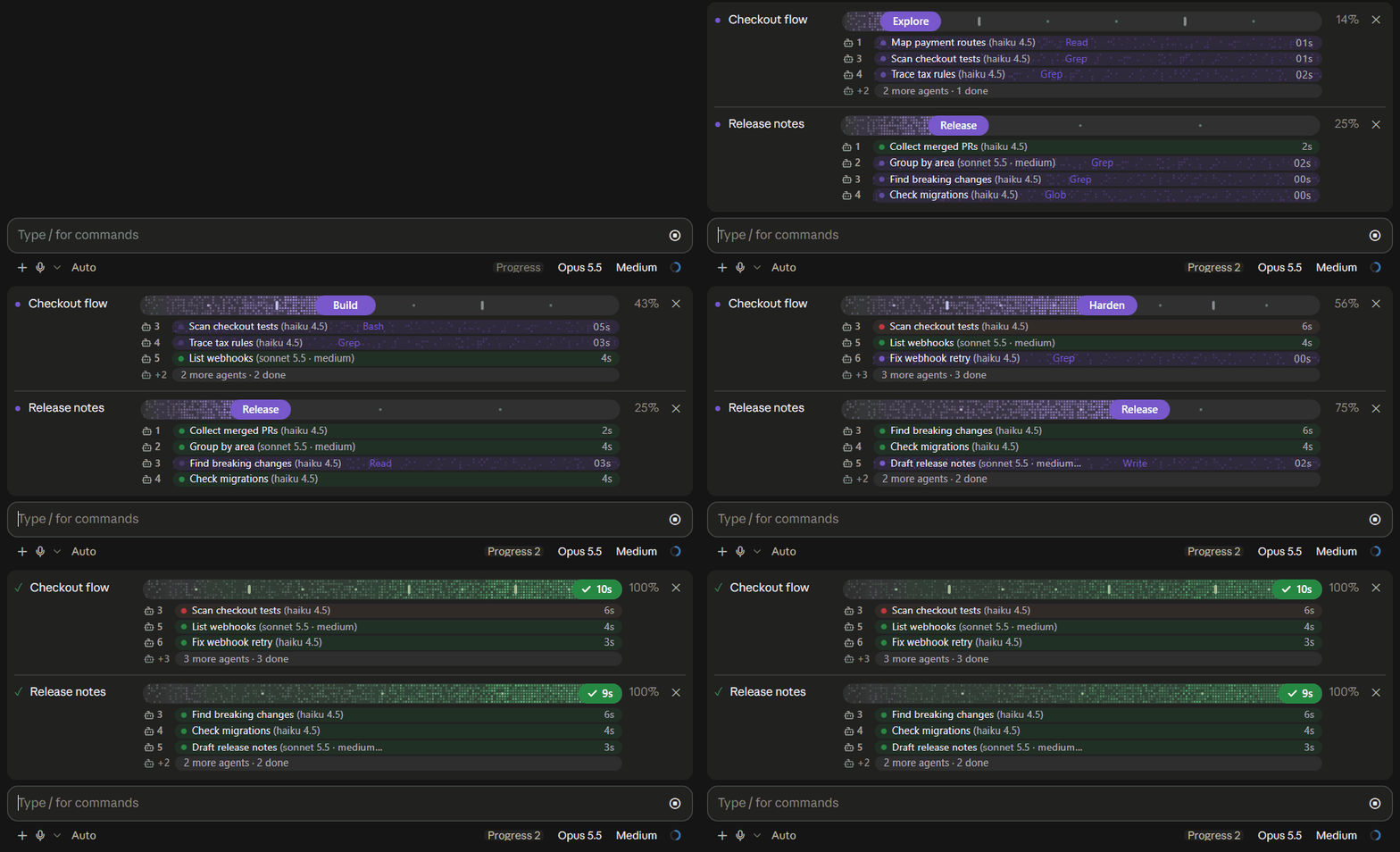
- One row per task: state, title, bar, percent, close button
- The pill on the bar shows the current stage and step; hover it for the time spent so far
- Stages are capsules, steps are dots; hover a passed one to see how long it took, one ahead to see what starts there
- A finished bar turns green, shows the total time and stays until it is closed; with
/plan-progress-autocloseon, it leaves afterdoneBarSeconds(30 s by default, in/config) - The dots of the fill and of the subagent rows twinkle; turn
twinkleoff in/configto draw them still - Four states: running, needs input, error, done
- Each subagent gets a row under its task: name, model and effort, current tool, time
- The plan can change mid-run; finished steps are kept by title
- Bars are saved per session and come back when the session is resumed
- Short sounds for a question, an error and completion
- The footer shows how fast the main conversation writes,
⚡ N tok/s; subagents are not counted - The ⚙ next to it (in the desktop app and the fullscreen terminal) opens a settings window: effects, auto-close and its seconds, sounds, the figure itself, the mod's version and the update check;
/plan-progress-settingsopens it anywhere. The window speaks the language set in/config, else the app's, else the system's - Updates: the version in the settings window, pressed, looks for a newer release, and Update installs it and reloads the mod in place (if the reload does not take, it asks for a restart). Once every 6 hours the mod also checks by itself and marks the ⚙ with 🔹 (● in the terminal) when a new version is out. A check is one request to the GitHub API (
api.github.com/repos/zycck/claude-mods/releases), with no account or session data in it; turn it off with Check for updates in the window or withCLAUDE_CODE_DISABLE_NONESSENTIAL_TRAFFIC. A copy installed from a folder is not checked - Works in the desktop app and in the terminal
- In the terminal the bar follows a light or dark GNOME desktop with the
autotheme, and takes the colors of the active Omarchy theme
Install
Requires Claude Code 2.1.295 or newer (claude --version; claude update to upgrade). On older versions parts of the mod do not work: the settings window stays empty, and before 2.1.286 the hooks module does not load at all, no bars appear and the startup banner says plan-progress: hooks module did not load.
/plugin marketplace add zycck/claude-mods
/plugin install plan-progress@zycck-mods
Update:
claude plugin marketplace update zycck-mods
claude plugin update plan-progress@zycck-mods
Commands
/progressshows or hides the bars/progress-clearremoves all bars/progress-agentsfolds the agent strips under the bars, or shows them again (the chevron button next to a bar's ✕ does it for that bar)/plan-progress-autocloseturns on finished bars leaving on their own (off by default), or turns it off again; the choice is kept across sessions/plan-progress-settingsopens the settings window, as the ⚙ in the footer does (in the terminal the ⚙ is shown only in fullscreen)
How it works
The mod registers a plan_progress tool. Claude sends the plan once, then short updates such as {id, next: true} or {id, done: ["Routes"]}. An unknown step name is refused with the list of the bar's steps. A plan approved in plan mode becomes the bar plan. Agent rows come from engine events and cost no tokens.
On the desktop the bar is an SVG image with a hover layer on top. In the terminal it is a character grid that animates only while Claude is working.
Tests
plugins/plan-progress/tests runs the real module against a stub engine: node compile.cjs ../hooks/register.tsx register.mjs, then node regress.mjs and node scenarios.mjs.
License
MIT
Details
- Author
- @zycck
- GitHub Stars
- 71
- Sub-category
- Dashboards
- License
- MIT
- Surfaces
- terminal
- Added
- 1 months ago
- Last synced
- today
- Events hooked
prompt.attachmentturn.startprompt.submittool.callclassic.Stopconfig.setsession.startsession.endprompt.compose
Weekly Mods Digest
Top new Claude Code mods and install commands, once a week. No fluff, unsubscribe anytime.

