
Habblaud
Isometric pixel-art room dashboard where your Claude Code session and subagents live, move, and report progress in real time.
claude plugin validate to auditGuide →Makes outbound network requests, calls MCP servers, or requests auth handles.
Statically scanned from hooks & source. Learn how to audit

Habblaud
The virtual office for your Claude Code (and Codex) agents.
Each project becomes a room, and each agent becomes a pixel-art character that shows, in real time, what it's doing.
English · Português · Español · Français





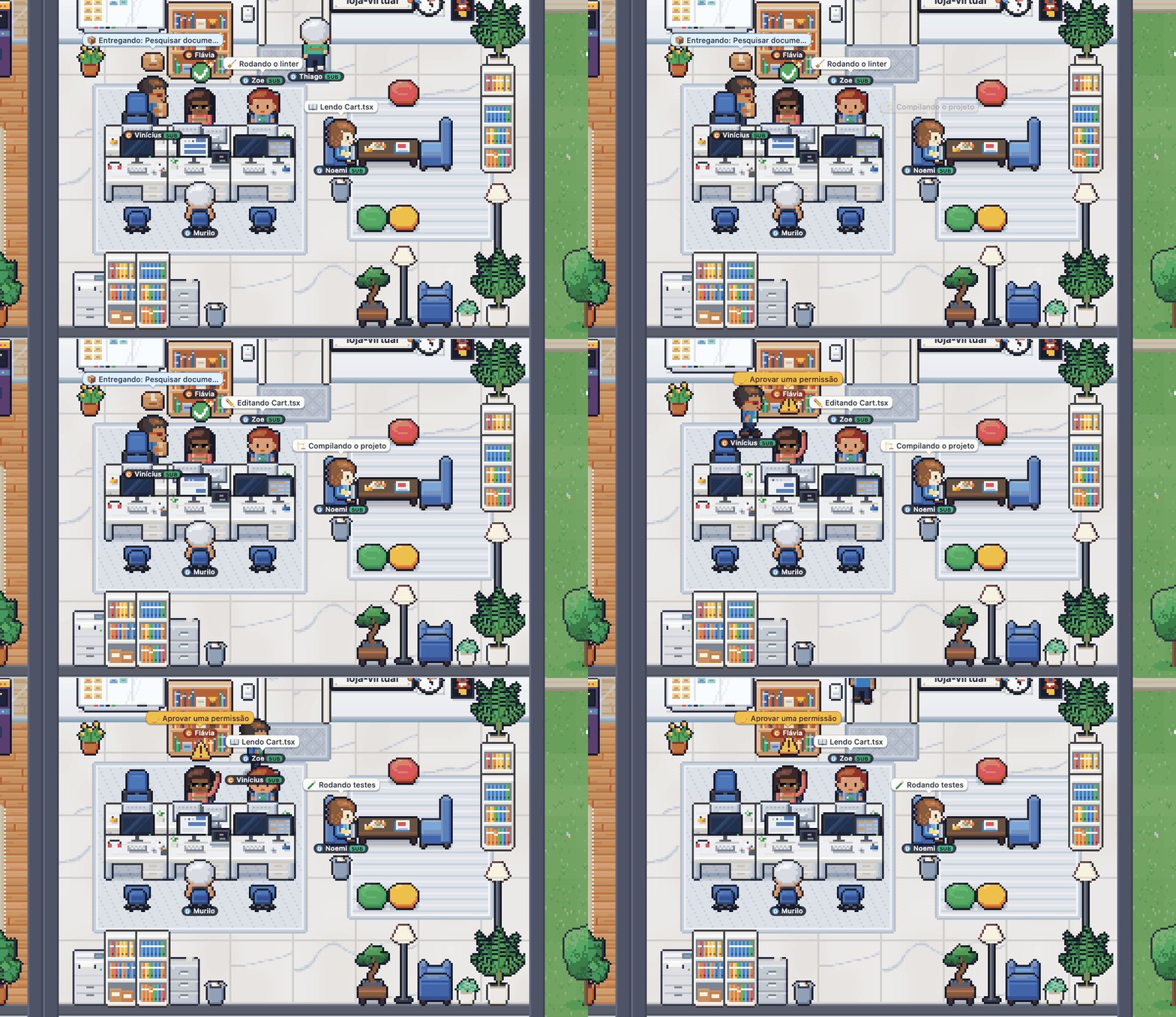
You open Claude Code in several projects, launch subagents, leave tasks running… and lose track of who's doing what. Habblaud turns all of that into an office you can take in at a glance: who's typing, who raised a hand because they need you, who delivered their work and left, who went for a coffee while waiting for the next instruction — and how much of each account you've already used in the 5-hour session and in the week.
And when two or more agents have nothing to do, the office gets a social life: each one has its own personality, and they watch soccer together in the lounge, play video games and ping-pong, gossip in the kitchen, freshen up at the mirror and bet coins on rock-paper-scissors. See Social life.
Everything runs on your machine, reading the files Claude Code itself already writes (plus only the alias lines in
your shell, to give each account its letter). Nothing leaves the computer: Habblaud doesn't read credentials or make
external calls.
Contents
- What it looks like
- Installation
- How to use
- Accounts and usage (5-hour and weekly)
- Configuration
- Habblaud World
- How it works
- Privacy and security
- Development
- Troubleshooting
- Disclaimer
- License
- Social life
What it looks like
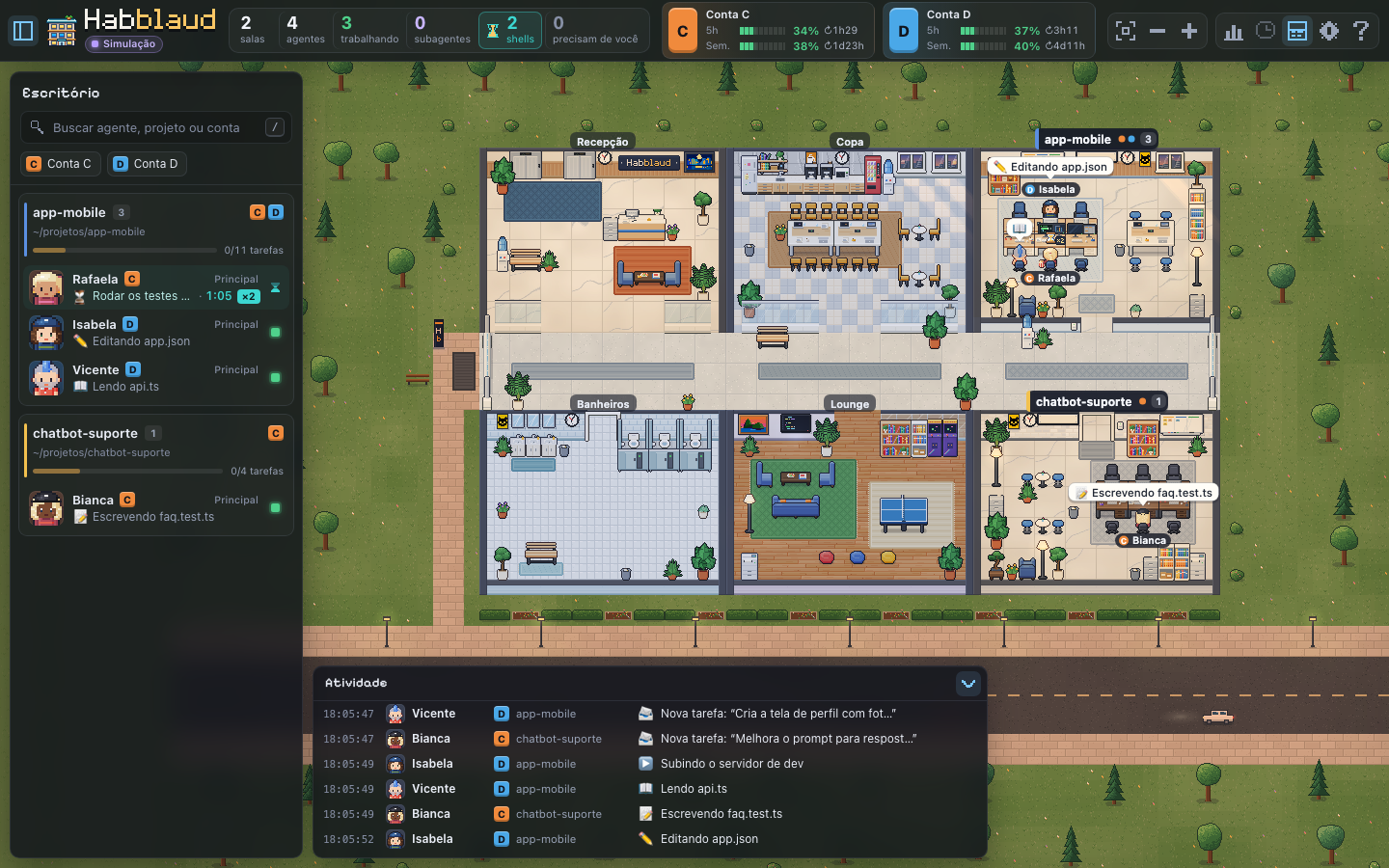
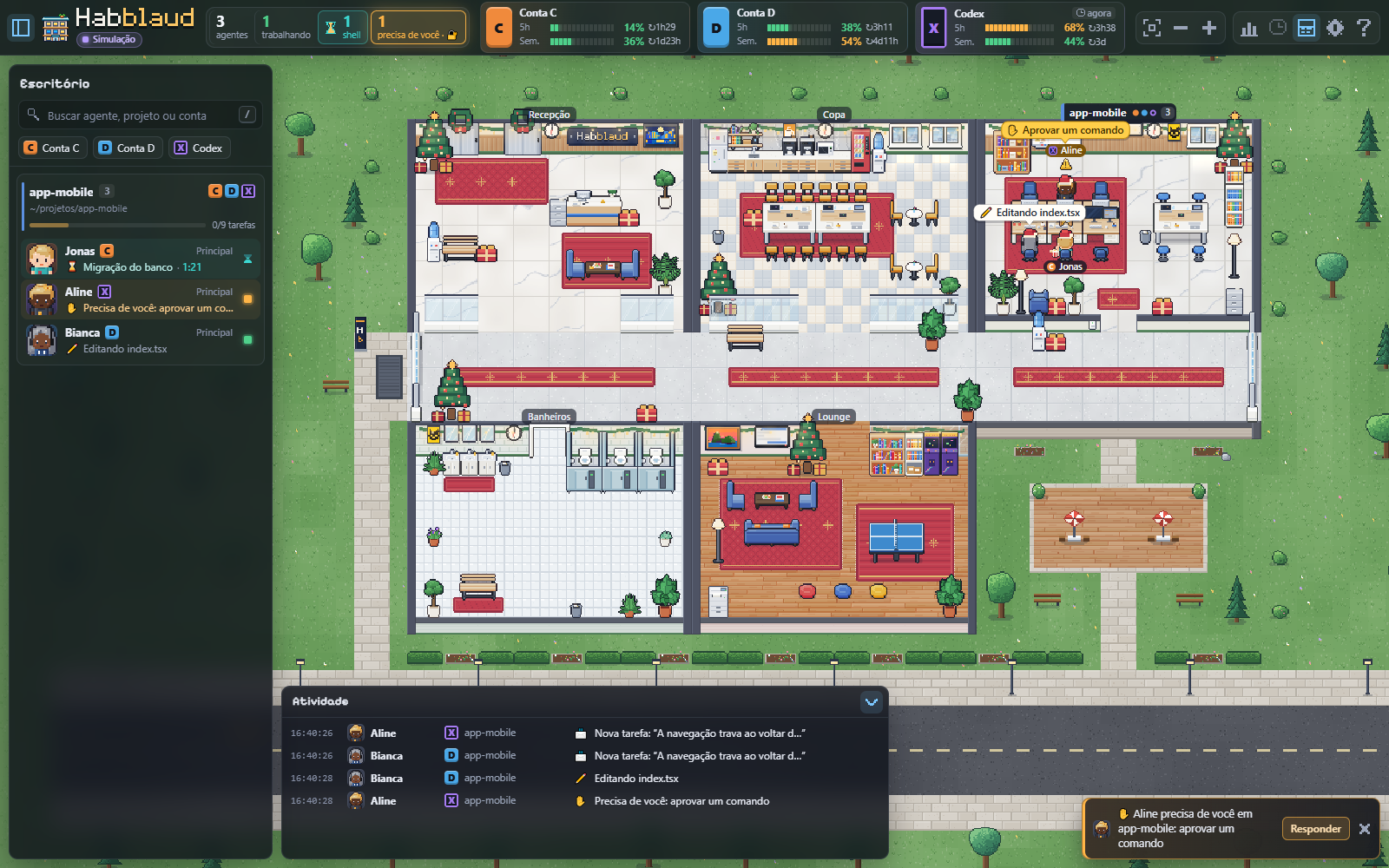
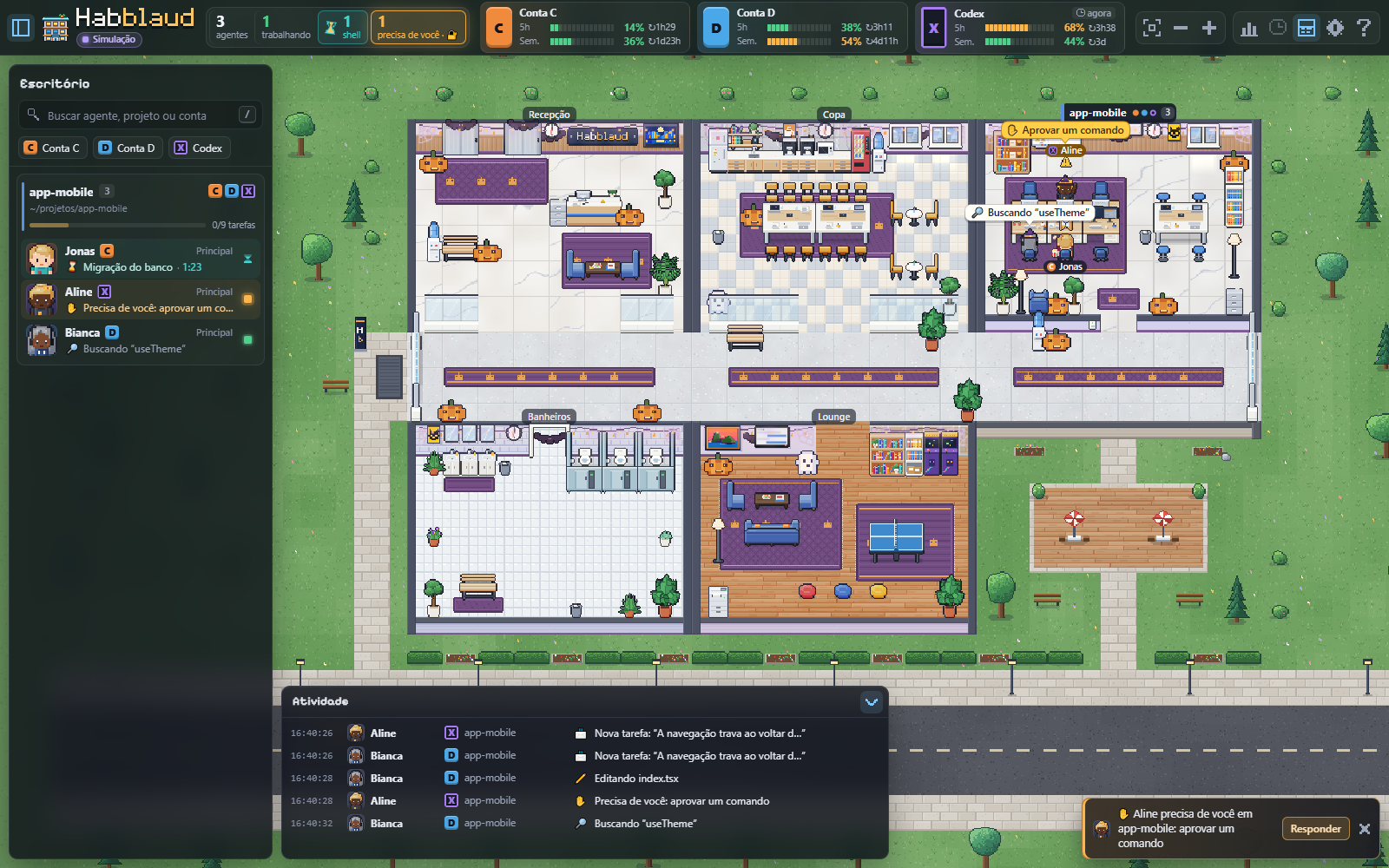
Overview. The building has a lobby with elevators, a kitchen, restrooms and a lounge; each project with an open session gets its own room along the hallway. At the top, the counters and each account's usage; on the left, the rooms and agents; at the bottom, the activity feed.
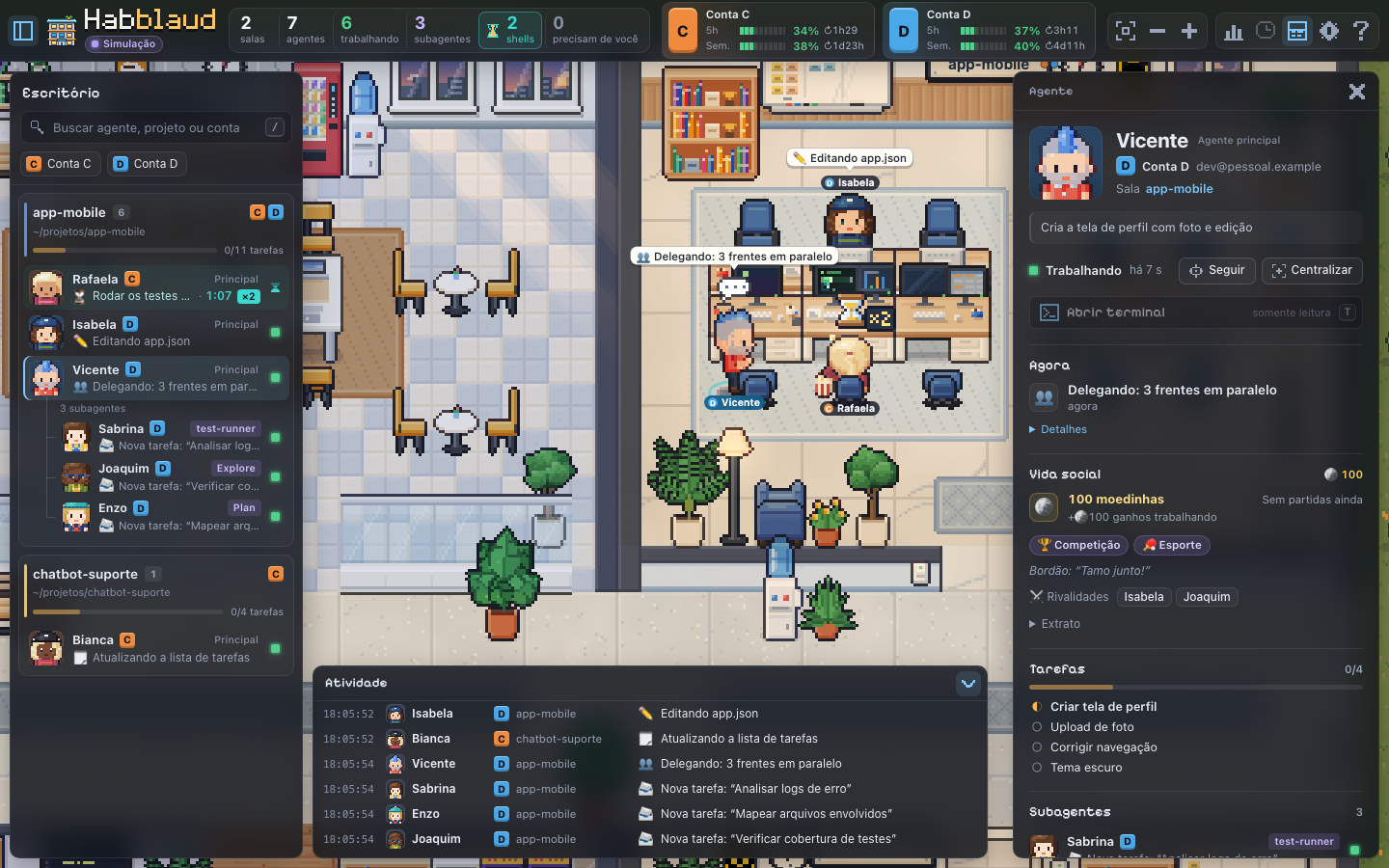 | 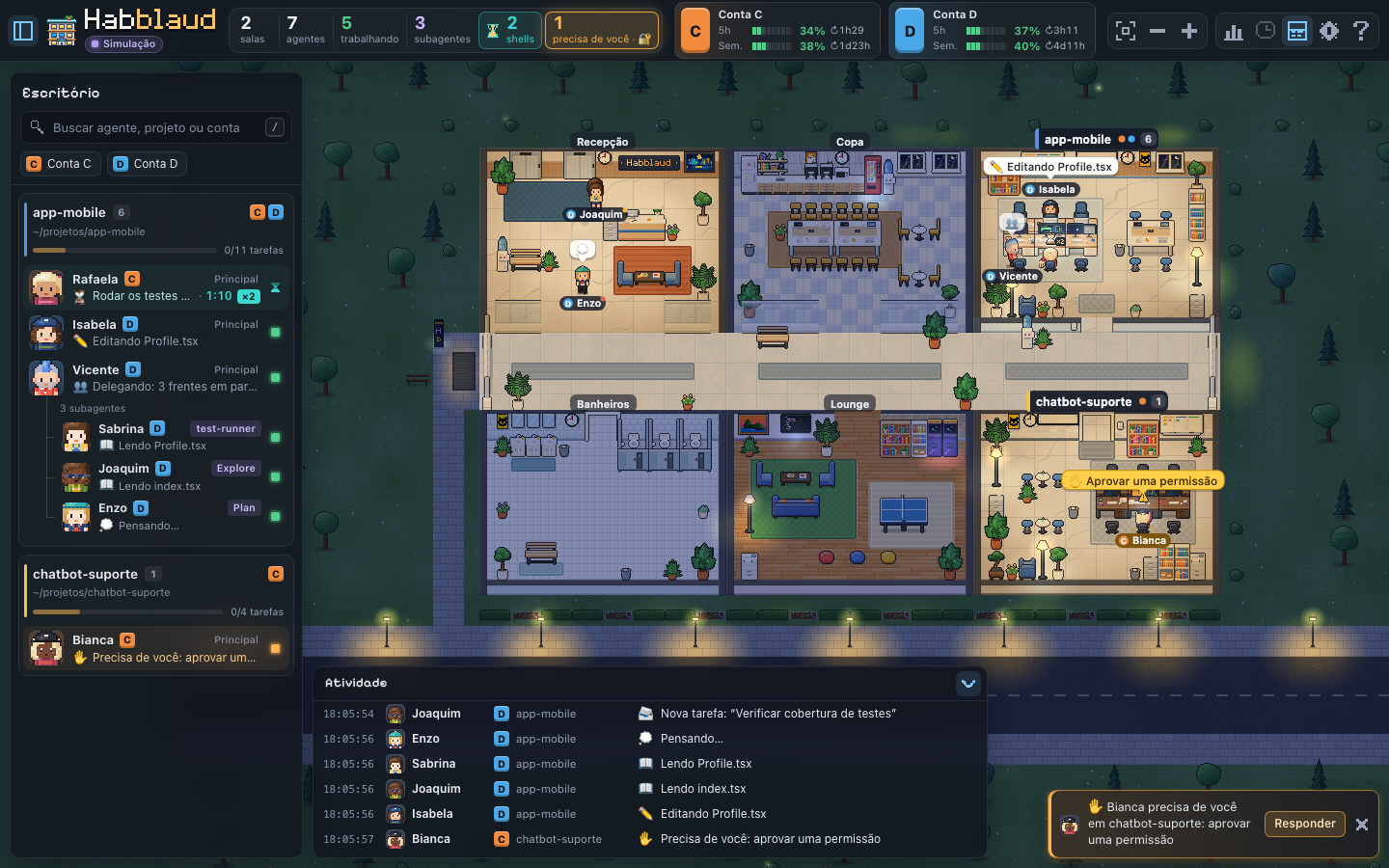 |
| Agent details: current activity, tasks with progress, subagents, timeline and stats. | Day and night: the sky in the windows and the lighting follow local time. |
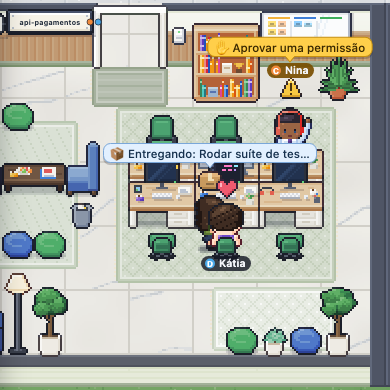 |
Collaboration in plain sight. Subagents are coworkers with their own names and badges: they arrive by elevator, work in
the project's room and, when they finish, walk over to the agent that called them to deliver the result (📦) before leaving. Needs you. When an agent is waiting for a permission or an answer in the terminal, it rushes to its desk and raises a hand, with a blinking alert — and a notice pops up on screen (optionally with sound and a browser notification). You can approve, answer the question or send the next instruction right there. |
| Waiting on shell. When the agent finishes its turn but leaves a command running (tests, build, deploy…), it doesn't wander off: it stays at its desk with an hourglass flipping over its head, the terminal showing progress and a bubble with the command and the elapsed time. And the wait turns into comedy: first it eats popcorn watching the terminal; after 3 min it crosses its arms and spins in its chair; after 10 min it gathers cobwebs; after 25 min it dozes off. When the command finishes, it stands up and celebrates with confetti — or gets a rain cloud, if it failed. In the sidebar list and in the details, a timer shows how long each command has been running. | 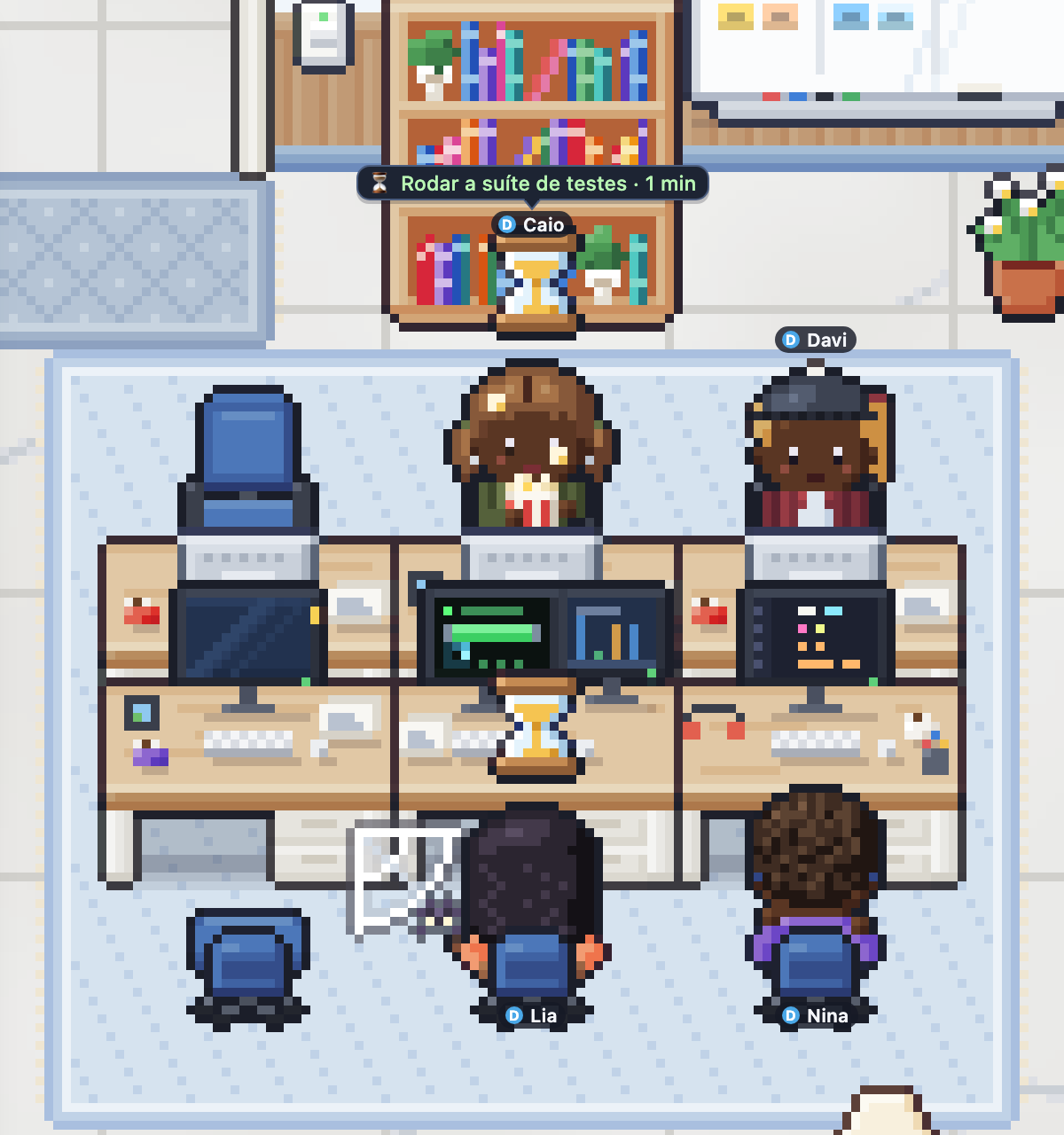 |
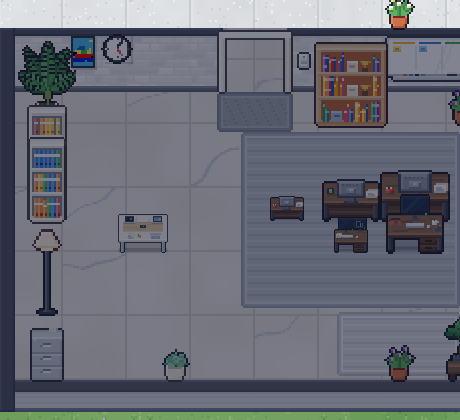
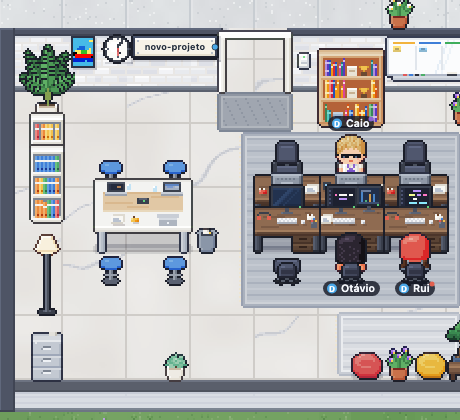
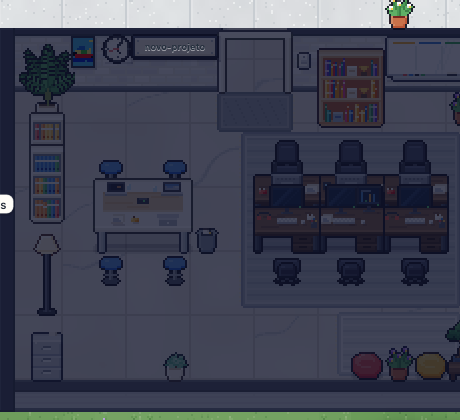
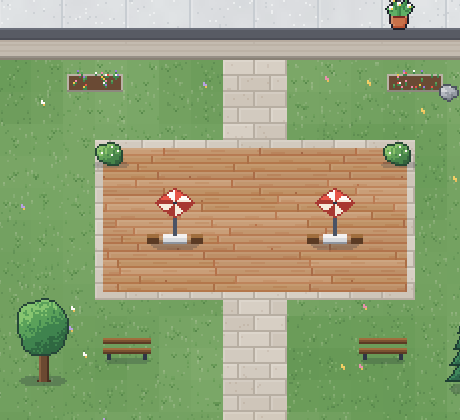
The lights go out. When you close a project's last session, the last character walks to the light switch, turns off the lights and leaves by elevator — and the room is taken apart, becoming a garden until a new project arrives. If the garden ended up between two rooms, the farthest room moves there: it's set up in the empty spot, everyone walks over to it, and the old address goes dark and is taken apart. That way the building has no gaps and shrinks on its own.
| 1. The room is set up, still dark | 2. Someone turns on the lights and everyone works | 3. The last one leaves and turns off the lights | 4. The room becomes a garden |
|---|---|---|---|
 |  |  |  |
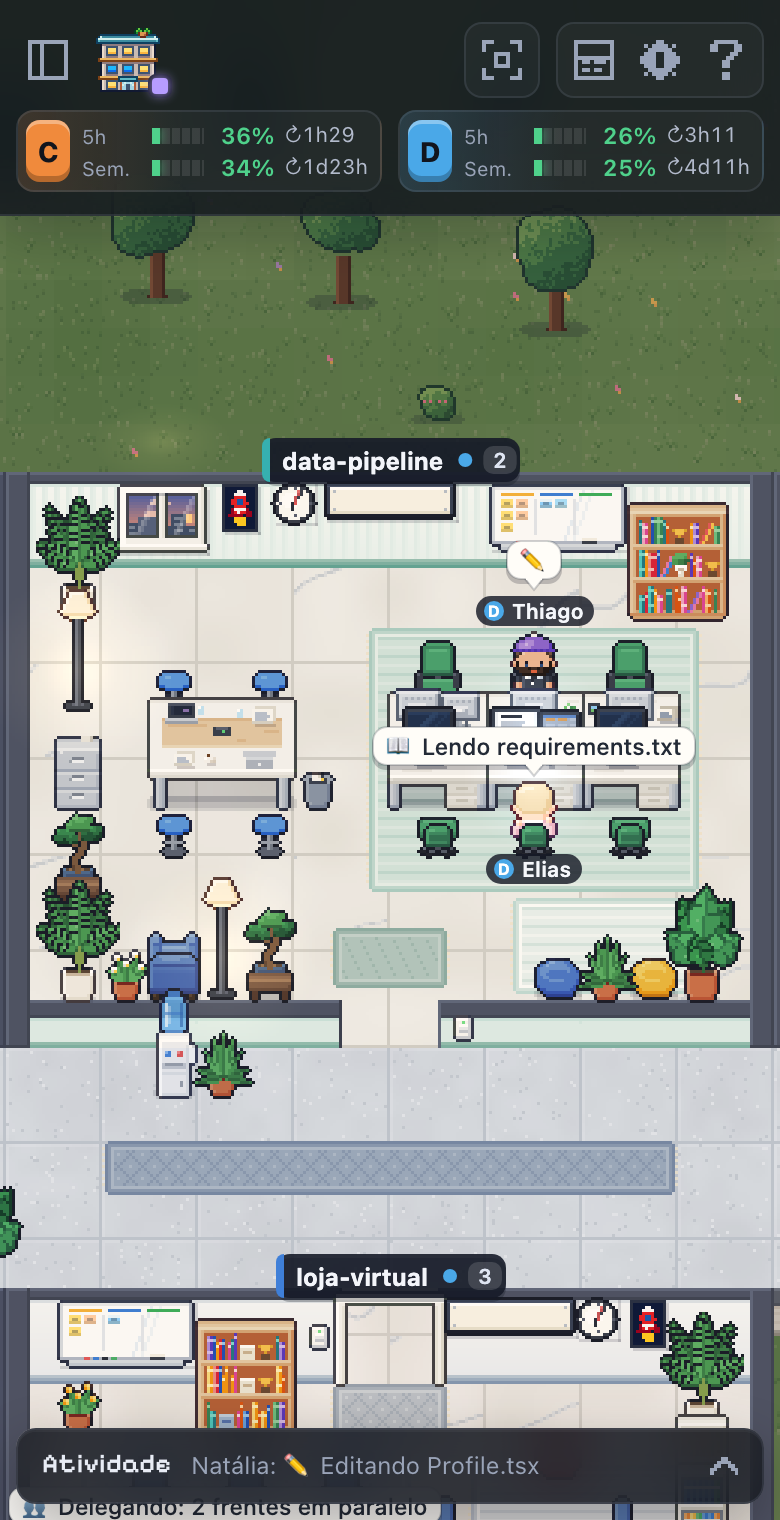 | On your phone too. The interface adapts to small screens: account usage stays at the top, the room list becomes a drawer and the details open from the bottom up. See how to allow access over the local network in Open on your phone. |
The images above use demo mode (made-up projects, people and accounts).
Installation
Requirements
- macOS (tested) or Linux.
- Claude Code installed, with one or more accounts (2.1.287 or newer for the mod).
- Node.js 22.12+ and npm (developed with Node 24; Docker already uses Node 24).
- Docker Desktop (or Docker Engine with Compose v2), if you're going to run it in a container.
1. Get the project
git clone https://github.com/marmottajr/habblaud.git
cd habblaud
npm install
npm installonly downloads build tools (Vite, TypeScript, tsx…). The Habblaud server has no runtime dependencies: it only uses Node's built-in modules.
2. Start Habblaud
Option A — Docker (recommended for keeping it always on)
npm run docker:up
The script detects your Claude Code accounts, mounts only the folders it needs (read-only), builds the image and starts the container — which restarts on its own along with Docker. Open http://localhost:4747.
Option B — Node, without Docker
npm run build
npm start
Open http://localhost:4747. For development, use npm run dev (server + Vite with hot reload).
Now open Claude Code in any project and watch your agent arrive by elevator. 🎉
3. Install the Habblaud mod in Claude Code (recommended)
npm run mod:install                        # o mod e os plugins de permissões e de mensagens, em cada conta
npm run mod:install -- --sem-permissoes    # sem responder permissões e perguntas pelo escritório
npm run mod:install -- --sem-mensagens     # sem mandar mensagens aos agentes pelo escritório
Habblaud ships a mod (a plugin that runs inside
Claude Code) and installs it in each account, through claude plugin itself, from this folder. With it:
- each account's 5-hour and weekly usage shows up live in Habblaud;
- the terminal shows a line when another session needs you (permission or answer);
- the
/habblaudcommand becomes available in Claude Code; - you can approve or deny permission requests from the office ("Do you want to…") and answer the agent's
questions, with the
habblaud-permissoesplugin (see Answering from the office); - you can send messages to the agent from the office, as if you were typing in its terminal, with the
habblaud-mensagensplugin (see Sending messages).
It requires Claude Code 2.1.287 or newer (claude --version). The mod runs inside each session, with your
permissions, and only accesses what is listed in mod/README.md; to check without running anything,
claude plugin validate mod/habblaud shows the events it handles and the calls it makes. Sessions that are already open
load the mod with /reload-plugins (or when reopened). If the account had the old setup (below), mod:install removes the
tap and the hook from settings.json (with a backup), because the mod does the same thing. Check with npm run mod:status; to
undo: npm run mod:uninstall.
The mod is loaded from this folder. If you move the folder, run
npm run mod:installagain.
Claude Code older than 2.1.287: the old way
Without mods, live usage and answering from the office come from two installers that edit each account's
settings.json (with a backup first):
npm run usage:install    # põe um "tap" na frente do statusline de cada conta, que captura o uso de 5h/semanal
npm run hooks:install    # acrescenta o hook PermissionRequest, para responder permissões pelo escritório
Your statusline keeps looking the same. To undo: npm run usage:uninstall and npm run hooks:uninstall.
Both point to this folder: if you move the folder, run them again (until then, the accounts' statusline shows an error).
When you update Claude Code, switch to the mod: npm run mod:install removes the old tap and hook (with a backup) so
you don't end up with two of them capturing usage or answering the same request.
4. Codex in the office (optional)
If you also use OpenAI's Codex (the codex CLI or the app), its sessions join the same office: each
project is a room — the same room as Claude Code, when both are open in the same project — and each session is a
character with the CODEX tag. Habblaud finds the Codex folder on its own (~/.codex, CODEX_HOME or ~/.codex*) and
reads the conversations, without installing anything. To see Codex live (what it's doing right now, who needs you) and
approve commands from the office, install the hooks:
npm run codex:install      # acrescenta os hooks do Habblaud em ~/.codex/hooks.json (backup antes; os outros ficam)
npm run codex:status       # confere
Then open Codex and approve the Habblaud hooks in /hooks: Codex only runs a new hook after you
approve it (Habblaud never writes that approval). With Habblaud in Docker, to send messages to Codex sessions,
also keep npm run codex:bridge running on the Mac (see Codex).
Open on your phone (optional)
By default Habblaud only accepts connections from the computer it runs on. To open it on your phone (on the same Wi-Fi), with Docker:
printf 'HABBLAUD_BIND=0.0.0.0\n' > .env
npm run docker:up -- --no-build
Then open http://<ip-do-computador>:4747 on your phone (on macOS: ipconfig getifaddr en0; if it comes back empty,
ipconfig getifaddr en1). In Node mode, use HABBLAUD_HOST=0.0.0.0 npm start.
⚠️ With this, any device on the network can see the agents' activity (commands, files, session titles). Use it only on trusted networks. The terminal (and with it, answering and sending messages from the office) stays off while the port is exposed. To go back: delete
.envand runnpm run docker:up -- --no-build.
Phone with login and HTTPS (approving requests)
Instead of exposing the main port, open a second port with a username, a password and HTTPS. Port 4747 stays on the computer only (hooks, plugins and your browser keep working without a login); the remote port goes to the network and every request on it requires a login. What separates the two is the port the connection arrived on, never the Host header. Nothing of this exists until you run the setup: without it, no extra port is published.
npm run remote:setup   # usuário, senha, nome do endereço e (opcional) um endereço próprio
npm run docker:up
remote:setup writes only the password hash (scrypt) to .env, creates a local CA and the server certificate in
~/.habblaud/remote-tls, and leaves a service announcing <nome>.local on the network (mDNS; LaunchAgent on macOS,
systemd on Linux). Open https://<nome>.local on your phone (with :4748 if port 443 was taken). The first time,
accept the warning, tap Install the Habblaud certificate and trust it (iPhone: Settings › Profile Downloaded ›
Install, then Settings › General › About › Certificate Trust Settings; Android: Security › Encryption & credentials ›
Install a certificate › CA certificate), checking the fingerprint the setup showed.
- Restricted CA: it only signs
localhost,.localnames, your own address and private-network IPs. Even if its key leaked, a certificate for any other site would be rejected by the phone that trusts it. Changing your own address creates a new CA (install the certificate on the phone again). The CA key never goes into the container. - Own address (e.g.
meuclaude.home): goes into the certificate, but the phone only finds it with an entry in the router's DNS pointing to the computer's IP.<nome>.localworks without configuring anything. - What the phone can do: by default, approve and deny permission requests.
HABBLAUD_REMOTE_ALLOWin.envacceptspermissions,messages,terminalandspawn, separated by commas, ornone(view only). The interactive terminal never works from the phone. - Deliveries (phone, with
terminalallowed): the box button in the top bar lists what each agent finished, with a summary and attachments (screenshots, PDFs, files it sent) that open with a tap. - New agent (the + button): starts a Claude Code session in the background on the computer (
claude --bg, in the chosen folder), which shows up in the office and receives messages and permission requests through Habblaud. In a folder Claude Code doesn't trust yet, it opens the Claude app's new-session screen filled in, and you press Enter there. It comes turned off: it needsHABBLAUD_PTY=1(the same opt-in as the interactive terminal; in Docker, put it in.envand keepnpm run codex:bridgerunning on the computer) and, from the phone,spawninHABBLAUD_REMOTE_ALLOWtoo. - Dictation (in New agent and in the message box): needs
whisper-cliandffmpeg(brew install whisper-cpp ffmpeg) and a multilingual model in~/.local/share/whisper/(ggml-small.bingets more right thanggml-base.bin; the.enones only understand English). Without them, the Dictate button doesn't show up. The voice never leaves the computer.HABBLAUD_WHISPER_BIN,HABBLAUD_FFMPEG_BIN,HABBLAUD_WHISPER_MODELandHABBLAUD_DICTATION_LANGS(defaultpt,en) adjust it. - Away from home (Tailscale): with Tailscale on the computer and on the phone,
tailscale serve --bg --https=443 https+insecure://127.0.0.1:443publishes the remote port (with login) only to your devices, with a valid certificate athttps://<computador>.<tailnet>.ts.net; add that name toHABBLAUD_ALLOWED_HOSTS. Always point it at the remote port, never at 4747 (which has no login). - Session: 30 days; changing the password (running the setup again) ends all of them, and Settings › Phone access › Sign out ends the one on that device. After 5 wrong passwords in a row, each new attempt waits from 1 s up to 5 min.
- IP changed?
docker:upre-issues the server certificate when the new IP is missing or when it's 30 days from expiring, with the same CA (the phone keeps trusting it); the server swaps the certificate without restarting. - Turn off:
npm run remote:setup -- --offandnpm run docker:up.
Without HTTPS the remote port doesn't start; HABBLAUD_REMOTE_INSECURE_HTTP=1 forces plain HTTP (password and cookie
in the clear on the network). In Node mode: HABBLAUD_REMOTE_PORT and HABBLAUD_REMOTE_HOST (default
0.0.0.0:4748) and HABBLAUD_REMOTE_TLS_DIR (default ~/.habblaud/remote-tls/server).
Updating
The version in use shows up in the top bar, next to "Connected", and in Settings › About. Every 6 hours
Habblaud checks GitHub for a new version (the releases
of this repository). When there is one, the green New version badge appears in place of the number, along with a notice and a dot on the
settings button. About has the link to what changed and the Check now button (each version's notes
are also in CHANGELOG.md). To update:
git pull
npm install
npm run docker:up        # ou: npm run build && npm start (e depois npm run mod:install)
If
git pullstops with "Your local changes to the following files would be overwritten by merge: package-lock.json", rungit checkout -- package-lock.jsonand try again: up to 0.4.0,npm installchanged that file.
docker:up also updates the mod in the accounts where it's already installed (it never installs it on its own) and tells you:
"Mod updated to 0.3.0 on Account D; open sessions: /reload-plugins". In Node mode, run npm run mod:install
after updating. To skip checking GitHub, use HABBLAUD_UPDATE_CHECK=0 (in .env, for Docker).
Coming from CodeTown
Habblaud was called CodeTown up to 0.3.2. After git pull, run once:
npm install
npm run mod:install      # troca o marketplace e os plugins codetown pelos habblaud, em cada conta
npm run docker:up        # tira o container codetown e copia os dados do volume antigo para o novo
- Mod: until you run
mod:install, the accounts' Claude Code complains about thecodetownmarketplace (themod/codetown*folders were renamed).docker:upwarns you, but doesn't switch it on its own. - Docker: the old volume (
codetown_codetown-data) is left untouched. After checking that the characters' names came over, delete it withdocker volume rm codetown_codetown-data, and the old image withdocker image rm codetown:local. - Local folder:
~/.codetownbecomes~/.habblaudon its own (in the server, indocker:upand inmod:install). - Browser: preferences and coins move to the new keys the first time the page opens.
- Variables: the
CODETOWN_*ones no longer work; rename them toHABBLAUD_*in.env(e.g.HABBLAUD_BIND). The server anddocker:upwarn you when they find an old one. - Repository: it's now
github.com/marmottajr/habblaud(GitHub redirects the old address). To fix your clone:git remote set-url origin https://github.com/marmottajr/habblaud.git. The local folder can keep its old name. settings.jsonbackups made before the switch keep the namesettings.json.codetown-backup-<data>.
Uninstalling
npm run mod:uninstall                       # tira o mod, os plugins de permissões e de mensagens e o marketplace
npm run codex:uninstall                     # tira os hooks do Habblaud do Codex (os outros ficam)
npm run docker:down                         # para o container
docker volume rm habblaud_habblaud-data     # apaga os dados do container (nomes, salas, linha do tempo e estatísticas)
docker image rm habblaud:local              # apaga a imagem
rm -rf ~/.habblaud                          # apaga os dados locais (uso capturado, nomes, salas, linha do tempo e estatísticas)
Then just delete the project folder — run mod:uninstall first, or the accounts' Claude Code will start
complaining about the missing marketplace. If you used the old way, also run npm run usage:uninstall (restores the
original statusline) and npm run hooks:uninstall (removes the permission hook); without them, the accounts' statusline starts
showing an error (and the hook, failing silently). mod:install, which removes the old tap and hook, and the old installers and
uninstallers leave settings.json.habblaud-backup-<data> copies in each account's folder (e.g.
~/.claude/); delete them if you no longer need them.
How to use
What each character is doing
| State | What you see |
|---|---|
| Working | At the desk, typing. The monitor and a bubble show the activity: 📖 reading, ✏️ editing, 💻 terminal, 🧪 tests, 🌐 searching… |
| Needs you | Rushes to the desk and raises a hand, with a blinking alert: it's waiting for a permission or an answer in the terminal. |
| Waiting on shell | Finished its turn but left a command running (tests, build, deploy…), so it stays at the desk with an hourglass flipping over its head and the terminal in progress: it eats popcorn while watching, after 3 min it crosses its arms and spins in its chair, after 10 min it gathers cobwebs and after 25 min it dozes off; when the command finishes, it stands up and celebrates with confetti (or gets a rain cloud, if it failed). After 40 s, if there are coworkers with nothing to do, it may head out to a hangout — with the hourglass over its head. |
| Idle | Finished its turn and wanders around: coffee in the kitchen, the water cooler, the restroom, the lounge couch, the phone on the beanbag, the mirror. With idle coworkers around, it joins a hangout: TV, video games, ping-pong, a kitchen chat, rock-paper-scissors (see Social life). After 10 min without moving, it dozes off — but a coworker may wake it up for a hangout. |
| Subagent done | Walks over to the agent that called it, delivers the result and leaves by elevator. |
| Session ended | Leaves; if it was the last one in the room, it turns off the lights on the way out. |
Each character has a unique Brazilian name (Marina, Henrique, Luan…) that stays as long as the session exists, and a colored chip with the account letter (C, D…).
Interface
- Top: counters (rooms, agents, working, subagents, shells running, need you) and a per-account usage card. The shells counter only shows up while some command is running; click it to go to whoever is waiting. Below the logo are the connection and the version in use, which turns into the New version badge when a new version comes out (see Updating).
- Side panel: search, account filter and the list of rooms with their agents and subagents.
- Details drawer: click a character (in the building or in the list) to see activity, tasks, subagents, timeline and stats (tools, tokens, cost, lines changed, model, branch).
- Feed: the latest activity across the whole office.
- Settings (⚙): names, bubbles, how much idle agents wander around, day/night cycle, sounds, browser notifications, demo mode and About (version in use and new version). Help (?): full legend and shortcuts.
- My day (📊): where the day's time went (see My day). Timelapse and Session history (the clocks in the top bar): see Day timelapse and Terminal.
Camera: drag to move, scroll to zoom, double-click a character to follow it.
Shortcuts: / search · F follow the selected one · T terminal · L timelapse · M my day · P next request
(permission or question) · O or 0 overview · Esc clear selection · [ side panel · ] feed · arrows/WASD move ·
+ - zoom · ? help.
Office themes
In Settings → Appearance → Office theme, choose:
- Automatic (default): follows the calendar, in local time. Halloween from October 1 to 31, Christmas from November 1 to December 26 and, the rest of the year, the original look.
- None: always the original look.
- Christmas: wreaths, warm lights, trees with presents, Christmas rugs, snow on the windows and Santa hats on the characters.
- Halloween: pumpkins, decorative ghosts, cobwebs, bats, purple lights, themed rugs and costume accessories.
The switch is immediate and the choice is saved in this browser. The themes keep the agents' paths, activities and animations. The day/night cycle is still a separate option.
 |  |
Languages
The interface is in Portuguese, English, Spanish and French. It follows the browser's language; in
Settings › Language you can pin one (the choice is saved in this browser). The texts the server builds
(activities, notices, terminal, logs and the install scripts) follow HABBLAUD_LANG and, without it, the
system language, except English: many machines and every container come in English by default, even for people who use another language.
For the server in English, set HABBLAUD_LANG=en (in Docker, in .env). Any text without a translation shows up in
Portuguese.
Day, night and sounds
The office follows local time: late at night and in the evening the lawn and the street turn bluish and dark, the streetlights,
the lamps, the machines and the monitors that are on cast halos of light, the rooms with people in them are lit (the lights that
go out when a room empties still apply), the cars drive by with their headlights on and fireflies show up in the garden. At
dawn (~5–7 a.m.) and at dusk (~5–7 p.m.) everything takes on a warm tone, and during the day the sun comes in through the windows and
draws strips of light on the floor — short at noon, long and orange in the late afternoon. In Settings › Day/night
cycle you can choose automatic, always day or always night; to test a time, use ?hora=21:30 in the URL.
Sounds come turned off. Turned on in Settings › Sounds, they're synthesized in the browser itself (no audio files) and quiet: the typing of whoever is working in the rooms in view, the elevator "ding" when someone arrives or leaves, the bell when someone needs you, the click of a finished task and the ping-pong and arcade sounds of the hangouts. There's a master volume and each category can be turned on and off separately. With the tab hidden, only the bell rings.
Terminal
Click an agent and use Open terminal to see the session's conversation the way Claude Code shows it: the prompts, the replies, each tool call (with the command or the diff) and the result, updated live. It works for main agents and subagents; in demo mode, the conversation is made up.
At the bottom, for main agents, you can type: Enter sends and Shift+Enter adds a new line. The text goes
into the session as if you had typed it in its terminal (see Sending messages); if the agent
is busy, it goes in when the agent finishes what it's doing. Subagents and sessions from the history stay read-only.
- Search: with the terminal focused,
Ctrl+F(⌘Fon Mac) or the magnifier in the header opens search in the conversation, ignoring case and accents. The counter shows the position ("3/17");EnterandShift+Entergo to the next and the previous one, expanding the collapsed blocks ("… +N lines") where the term is. Search keeps working while new messages arrive.Esccloses the search; the next one closes the terminal. - Filter: All, Prompts only (your prompts and the agent's final replies, without the intermediate steps) or No tools.
- Copy: hover over (or focus) a prompt, a reply, a command or a result to copy it.
- Session history: the clock in the top bar lists the sessions from the last 7 days across all accounts (up to 150), grouped by day, with search by title, project or account. An ended session opens in the terminal with the project, title and date in the header and "Session ended at …" at the bottom; a session that's still open opens the agent's live terminal.
Since the terminal (and the history) shows the whole conversation, it only exists when Habblaud is reachable only from the
computer it runs on (the default), and it only opens through http://localhost or http://127.0.0.1. With the port open to the network
(HABBLAUD_BIND=0.0.0.0 or HABBLAUD_HOST=0.0.0.0), it stays off. Details in
Privacy and security.
Interactive terminal (take over, new session and end)
With HABBLAUD_PTY=1 and running with npm start (outside Docker), each main agent's terminal window is
interactive: the drawer's Open terminal button, the shortcut next to each agent in the side list or the T key
open the same window, with tabs for the other agents in the same project.
- Session opened here: it's the real Claude Code (type, answer; Esc interrupts the agent, as in the terminal).
- Session opened in another terminal: Take over here (at the top of the window) ends the session there and continues the same
conversation here (
claude --resume <sessão>, in the same folder and account). The character keeps its name. On Windows, the terminal the session came from goes back to normal (Habblaud turns off the mouse/keyboard modes that Claude turned on). - End closes the session, whether it's here or in another terminal (the conversation is saved).
- New session (in the room's drawer) opens a new Claude Code in the project folder.
Taking over and ending ask for a second click; closing the window doesn't end the session. The window (and the agent's
drawer) can be dragged by its bar and resized from the corner; double-clicking the bar puts it back in place.
It comes turned off: turn it on with HABBLAUD_PTY=1 (first read the warning in Privacy and security).
It uses node-pty, @xterm/headless (optional dependencies) and the claude on your PATH (HABBLAUD_CLAUDE_BIN for
another one); it only accepts requests from the computer it runs on. On startup, Habblaud opens a test terminal: if node-pty or
claude don't work, the feature stays off and the log says why. Restarting Habblaud ends the sessions
it opened.
The live terminal is still available in the session history, for subagents and when the interactive one is off.
Day timelapse
The Timelapse button (a clock with a back arrow, or the L key) replays the day at high speed: rooms
lighting up and going dark, agents arriving, working, waiting on you, heading to the hangouts, subagents coming and going.
The playback bar has the day, play/pause, the speed (60×, 180× or 600×: a 10-hour day in 10, 3⅓ or 1 min),
the draggable timeline with the chart of who was present and working, the peak markers (click to
jump there) and Back to live. Meanwhile, the office takes on a light sepia tone, with the REPLAY 14:32 badge, and the
feed keeps showing what's happening now.
The server records the timeline from the moment it's turned on (the past can't be rebuilt):
summaries of what the office shows, without conversations, in ~/.habblaud/timeline/ (in Docker, in the data volume), with
a size limit per day and the last 7 days kept. To not record: HABBLAUD_TIMELINE=0. Details in
server/README.md.
The characters walk faster in the replay, but at high speeds anyone who stays only briefly in the office barely reaches their desk; jumping to another point shows everyone already in place.
Answering from the office
With the permissions plugin installed (npm run mod:install, which installs it along with the mod; on Claude Code older
than 2.1.287, npm run hooks:install), when an agent asks for permission — to run a command, edit a file, open
a page — the request shows up in the office: the character raises a hand, a notice with Reply
pops up on screen and, in the agent's details, the Asks for permission card shows the command (or the edit's diff) with the
buttons:
- Approve — and, when Claude Code suggests it, Approve and don't ask again (the same rule the terminal
would offer, for example
Bash(npm test:*)in this project); - Deny — with an optional reason, which goes to the agent, and the option to interrupt it;
- Answer in terminal — Habblaud sets the request aside.
The dialog keeps showing in the terminal at the same time, and whichever answer comes first wins: if you answered in the
terminal, the request disappears from the office on its own. The need you counter (and the P key) takes you to each request.
The agent's questions (AskUserQuestion) work too: the questions card shows each question with its
options and descriptions, as the terminal would. Pick an option (or several, when the question allows it) or write
your own in Other, and use Reply; Deny… tells the agent you don't want to answer, and Answer in
terminal leaves the question there. The answer reaches the agent as if you had chosen it in the terminal.
- The request goes through a Claude Code
PermissionRequesthook (the plugin's, or the old way's), which only diverts it when there's some Habblaud page open on this computer; with Habblaud stopped or no page open, it exits right away and the terminal carries on as usual. - With no answer from the office within 5 minutes (up to 24 h with
HABBLAUD_PERMISSION_TIMEOUT=86400in theenvofsettings.json), the request goes back to being answerable only in the terminal (the plugin's options are inmod/README.md; in the old way,npm run hooks:install -- --timeout 120changes the time and--port, the port). For background subagents, Claude Code only shows the dialog in the terminal after the hook finishes: answer from the office or use Answer in terminal. With a wait longer than 5 minutes, if no page that can answer stays open for 5 minutes (and no phone with login is set up to answer), the request goes back to the terminal. - It works under the same safeguard as the terminal: only with Habblaud reachable only from the computer it runs on
and opened through
http://localhost. Check withnpm run mod:status(ornpm run hooks:status, in the old way). It also works from the phone with login (its default). - In demo mode, the made-up agents also ask for permission and ask questions (pretend ones), so you can try it out.
Sending messages
With the messages plugin installed (npm run mod:install, which installs it along with the mod; it requires Claude Code
2.1.287 or newer), each main agent's details get the Send message section, and the bottom of the
terminal becomes a text box. Write and press Enter (Shift+Enter adds a new line): the text
goes into the session as if you had typed it in its terminal. You can reply when the agent finishes its turn
and waits for the next request, give a new instruction or correct its course, without hunting for the right window.
- The box shows the status: queued (the session fetches messages every 2 seconds), delivered or not delivered, with the reason. With the agent busy, the message waits and goes in when it finishes its turn, like a prompt typed while the agent is working.
- The plugin runs inside each session and only talks to Habblaud at
127.0.0.1. Without it (or in a session opened before the install: use/reload-plugins), an install hint shows up in place of the box. Subagents don't receive messages. - It works under the same safeguard as the terminal (local access only) and can be turned off with
HABBLAUD_MENSAGENS=0. Read the warning in Privacy and security. From the phone with login, only withmessagesinHABBLAUD_REMOTE_ALLOW. - In demo mode, the made-up agents also receive messages (pretend ones).
Editing the character
Each session arrives with a random name and look. To pin a project's character, open the main agent's details and click the pencil next to the name (Edit character). In the editor:
- Name: up to 24 characters. It can't repeat the name of someone who's in the office or the one chosen for another project.
- Randomize: brings up another look.
- Pieces: skin, hair, beard, eyes, top, bottom, shoes and accessory, with a preview next to them.
- Save: applies to the project (the room). The next session opened in it arrives as this character. With two sessions at the same time in the same room, the second one gets a random character.
- Back to random: undoes the choice.
The choice is stored in ~/.habblaud/names.json and goes away after 60 days without the project being used. The editor has the same safeguard as the
terminal: the pencil only shows up with the terminal on (without HABBLAUD_TERMINAL=0) and local access, that
is, with Habblaud reachable only from the computer it runs on and opened through http://localhost.
Codex
Codex sessions (CLI or app) show up like Claude Code's: character, project room, activity, tasks, subagents, terminal and history, 5-hour and weekly usage and My day (tokens only: Codex doesn't report cost). The Codex account chip is hollow and carries the CODEX tag.
- Without installing anything, Habblaud reads the files Codex itself writes (the conversations in
~/.codex/sessionsand the locks of the open sessions in~/.codex/thread-writer-locks). The catch is that Codex writes each step after it finishes and never writes "waiting on you": without the hooks, the office shows Codex with a delay and doesn't tell you when it needs you. - With the hooks (
npm run codex:installand approving them in/hooks), Codex notifies Habblaud at every step: the session shows up right away, the activity is the current one and an approval request makes the character raise a hand. - Approving from the office: with some Habblaud page open, Codex's approval request waits for your
answer in the Asks for permission card for up to 25 seconds (
npm run codex:install -- --espera <s>, from 5 to 120): Approve or Deny (with the reason). Unlike Claude Code, Codex only shows the approval in the terminal after the office answers or the time runs out — in the meantime the terminal shows "Waiting for an answer in Habblaud…". There's no "always allow" or "interrupt", and Codex doesn't let you answer its questions from outside. - Sending messages: the Send message box works for Codex too, through
codex queue: the message joins the session's queue and Codex picks it up when it finishes what it's doing (up to about 10 seconds later). In Node mode Habblaud runs the command itself; in Docker, keepnpm run codex:bridgerunning on the Mac (the container can't see your Codex). - 5-hour and weekly usage: comes from Codex's own files and only refreshes while some session is running; the card shows how old the numbers are and "no quota" when the workspace has run out of credits.
- When the session comes in: with the first message (that's when Codex records the project folder); a CLI that's open and still has no conversation doesn't show up.
- When the session leaves the office: the Codex CLI runs sessions on a background server, which keeps them loaded for up to a minute after they go idle with no one watching; that's why the character may take a little while to leave after you close the terminal.
- ChatGPT cloud conversations (with no file on the computer) don't show up.
HABBLAUD_CODEX=0turns Codex off.
GitHub in the office
What the agents do on GitHub livens up the project's room, with no token and no internet access: Habblaud reads the
calls in the transcripts (gh pr create, gh pr merge, git push, gh run watch, gh pr checks, gh run view,
gh release create and the GitHub MCP tools) and their results.
| Event | What happens |
|---|---|
| 🎉 PR opened or merged, release published | Confetti falls in the room, everyone celebrates by hopping and a banner says why ("PR #12 merged!") for ~12 s. |
| 🚨 Red CI | A rotating beacon flashing in the corners of the room, a reddish floor and a "!" bubble over whoever saw the failure, until a green CI in the room (which turns into a party) or for 10 min. |
| 🚀 Push | Just the notice and the feed. |
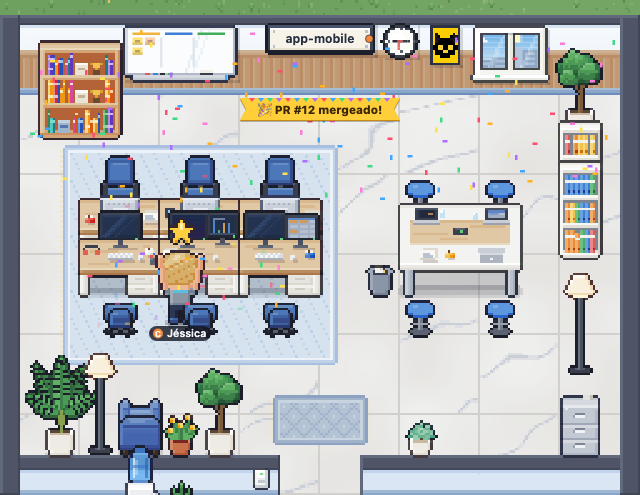 | 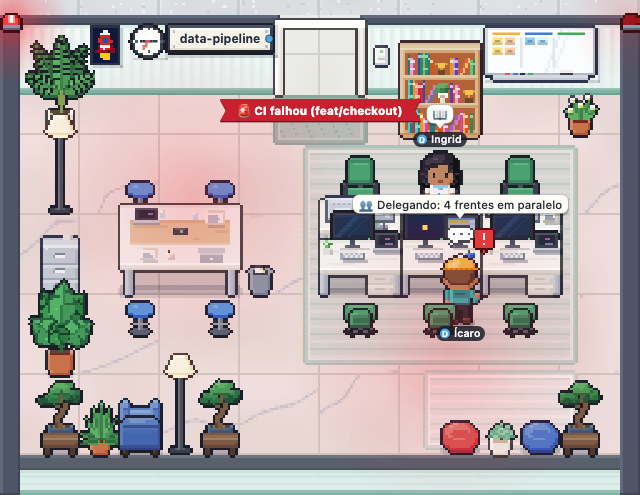 |
Each event also creates a notice ("🎉 Danilo opened PR #12 in habblaud", "🚨 CI failed in habblaud (feat/x)") and goes into the feed. Only what happens live livens up the room: whatever was already in the transcripts when Habblaud opened only goes to the history. With "reduce motion" turned on in the system, nothing flashes or spins. In demo mode, made-up PRs, merges and CI runs show up from time to time.
My day
The My day button (or the M key) shows where the day went: how much time the agents spent working and,
highlighted, how much time they spent waiting on you (permission, question or choice) — with the longest wait, who
waited, where and when. Next to it, sessions, subagents, requests, tokens and cost (when Claude Code records the cost in the
transcript), and charts by hour, by project (from the one that waited on you the most to the one that waited the least) and by account, plus
the ranking of the longest waits. Pick the day in the selector (Habblaud keeps the last 30); when it's showing today,
the panel refreshes every 30 s. Each chart has a table version, and the legend turns each status on and off.
The time is agent time: two agents working for an hour count as two hours. Habblaud only counts what happens while it's running, and the day follows your browser's time zone. With demo mode on, the panel shows made-up numbers (with the "demo" badge) and lets you switch to the real data; the demo agents never go into the real stats.
Demo mode
Want to see the office full without having any sessions open?
- Add
?mock=1to the URL (e.g. http://localhost:4747/?mock=1) to simulate everything in the browser, without your real sessions. Parameters:&speed=3speeds up time and&sessions=6changes the number of simulated sessions. - Or turn it on from the interface — View demo (when the office is empty) or Settings › Demo
mode — which puts made-up agents alongside the real ones. With
npm run demo(orHABBLAUD_DEMO=1in the Docker.env), this mode starts already on.
Accounts and usage (5-hour and weekly)
Codex accounts come in on their own (each
~/.codex*folder orCODEX_HOMEis an account; the letter comes from analias x='CODEX_HOME=… codex', if there is one) and their usage comes from Codex's files; see Codex. The rest of this section is about Claude Code.
If you use more than one Claude Code account (for example, a c shortcut with ~/.claude and a d with
CLAUDE_CONFIG_DIR=~/.claude-conta2), Habblaud shows them all together: each agent carries its account's chip and the top bar
shows, for each account, the percentage used of the 5-hour session and of the week and when each limit resets.
How accounts are recognized. Each Claude Code config folder is an account: ~/.claude and any
~/.claude* with projects/ or sessions/ (plus CLAUDE_CONFIG_DIR). To give each one its letter, Habblaud
reads, in your shell files (~/.zshrc, ~/.bashrc…), only the alias x='... claude ...' lines:
alias c='claude'
alias d='CLAUDE_CONFIG_DIR=~/.claude-conta2 claude'
becomes Account C and Account D. Only shortcuts of up to 3 letters count; accounts without a shortcut get A, B…
Where the numbers come from. The recommended way is the Habblaud mod (npm run mod:install, Claude Code 2.1.287+):
inside each session, it receives the plan limits from Claude Code itself and stores only the 5-hour and weekly
percentages (and when they reset) in ~/.habblaud/usage/<conta>.json. The numbers arrive after each account's next
reply. Check with npm run mod:status. On earlier versions of Claude Code, the statusline tap
(npm run usage:install) does the same through the statusline command, in the same file.
Details of the tap and the /usage cache
usage:install(the old way) changes, in<conta>/settings.json, only thestatusLine.commandfield: the original command (e.g.npx -y ccstatusline) now runs throughnode "<pasta do Habblaud>/scripts/statusline-tap.mjs" -- <comando original>(on Windows, the original command runs in Git Bash, as Claude Code would run it). A copy of the file first goes tosettings.json.habblaud-backup-<data>. If the account had no statusline, one is created that only captures usage.npm run usage:install -- --dry-runshows what would change without writing anything.- The tap passes the same JSON on to your statusline (output and exit code are still its own) and writes only
{accountId, configDir, fetchedAt, five_hour, seven_day}— no prompts, costs or project paths. Any failure while capturing is ignored: the statusline never breaks because of Habblaud.
| Source | How it works |
|---|---|
| Habblaud mod (recommended) | Live, as described above. Replaces the tap: mod:install removes the tap from the account. |
| Statusline tap (Claude Code older than 2.1.287) | Live, through the statusline command, in the same file. |
/usage cache (always on) | Claude Code saves the last result of the /usage command. In Node mode, Habblaud rereads it every 60 s; in Docker, the value read at the last npm run docker:up applies. It only changes when someone runs /usage. |
The sources are local files: none of them reads passwords or tokens, or makes network calls. The source with the most recent numbers always wins. Numbers older than 30 minutes show up as outdated; a window that has already reset since the numbers were collected shows up as — until new numbers arrive.
Configuration
Everything works without configuring anything. If you need to adjust something, use environment variables:
| Variable | Default | What for |
|---|---|---|
HABBLAUD_PORT | 4747 | HTTP port (in Docker, the port published on the host). |
HABBLAUD_HOST | 127.0.0.1 | Server interface in Node mode. Anything other than 127.0.0.1/localhost turns off the terminal (and answering and sending messages from the office). |
HABBLAUD_BIND | 127.0.0.1 | Docker only (in .env): where the port is published. 0.0.0.0 opens it to the local network (and turns off the terminal and anything that acts on the sessions). |
HABBLAUD_CLAUDE_DIRS | automatic detection | Account folders, comma-separated (e.g. /caminho/conta1,/caminho/conta2). |
HABBLAUD_DATA_DIR | ~/.habblaud | Where Habblaud keeps its own data (character and room names, the timelapse timeline and the My day stats). |
HABBLAUD_TIMELINE | on | 0 turns off timeline recording (the days already recorded stay in the timelapse). In Docker it's always on. |
HABBLAUD_USAGE_DIR | ~/.habblaud/usage | Where the mod (or the statusline tap) writes usage. |
HABBLAUD_DEMO | off | 1 turns on demo mode at startup. |
HABBLAUD_ALLOWED_HOSTS | — | Extra names accepted in the address (e.g. meu-mac.local), besides localhost and IPs. |
| `HABBLAUD_TERM |
Details
- Author
- @marmottajr
- GitHub Stars
- 1,567
- Sub-category
- Dashboards
- License
- MIT
- Surfaces
- terminal
- Added
- 1 months ago
- Last synced
- today
Weekly Mods Digest
Top new Claude Code mods and install commands, once a week. No fluff, unsubscribe anytime.

