
Flowdeck
FlowDeck plans each task, hands it to a worker on the model that fits, and logs what was asked, done, reviewed and spent. A band above the prompt and a side panel show the crew live, and every finished session is archived as a file you can reopen.
claude plugin validate to auditGuide →Writes files, executes local shell processes, or programmatically drives Claude.
Statically scanned from hooks & source. Learn how to audit

FlowDeck
A Claude mod for Claude Code: orchestrate the work, keep the record.
FlowDeck plans each task, hands it to a worker on the model that fits, and logs what was asked, done, reviewed and spent. A band above the prompt and a side panel show the crew live, and every finished session is archived as a file you can reopen.




Install · Features · Model routing · Changelog · Privacy
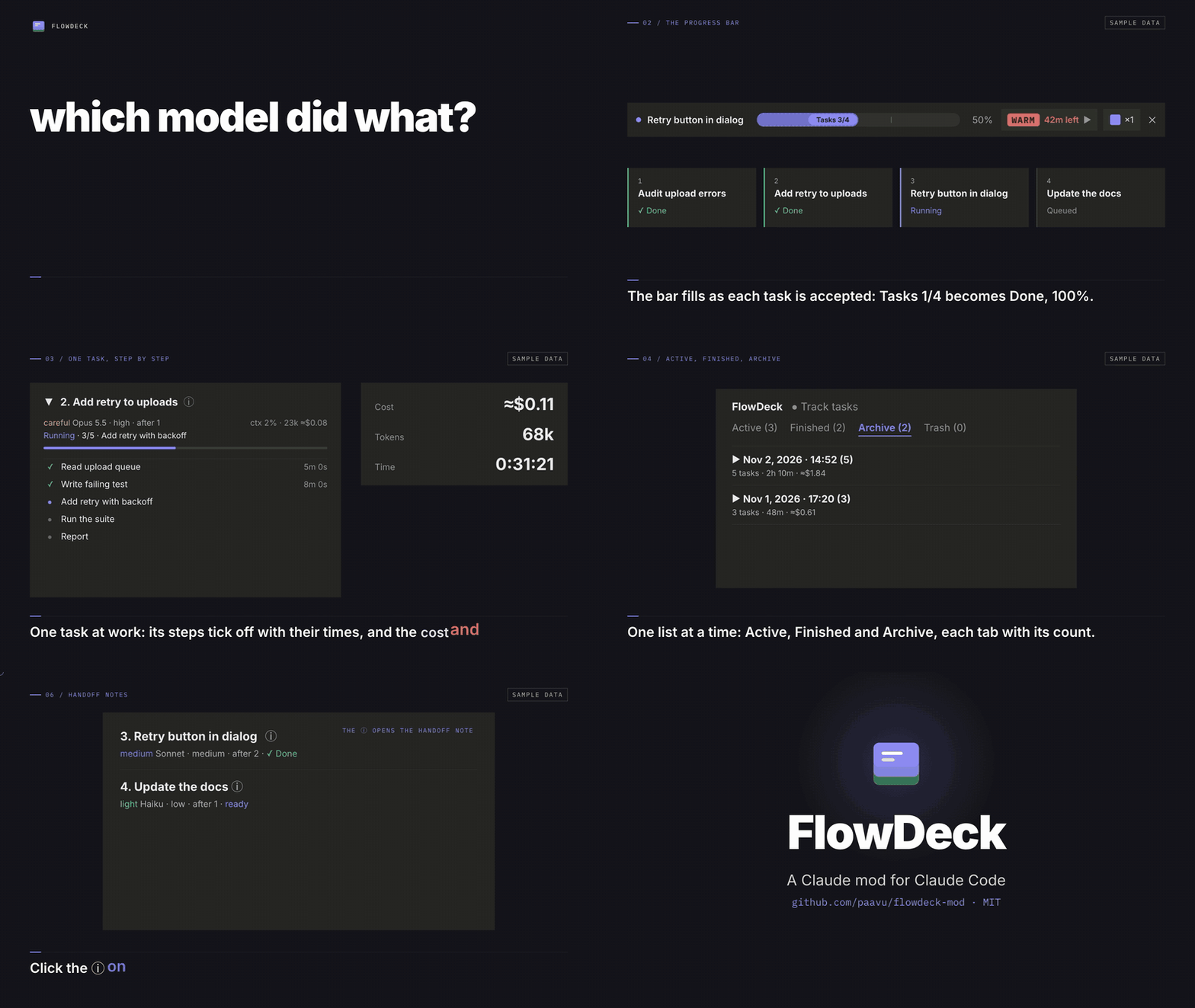
A 38-second tour with sample data. Download the full-resolution video.
The problem
Long Claude Code sessions run work the user cannot see. Subagents start and finish out of view, so the user does not know which model did what, what it cost, which task is still open, or why a choice was made. When the session ends, the plan and the decisions go with it.
The real cost is repeated work, lost context and surprise bills.
The idea
FlowDeck turns each request into a flow of tasks.
- Orchestration: the session plans the flow, delegates each task to a worker and reviews the result before accepting it.
- Logging and history: every task, run, step, time, cost and handoff note is recorded. Each session is archived as its own file that can be reopened, restored or moved to the Trash.
Every task carries a handoff note behind the ⓘ icon, with four parts: Goal and Brief when the task starts, Result and Feedback when it is accepted. Each task's note is logged and archived with its session. More in Handoff notes.
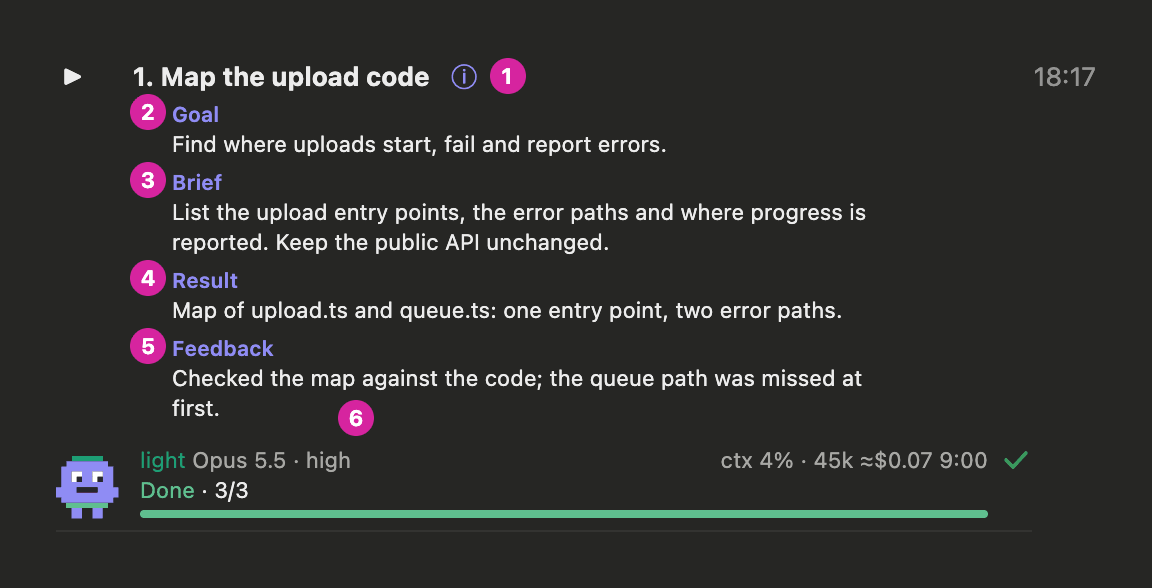
ⓘ: opens or closes the note.- Goal: what the task is for.
- Brief: the start of the worker's delegation prompt.
- Result: what was achieved.
- Feedback: the orchestrator's short review.
- The worker line below the note: tier, model, state and bar.
- Model routing: each task goes to the model that fits. Sonnet takes clear, checkable work, Opus takes judgement work, and Fable is used only after the user approves it. The orchestrator assigns the model per task following written routing rules; the mod shows the choice, keeps the tier defaults and enforces the Fable approval in code.
- Visibility: a band above the prompt, a side panel with live status, a WARM/COLD cache chip and card, and keep-warm renewals.
A flow is the task list for one request. A task is one self-contained piece of it. A worker is the subagent that does a task. A handoff note is the record of a task's goal, brief, result and feedback. The archive is the per-project folder of finished sessions.

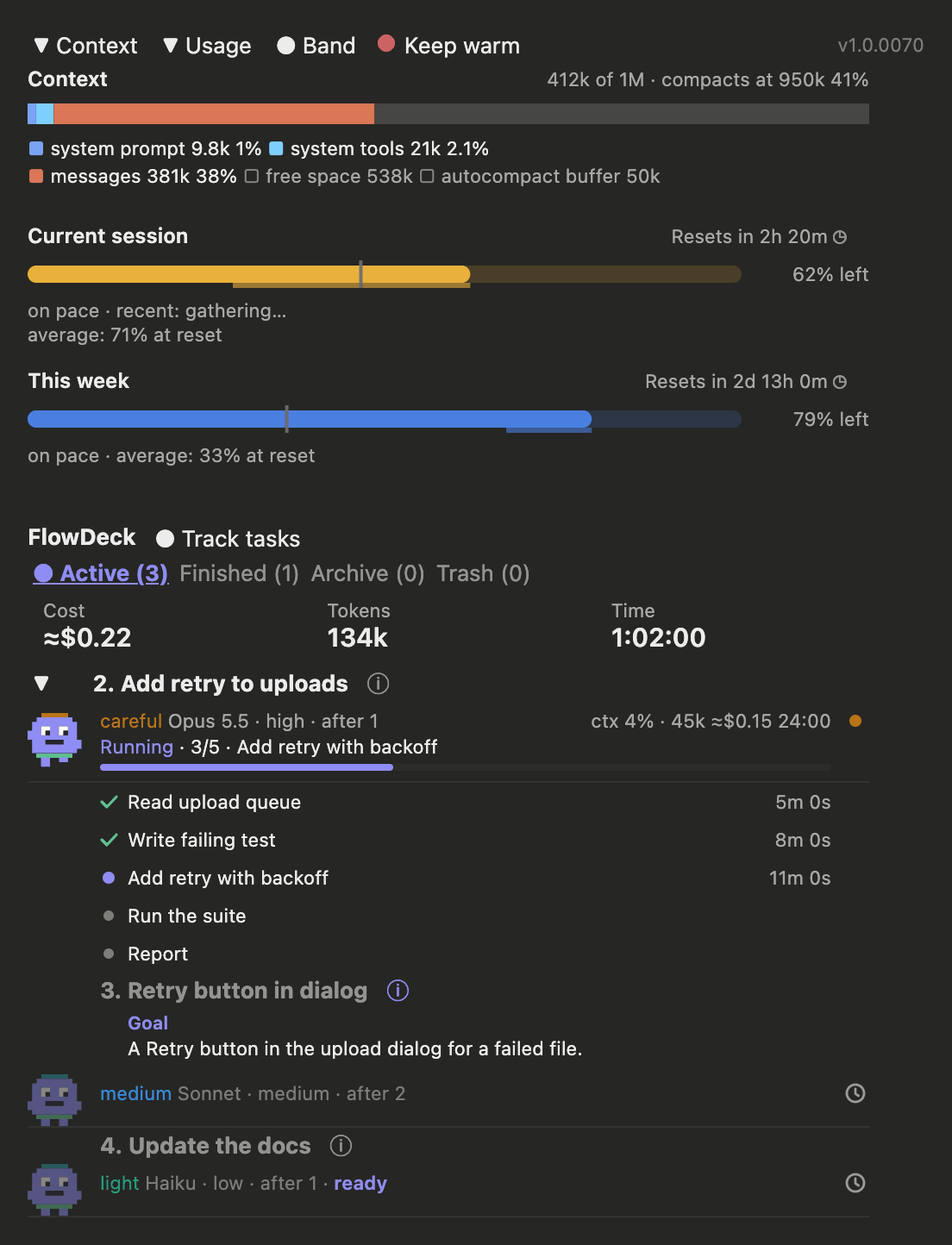
The screenshots are rendered from the mod's own drawing code with sample data (see Screenshots); nothing in them comes from a real session. In the feature sections below, each screenshot carries numbered circles, and the "What you see" list under it says what each number points at.
Install
In your shell:
claude plugin marketplace add paavu/flowdeck-mod
claude plugin install flowdeck@flowdeck-mod
Then run /reload-plugins in an open session while it is idle (new sessions load the mod by themselves).
Other ways to install
In one step: claude plugin install flowdeck --marketplace paavu/flowdeck-mod from the shell (Claude Code 2.1.292 or later), or /plugin install flowdeck --marketplace paavu/flowdeck-mod inside a session (2.1.275 or later). In the desktop app, where /plugin does not run: click + next to the prompt box, then Plugins, Add marketplace with paavu/flowdeck-mod, then add flowdeck.
The install may print 1 userConfig option not yet set: that is the panel language, which defaults to auto; nothing needs setting.
Check it loaded: /plugin shows a dim line such as 1 mod active · flowdeck under its tabs (the count includes other mods).
To see what the mod hooks and calls before you install it, clone the repository and run claude plugin validate <folder>: its hooks: and calls: lines list every event and engine call.
Overlapping mods. flowdeck was built from savvy-flow, savvy-progress, context-bar and plan-progress and does what the first three do; plan-progress's separate plans are replaced by the flow's own task list. Running them side by side gives two progress bands and two sets of tools; disable them first (claude plugin disable <name>@<marketplace>, or /plugin).
Optional: panel language. auto (default), en or ru: claude plugin configure flowdeck@flowdeck-mod, or /plugin configure flowdeck@flowdeck-mod in a session. auto follows Claude Code's language setting, then LC_ALL, LC_MESSAGES and LANG.
Your first two minutes
- Open the panel with
/flowdeck-panel. It shows the top row, theFlowDecktitle and the tabsActive,Finished,ArchiveandTrash, all at(0)in a new project. - Task tracking is on from the start, so Claude reports every task to flowdeck. To opt out, switch
● Track tasksbeside theFlowDecktitle off, or run/flowdeck-rule off(see Task tracking). - Run
/flowdeck:flowdeck <a small task>. It starts a flow whatever the tracking choice. - Watch the band above the prompt (the running task,
Tasks X/Y, the progress bar) and the Active tab, where each worker appears with its steps. - Open a task's handoff note with
ⓘand read its Goal, Brief, Result and Feedback. - When every task is done and the turn ends, the band reads
Done; check the Finished tab, then the Archive tab, where the flow is saved.
Features at a glance
| Feature | What it shows or does |
|---|---|
| Band | One row above the prompt: the running task, Tasks X/Y, a progress bar and percent, the cache chip, the running workers and a dismiss button at the right edge. |
| Context | The context window as a stacked bar by category, with the point where auto-compaction runs. |
| Usage | The five-hour and weekly limits as bars that drain, an even-pace mark, a forecast to the reset and the reset time. |
| WARM/COLD cache chip and card | Whether the prompt cache is still warm (minutes left) or cold (idle time and the cost of the next message), and a card with the cost per model. |
| Keep warm | Renews the prompt cache with one small side request during a long idle stretch; the card says when it renews and how often it did. |
| Track all tasks | One choice for every project: whether Claude reports every task to flowdeck. On by default; a strip shows only while it is off. /flowdeck:flowdeck always works. |
| Panel top row and tabs | Switches for Context, Usage, Band and Keep warm, the version, the FlowDeck title with the Track tasks switch, and the tabs Active, Finished, Archive, Trash with live counts. |
| Flows and workers | A flow is a task list the orchestrator plans and delegates to five worker tiers; each worker row shows its tier, model, effort, after waits, state, steps and times. |
| Handoff notes | A note per task with Goal, Brief, Result and Feedback, opened with ⓘ. |
| Finished | Runs that ended (Done, Error, Incomplete) and accepted tasks, latest first. |
| Archive | Every finished flow of the project, one foldable row each, kept in .claude/flowdeck/. |
| Trash and Empty Trash | Archived sessions can be moved to the Trash and restored; Empty Trash erases them for good after a confirmation. |
| Model routing and the Fable approval | The orchestrator may pick a model per task; the Fable tier launches only after the user approves it in Claude Code's own dialog. |
| Commands | /flowdeck-panel, /flowdeck-rule on, off or status, /flowdeck:flowdeck <task>. |
Features
Each section below has a screenshot with numbered circles, a "What you see" list that says what each number points at, and a short "How to use".
The band above the prompt

One row for the open flow. On the desktop the cache chip and its chevron sit on one card and the worker icon and ×N on another, with the ✕ at the right edge; the terminal draws the same parts as plain text.
What you see:
- The dot and the title: the running task's title (a worker's, or an Orchestrator row's; the lowest-numbered one and
+Nwhen several run), else the next ready task, elseFlowDeckonce every task is done. It is never the flow's own title. The dot is blue-violet while the flow runs and green when it is finished. - The bar: the dense dots are the done share; the faint dots beyond them are tasks handed to workers and not yet accepted; the small ticks mark the task boundaries still ahead.
- The label on the bar: the phase word and a count,
Tasks X/Y. Y counts every row the panel's tabs count (Active plus Finished, including the earlier flows of today); X is the done count, whether a task runs or not: the Finished rows that are done (a Done run, any run of an accepted task, an Accepted row), so the band reads 100% only when every row is. The phase word becomesPlan,DesignorReviewin those phases. - The percent: the done fraction. The bar and the label turn green and read
Donewhen the flow is finished. - The cache chip:
WARM(red) with the minutes left, orCOLD(blue) with the idle time and the cost of the next message. See the cache chip and card. - The chevron: opens and folds the cache card under the band.
- The worker icon, a small card buddy: it bobs, steps and waves while at least one worker runs and rests still otherwise.
×N: the workers running now (queued tasks and finished runs do not count;×0when none runs). Pressing it opens or closes the panel.✕: hides the band only. The panel'sBandswitch, or a new flow, brings it back.
How to use:
- Look at it for where the flow stands; press
×Nfor the panel and the chevron for the cache card. ✕hides the band; press● Bandin the panel's top row to show it again.
A finished flow:

What you see:
FlowDeck: every task is done, so no task title is left to show.- The bar, full and green.
Done: the label on the bar.100%.×0: no worker is running; the worker icon stands still.
Context
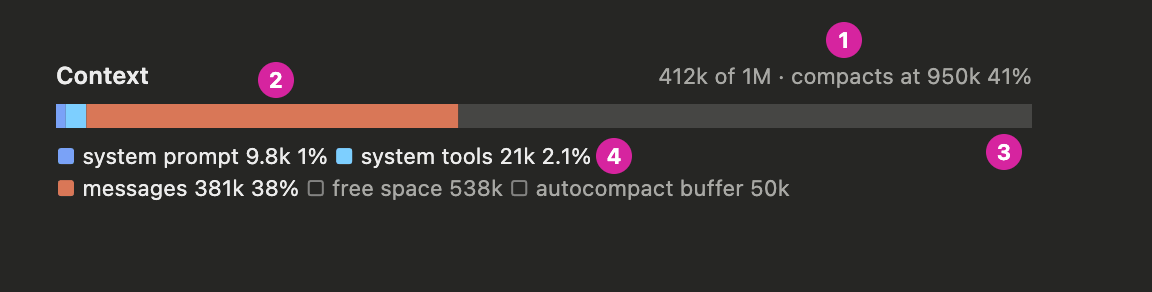
The context window of the session, as Claude Code reports it. The section is the panel's first one; ▼ Context in the top row folds it (folded, it keeps the head line and the bar).
What you see:
- The head line: tokens used of the window (
412k of 1M), where auto-compaction runs (compacts at 950k) and the used share (41%). - The bar: the window as a stacked bar, one colour per category (system prompt, system tools, messages).
- The end of the bar: the autocompact buffer, the room kept for compaction, and the free space before it.
- The legend: each category with its tokens and share; a hollow square marks free space and the buffer.
How to use: read it to see how close the session is to compaction. Press ▼ Context to fold it; the choice is remembered.
Usage
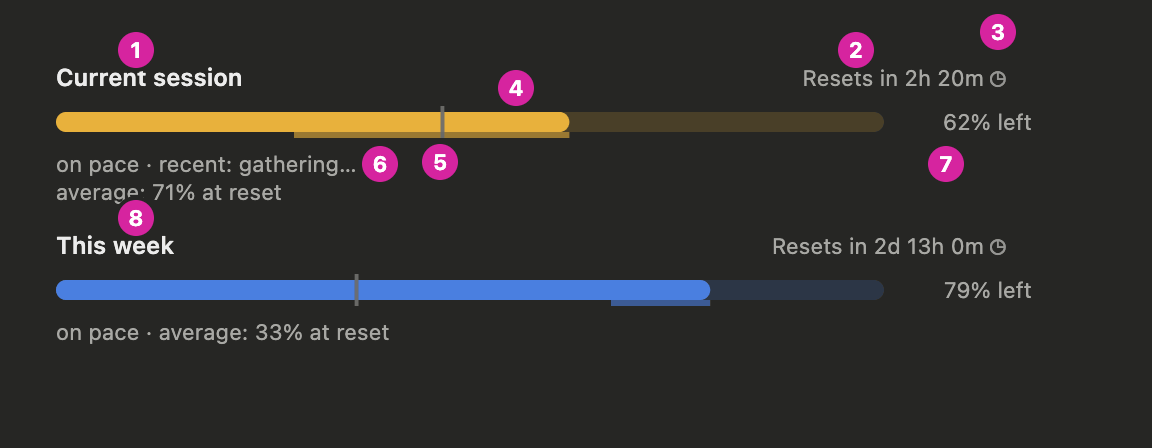
The five-hour and weekly rate limits of a Claude subscription (Pro, Max). Without one the section says there is no data yet.
What you see:
Current session: the five-hour window. The week below it is the seven-day window.- The reset as time left (
Resets in 2h 20m). ◷: switches every project between time left and the exact time (Resets at 14:40).- The bar: it drains with use, so its length is what is left. It is amber for the session and blue for the week, and red at 90% used or when the forecast says the limit runs out. The faint strips mark the part of what is left that the forecast says will be used up by the reset: a strip along the bar for the recent pace, a thin one under it for the average.
- The even-pace mark: where the fill would end if the use were spread evenly over the window. A fill that ends left of the mark means the use is ahead of an even pace; right of it, behind.
- The forecast:
on pace, or when the limit would run out (100% at 14:05, 1h 10m early); the session showsrecent:(the last 30 minutes,gathering…until there are 5 minutes of readings) andaverage:(since the window began), the week only the average. 62% left: the percent left.This week: the weekly window, drawn the same way.
How to use: look at the mark and the forecast before a long task. Press ◷ to see the reset as a clock time; ▼ Usage folds the section.
The prompt cache chip and card

Once the main thread has made a request, the chip says WARM (red) for an hour after its last request or keep warm's last renewal, then COLD (blue). Warm, it shows the minutes left (42m left); cold, the idle time and what the next message costs on the session's model (3h 13m · $3.30). Subagent requests do not count; /clear and /compact drop the chip until the next request. Warm starts folded, cold starts open.
What you see (the open card, warm):
- The chip:
WARM. - The idle time since the main thread's last request (a renewal does not reset it) and the tokens the cache holds.
- The hour as a bar, with the time left (
cold in 42m). - Keep warm's state (see Keep warm).
- What one renewal costs, beside what a cold restart costs.
- The next message's cost on Fable, Opus, Sonnet and Haiku; the caption names the case (
cache readwhen warm). YOU: the session's model.prices are estimates: one table,MODELSinhooks/cache.ts(USD per million tokens, input and cache read); a cold cache costs the 1-hour cache write (2x input), a warm one a cache read.

What you see (cold):
- The chip:
COLD. - The idle time (
8h 13m) and the tokens that would be written again. - The bar, full, with how long the cache has been cold (
cold for 33m). - Keep warm's record: here eight renewals, then
limit reached. - The renewal cost beside the cold restart cost.
- The caption (
next message, re-cache (1-hour write)) and the cost on each of the four models.
How to use: press the chevron after the chip to open or fold the card. When the chip is COLD, the next message writes the context to the cache again at the cost shown.
Keep warm
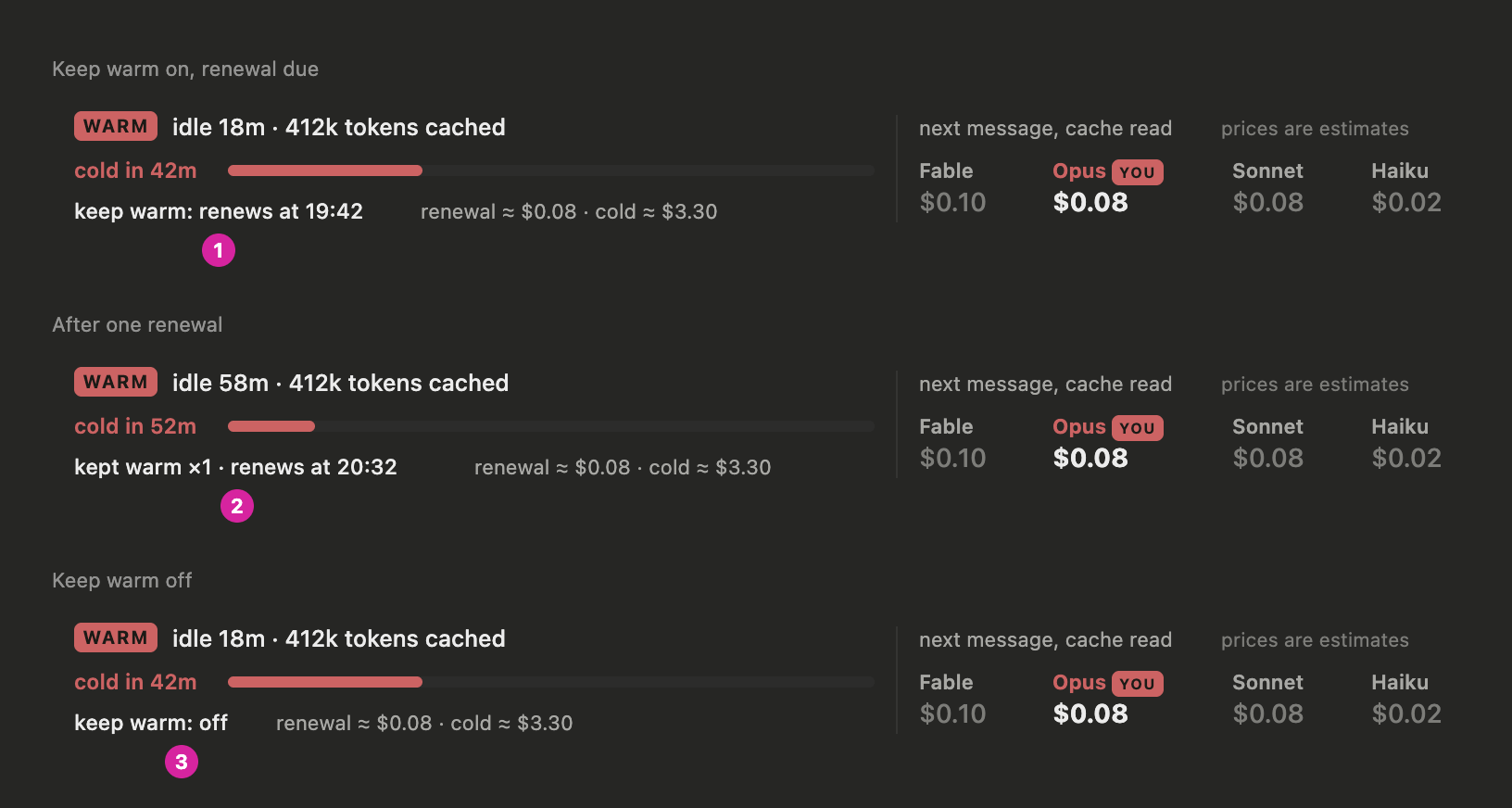
Keeps the prompt cache warm through a long idle stretch so the next message reads the context from the cache instead of writing it again.
What you see (the keep warm line of the card):
keep warm: renews at 19:42: on, waiting for the renewal time.kept warm ×1 · renews at 20:32: one renewal done, the next one due.keep warm: off: the switch is off. The line can also readfailed(withretry at <time>),limit reached,below 80k tokensornot renewed; after renewals it starts withkept warm ×N.
How to use: the Keep warm switch (with its dot) in the panel's top row turns it on or off; it is on by default and saved per project folder. Watch the line on the open card.
- How: one side request through
$.model.fork: the main thread's last request again with a one-line prompt asking forok, no tools. Nothing is added to the transcript. - When: 50 minutes after the cache was last read or written (
RENEW_AT_MS), when the context holds at least 80,000 tokens (KEEP_WARM_MIN_TOKENS), no main turn is running and the user has sent nothing since. At most 8 renewals between two of the user's messages (KEEP_WARM_MAX_RENEWALS), so an idle session stays warm for about 7 h 40 min, then goes cold. - Never: while the cache is already cold, in the hour's last minute, after the session ended, or with the switch off.
- Failures: a failed renewal waits 2 minutes and tries again; after 2 failures in one idle stretch it stops until the user's next message. The card says
failed; it never shows as an error. - Cost: a renewal is a real request. It costs about a cache read of the context (a renewal of a 770k-token Opus context is about $0.15, against about $6.16 to write it again; eight renewals are about $1.20) and counts against the plan's usage limits like any other message.
- Switch: the constants are at the top of
hooks/cache.ts.
The panel
The panel opens with /flowdeck-panel, the band's ×N button, or by itself when the first worker of a flow starts.
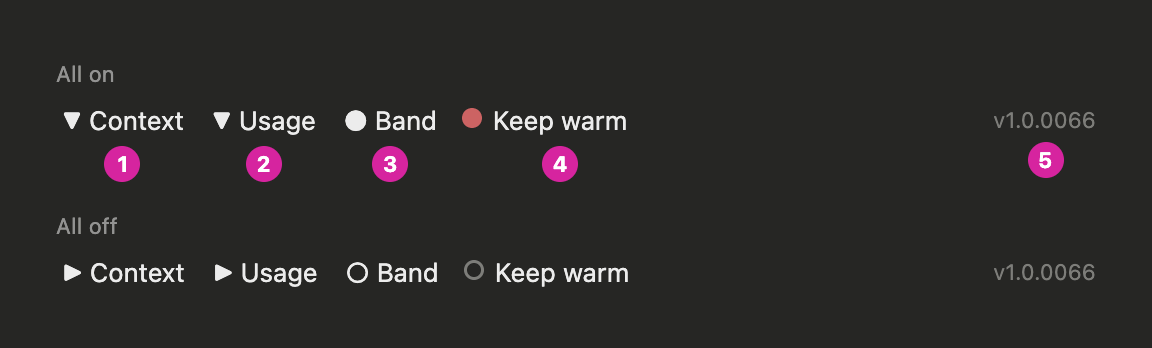
The top row, with every switch on and then off.
What you see:
▼ Context: folds the Context section (▶︎when folded, the same glyphs as every fold in the panel). Remembered.▼ Usage: folds the Usage section. Remembered.● Band: shows or hides the band (○hidden).● Keep warm: keep warm on or off, per project folder. The dot before the label has the cache's colour while the switch is on: the warm colour while the cache is warm, the cold colour once it is cold, the plain text colour before any request; off, it is a hollow grey○.- The version of the code that is running.
How to use: press a switch to flip it; ● is on or shown, ○ is off or hidden. The Keep warm dot is not a button of its own; press the label next to it.
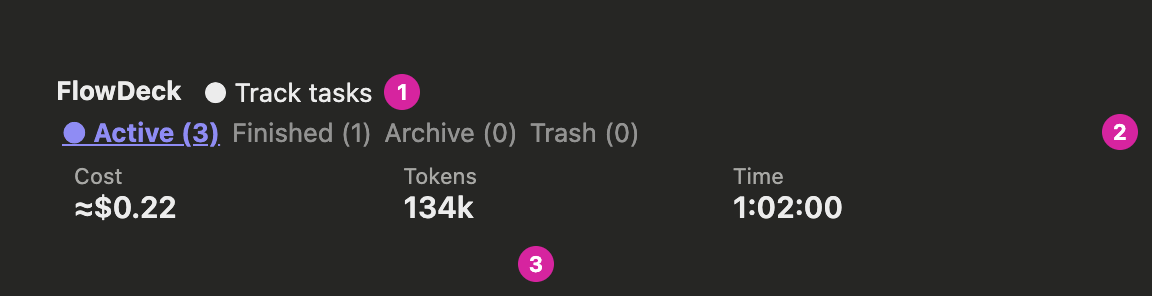
What you see:
● Track tasks, beside theFlowDecktitle above the tabs: task tracking on or off for every project (○until it is on). See Task tracking.- The tabs, each with its live count:
Active (n),Finished (n),Archive (n),Trash (n). One list shows at a time. The selected tab starts with a dot (● Active (n)); in the terminal it is also bold, in the accent colour and underlined. Pressing it changes nothing. - The tiles: the flow's estimated cost, its tokens and its time.
How to use: press a tab to change the list.
Under the tab row, a muted line counts today's turns that did work with tracking on and no flow open (3 turns without a flow today); at zero it is not drawn. See Task tracking.
| Tab | Lists |
|---|---|
| Active | The flow's cost, tokens and time, then the running workers (newest first), the tasks the orchestrator works on itself (Orchestrator rows) and the queued tasks in plan order. |
| Finished | Done, Error and Incomplete runs and Accepted · Orchestrator rows of the current flow and of every flow finished earlier on the same date, as one list. At the date change they move to the Archive as one session named after the date. |
| Archive | Saved sessions of this project, newest first, one foldable row each; an opened row shows its tasks one level in under it. Today's flows are in Finished instead; a past day is one session named after its date. |
| Trash | Sessions moved to the trash, with ↩ and Empty Trash (n). |
Commands
| Command | What it does |
|---|---|
/flowdeck-panel | Shows or hides the side panel. /flowdeck-agents, its old name, still works in this release. |
/flowdeck-rule on, off, status | Turns task tracking on or off for every project, or says what the current choice is and what it means (see Task tracking). |
/flowdeck-strict on, off, status | Turns strict mode on or off for every project, or says what it refuses (see Strict mode). |
/flowdeck:flowdeck <task> | Starts a flow on the task: plan, design (when the task touches UI), delegate, review, close. A flow already open is saved and replaced. Works whatever the tracking choice. |
/flowdeck:flowdeck | With no task: adopts the work already under way in the session into a flow. |
The skill (skills/flowdeck/SKILL.md) tells the orchestrator how to plan, how to pick a tier and how to review.
Flows and workers
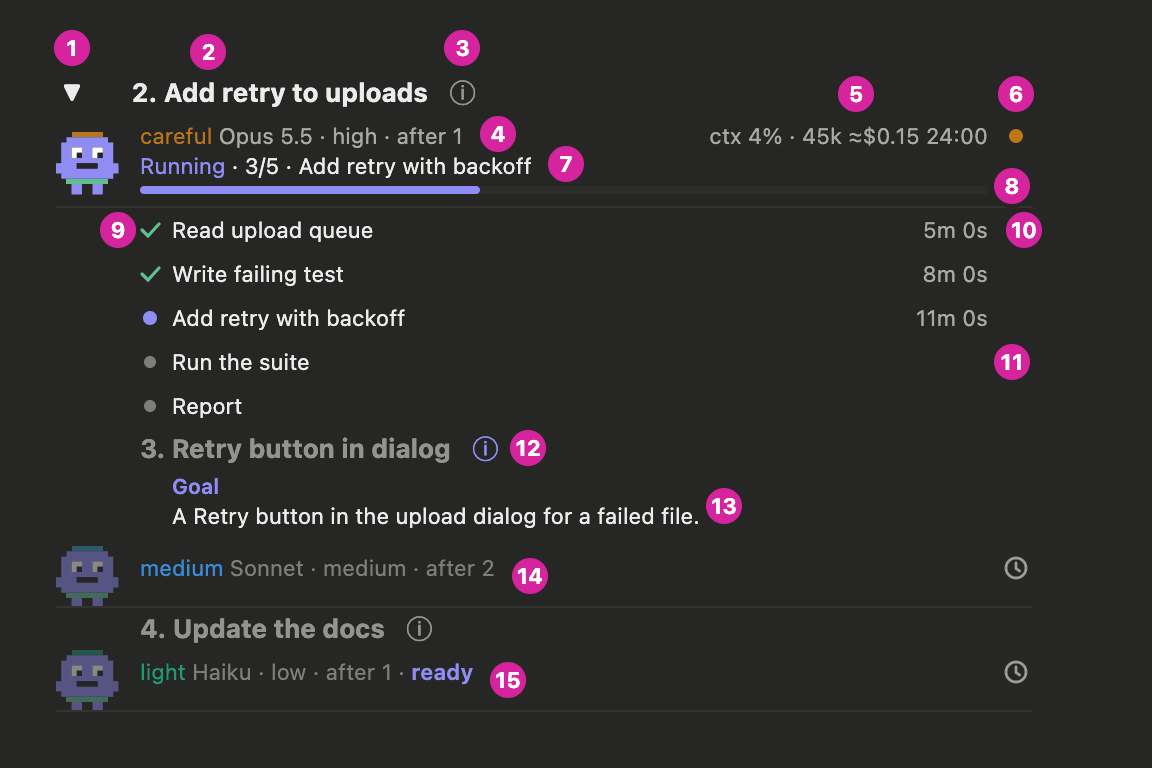
A flow is the session's task list. The orchestrator plans it, delegates each task to one of five worker agents and reviews every result; the panel draws each worker run as a row.
What you see:
- The fold glyph (
▼open,▶︎folded): opens or closes the worker's steps. - The task number and title. Queued rows are dim.
ⓘ: opens the task's handoff note.careful Opus 5.5 · high · after 1: the tier (coloured), the model, the effort and the tasks it waits for (after 1,after 2, 3).ctx 4% · 45k ≈$0.15 24:00: context use, tokens, estimated cost and the time the run has taken.- The state mark:
●running,✓done,✗error,◐incomplete,◷queued. - The state word in colour, with the step now worked on out of the step count and its title (
Running · 3/5 · Add retry with backoff); with no step, the live tool (Running · Bash). - The bar: fills as the worker finishes steps. A worker sends its plan once and moves it as each step finishes.
- The steps, each with its mark:
✓done, a dot for the running one, a grey dot for the ones still to do. - The time a step took.
- A step not started shows no time. It shows
–instead of a time when the worker closed it in the same call as other steps it never started (a batch close at the end): the mod does not guess how long those took. - A queued task with its note open (
ⓘ). - The note's Goal: queued rows have it from the moment the task is planned.
- A queued row's line: the tier, the model and effort the task will run with, and what it waits for.
◷at the end marks it as queued. - A queued task with a model of its own (here
Haiku) andready: every task it waits for is done, so it can start now, in parallel with others.
How to use:
- Press the fold glyph to read a worker's steps and
ⓘfor its note; nothing needs pressing to follow a flow. - To keep the list current, the mod adds one line to a worker's tool result ("update your step list now") after 8 tool calls without a step call; the user never sees that line.
| State | Colour |
|---|---|
Running (with the live tool, Running · Bash) | blue-violet |
| Needs approval | amber |
| Done | green |
| Incomplete (ended, steps left) | amber |
| Error | red |
Orchestrator rows
A planned task no worker run belongs to is one the orchestrator (the main session) does itself. While it works on it, the Active tab draws it as a worker's row is drawn, with Orchestrator where a worker's model is: the tier, what it waits for and the time since it started on the meta line, then the state (Running · 2/4 · Run the backtest), the bar and, folded out, its own steps. The orchestrator reports those steps with mcp__flowdeck__step as a worker does, with task naming the task when several are open. A running session whose system prompt was composed without the flow rule of this version (an update picked up with /reload-plugins) gets a one-line reminder to do so on its work calls for such a task, on the 1st and every 3rd, until the task has a step list. The row runs:
- while the orchestrator's step list for the task has a step left (once every step ended it reads
Done, orIncompletewith a step not done, until the task is accepted); - without a step list, from the orchestrator's first own work call (an edit, a shell command; not a worker launch) while the task is the lowest ready one with no worker run, no worker running, no worker result waiting for review and the flow in its delegate or review phase.
Once accepted, the row moves to Finished as Accepted · Orchestrator, its steps still behind the fold glyph. A task a worker run covers never gets an Orchestrator row.
The Archive draws them the same way: an opened session shows its Orchestrator rows and Accepted · Orchestrator rows among the worker rows, latest completion first, with their steps and notes. A session saved without worker runs also lists its tasks never started, as queued rows.
A finished row shows when it finished (14:07, or Oct 29 · 14:07 on an earlier day). The mod links each run to its planned task by itself: by the exact title (also after a #n at the start of the Agent description, which then wins over that number), else the #n, else the closest title, else the only open task of the worker's tier.
Five worker agents ship with the mod; the orchestrator picks the cheapest one likely to get the task right:
| Agent | Model / effort | For |
|---|---|---|
flowdeck-light | Sonnet / low | Mechanical edits, renames, config, running builds and tests |
flowdeck-medium | Sonnet / medium | Standard features, bug fixes with a known cause |
flowdeck-careful | Opus / high | Delicate work: multi-file refactors, invariants, many edge cases |
flowdeck-heavy | Opus / xhigh | Unfamiliar code, unclear root causes, non-obvious architecture |
flowdeck-fable | Fable / high | Used only after the user approved it, for a task that failed on Opus heavy |
Tasks that edit the same files are chained with after and never run in parallel. Workers never make design decisions unless the brief gives them one.
Tools the model calls
| Tool | Called by | Purpose |
|---|---|---|
mcp__flowdeck__progress | the main session | The flow's title and phase, its tasks (title, tier, after, goal), add for a new task, done: [numbers] for accepted tasks, notes for handoff notes, finished and restart. One call can carry add, done and notes together. New work after a finished flow starts a new one, numbered from 1, and the reply lists its tasks (new flow started: 1 title, 2 title). |
mcp__flowdeck__step | workers, and the main session for a task it does itself | A worker's own plan as a steps list, then next, done, active, failed. From the main session the list goes on an Orchestrator row: task names the task (by default the task whose list is open, else the lowest ready task with no worker run), only a steps list is taken, and the reply names the task (ok: task 3). |
The flow's task list is the only task list: there is no separate plan tool.
Automatic flow lifecycle
There are no Start or Finish buttons.
- Start: the first
progresscall starts a flow. So does a task list (TodoWrite or TaskCreate) with an open item, or a flowdeck worker launched while no flow is open. - Finish: when the main turn ends with every task done and no worker running, the flow finishes by itself. A flow with nothing running or queued finishes after 30 minutes idle (
IDLE_FINISH_MSinhooks/live.ts). A finished flow is archived at once and stays in Finished and on the band (Done) until the next task starts a new flow. - Across restarts: the open flow is written to
.claude/flowdeck/flow-live.jsonas it changes. The next session restores its own flow, and closes and archives a flow another session left once that session ended or has been quiet for 3 minutes. Runs that were still going readRunning at finish.
Handoff notes
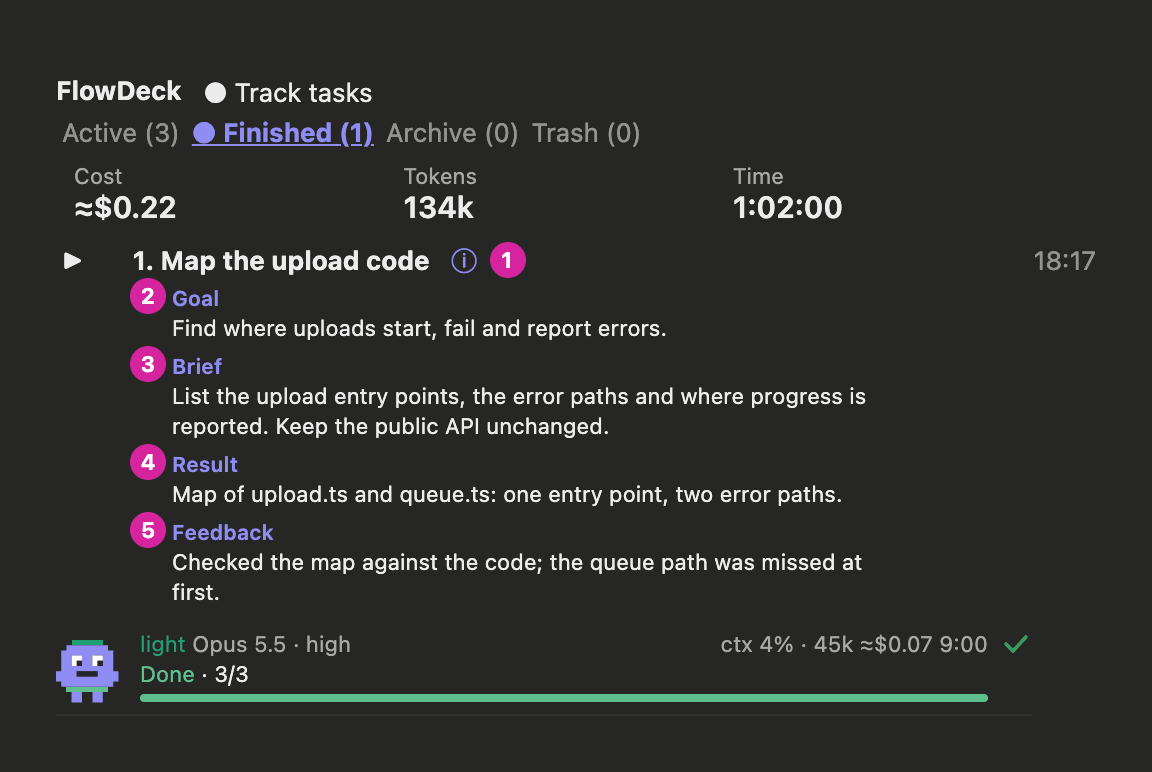
Every task row can carry a short note so whoever reviews the list knows what each task was about and how it ended. Below, "the orchestrator" is the Claude session running /flowdeck, and "the mod" is flowdeck itself.
What you see:
ⓘ: opens the note directly under the task's title, above the worker line, the progress bar and the steps. Every row with a note, queued, running, finished or archived, has it.- Goal: the optimized summary of the user's request.
- Brief: the start of the worker's delegation prompt, taken by the mod.
- Result: what was achieved.
- Feedback: the orchestrator's short review.
How to use: press ⓘ to open the note and again to close it.
| Part | Written by | When |
|---|---|---|
| Goal | the orchestrator: an optimized summary of the user's request (a sentence or two) | when it creates or adds the task, so queued rows have it too |
| Brief | the mod, taken automatically from the worker's delegation prompt | when the worker starts |
| Result | the orchestrator: what was achieved | when it accepts the task |
| Feedback | the orchestrator: a short review | when it accepts the task |
Caps: goal 300, brief 600, result 300 and feedback 300 characters; the mod cleans each part to plain text and cuts it at a word with …, whatever the caller sends.
The brief leaves out headings, code fences and common preamble lines (repository line, tool and commit rules, the step-list closing line) and keeps the start of the real task text; a return round's prompt replaces it until the task is accepted. The orchestrator can change any part later through notes (an empty string clears it), but a finished flow takes no notes. Notes are saved with the flow, so the Archive shows them too.
Finished
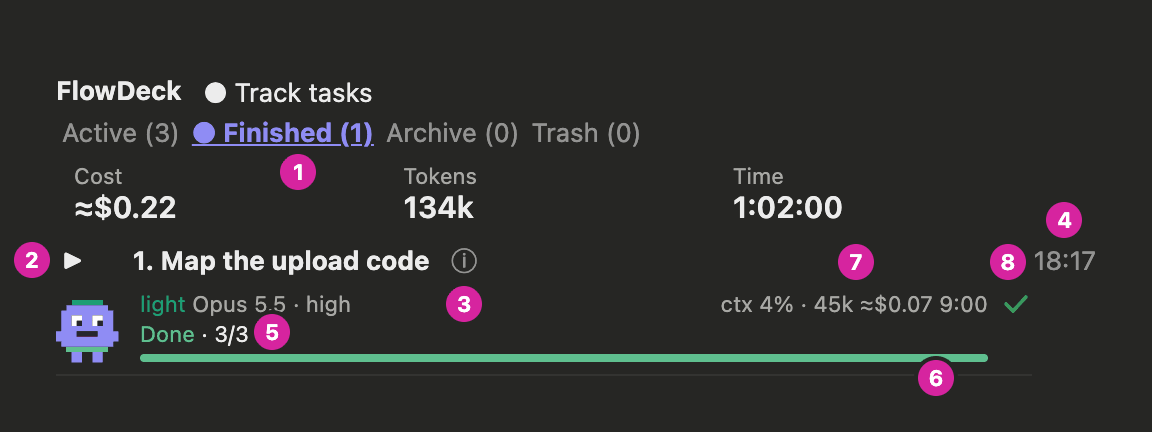
Runs that ended: Done, Error and Incomplete runs, and Accepted · Orchestrator rows (tasks the orchestrator did itself), latest first. The flow's rows move to the Archive on their own when the flow closes.
What you see:
- The
Finished (n)tab with its live count. - The fold glyph (
▶︎folded): opens the run's steps; then the task number and title. ⓘ: the handoff note.- When the run finished (
18:17, orOct 29 · 14:07on an earlier day). - The end state in colour with its step count:
Done · 3/3. - The bar, full and green for a done run.
- Context use, tokens, estimated cost and time.
- The state mark (
✓).
How to use: open a row's note or steps to review it; there is nothing to press to archive, the flow does it when it closes.
Archive, Trash and Empty Trash
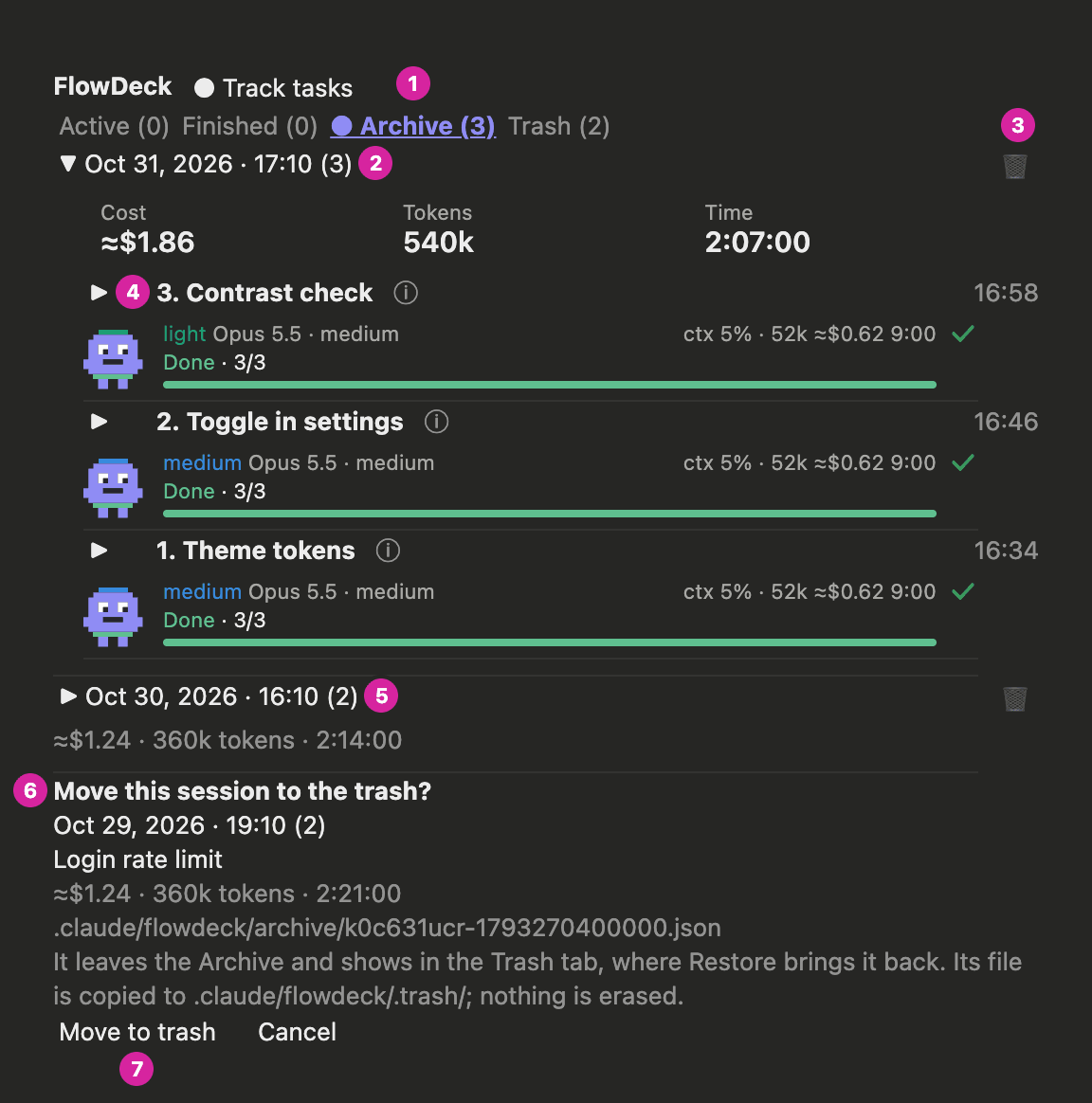
What you see (Archive):
- The
Archive (n)tab: the saved sessions of this project. - A session row: the fold glyph, the date and time the session ended, and the number of tasks. Opened, it shows cost, tokens and time as three tiles and its tasks below.
- The trash can: asks before moving the session to the Trash.
- A task of the opened session, one level in under its row (number, title,
ⓘ, finish time, steps). - A folded session: its cost, tokens and time as one dim line.
- The confirmation: what the session is, and what moving it does (it leaves the Archive and shows in the Trash tab; its file is copied to
.claude/flowdeck/.trash/; nothing is erased). Move to trash(orCancel).
How to use: fold or open a session row to read it; press the trash can and then Move to trash to put a session away.
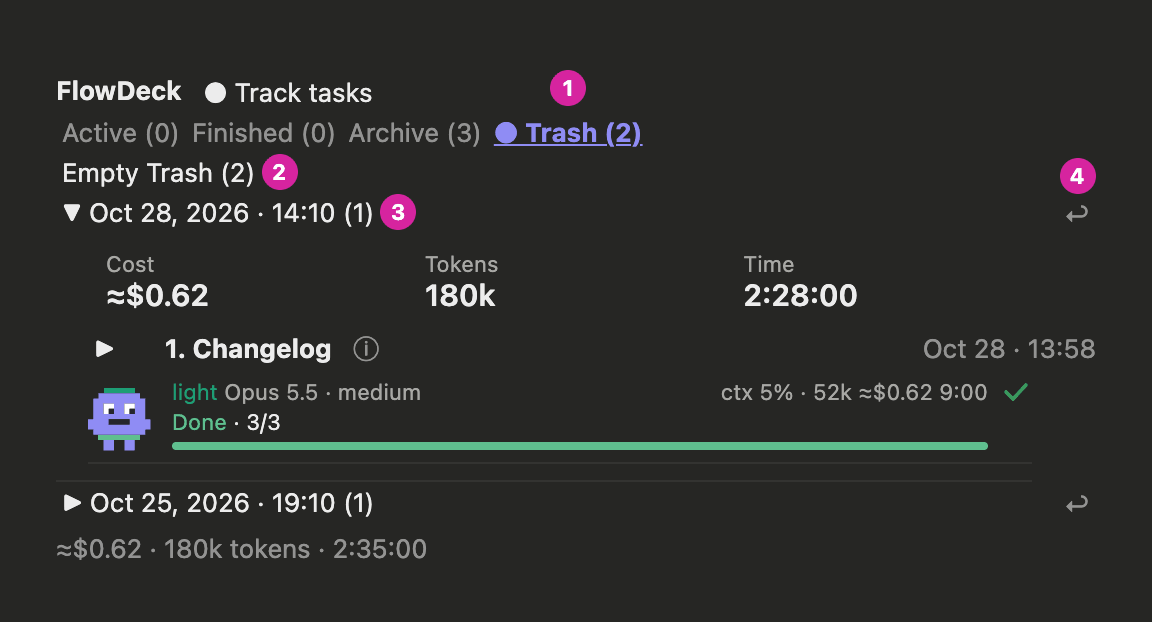
What you see (Trash):
- The
Trash (n)tab. Empty Trash (2): erases every trashed session for good, after a confirmation.- A trashed session, laid out as in the Archive.
↩: asks first, then moves the session back to the Archive.
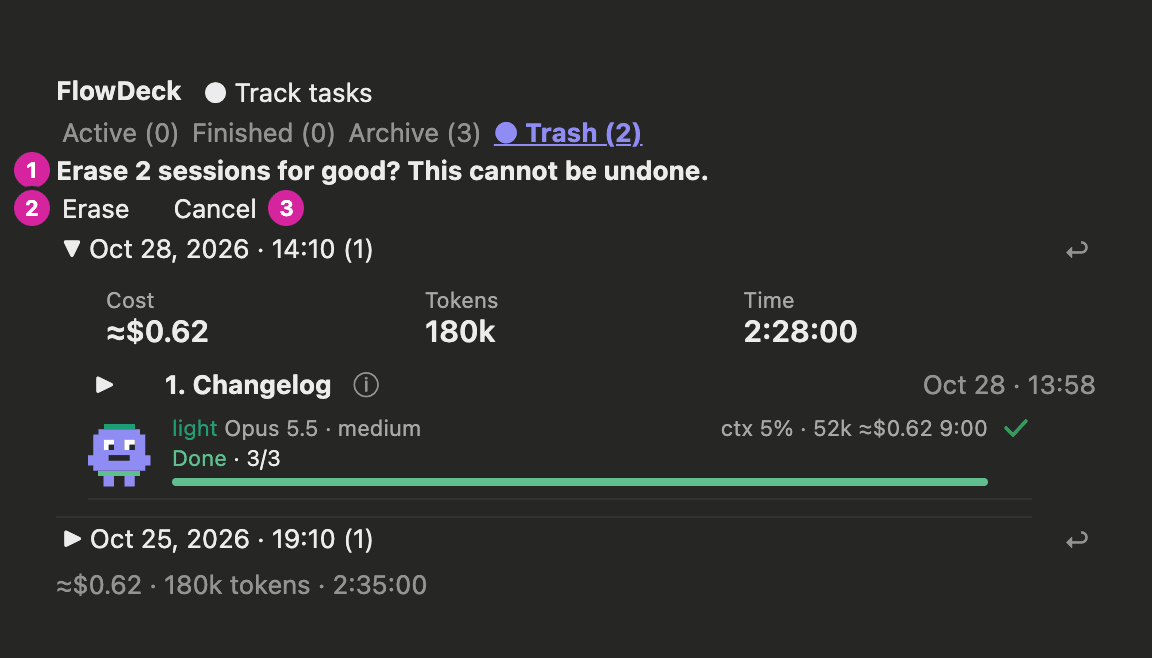
What you see (after Empty Trash):
Erase 2 sessions for good? This cannot be undone.(Erase 1 session…for one).Erase: erases the sessions.Cancel: nothing happens. Leaving the Trash tab also cancels.
How to use: press the ↩ of a session to restore it, or Empty Trash (n) and then Erase to remove all of them.
- Archive: one file per saved session (a flow, or a finished plan an older version saved) in
.claude/flowdeck/archive/, listed byarchive-index.json. The list draws from the index alone; a session's file is read only when its row is opened. A folded row shows its cost, tokens and time as one dim line; an opened session shows them as the same three tiles the Active and Finished tabs use (the terminal keeps the one line). - Move to trash (the trash can on a session row): asks first, then copies the session to
.claude/flowdeck/.trash/and hides it from the Archive. Nothing is erased. - Restore (
↩on a Trash row): asks first, then moves the session back to the Archive. - Empty Trash (n): asks
Erase n sessions for good? This cannot be undone.withErase/Cancel, then erases each trashed session's files permanently, with no system trash and no undo. This is the only place flowdeck deletes a file. It erases only files whose names the archive itself gives the trashed sessions, directly inside.trash/orarchive/, never a link, one file at a time; a session that cannot be erased whole stays in the Trash and the tab says how many failed.
Model routing
Each tier has a default model (the table under Flows and workers). The orchestrator may pick another per task, with the Agent tool's model argument: sonnet for clear-spec work a test can check, opus for judgement and delicate or unfamiliar work, haiku only for pure search-and-run jobs. It sends the same value as the task's model in the plan (sonnet, opus or haiku; Fable is not selectable there), and a queued row then reads <tier> · <Model> · <effort> with that model instead of the tier's default (callout 15 in the flow row above). A running or finished row shows the worker's real model.
A task that fails review on Sonnet goes to Opus careful (Opus heavy if the cause is unclear), one that fails on Opus careful to Opus heavy. One that fails on Opus heavy is never sent to Fable automatically: the orchestrator tells the user which task failed and why, and uses flowdeck-fable only after the user says yes. The orchestrator itself may run on any model.
Fable approval guard. The rule above is also enforced in code, so it holds even if a model ignores the text. Every Agent launch that names flowdeck-fable (or flowdeck:flowdeck-fable) as subagent_type, or fable as model, is held while the mod asks the user, in Claude Code's own question dialog: flowdeck wants to use Fable (the reserve tier) for: <task description>. Reason: <the start of the brief>. Approve? with Approve and Decline. That dialog belongs to Claude Code, not to the mod, so it has no screenshot here. The orchestrator is told to state at the top of the Fable brief which task failed on Opus heavy and why; that text is the reason shown (first 300 characters). Approving lets that one launch run; the next Fable launch asks again. Declining, dismissing the question, or running where nobody can be asked (such as claude -p) denies the launch, and the orchestrator is told to keep the task on Opus heavy or report to the user, not to retry Fable. If the guard itself fails, the launch is denied. Every other Agent call passes through unchanged. The guard is always on, independent of task tracking, and has no setting to turn it off.
How to use: answer the dialog when it appears; Approve runs that one Fable launch, Decline keeps the task on Opus heavy.
Task tracking
Tracking is on from the first session of every install. Only an explicit off stops it; an install that stored unset in an older release counts as on. While tracking is off, the Active and Finished tabs show a strip with one button:
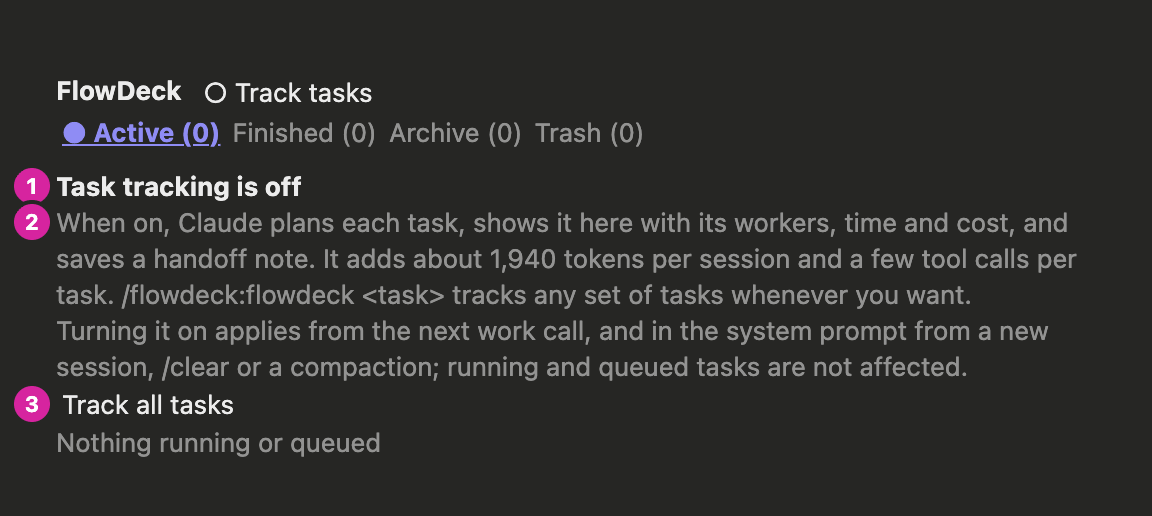
What you see:
Task tracking is off: the current choice.- What tracking does and what it costs in tokens, and when a switch applies (the next work call for turning on, the next new session,
/clearor compaction for the system prompt). Track all tasks: turns tracking on. The● Track tasksswitch beside theFlowDecktitle above the tabs does the same, and/flowdeck-rule onorofffrom the prompt.
How to use: switch tracking from the strip, the switch beside the FlowDeck title or /flowdeck-rule; the choice is kept for every project. With tracking on there is no strip.
Task tracking decides whether the mod puts its flow rule (flowdeck:flow-rule) into the system prompt of every session. It is on unless switched off. The rule tells Claude to report every task through progress: the plan once with title and tasks (title, tier, after for tasks that edit the same files, goal), add for a new task, done with result and feedback notes when a task is accepted, and #<n> <title> at the start of each worker's Agent description. For a task it does itself, the orchestrator also reports its own steps with step: a steps list (3-8 titles) once, then next: true as each step finishes. Every task that does work (an edit, a shell command, a worker) opens or joins a flow first, even a one-step task (a flow of one task), and each task is closed with done and its notes before the turn ends; only an answer given with no work calls gets no flow. It blocks no edit or tool call unless strict mode is on.
The rule is a request, so the mod also checks it, in three ways. All three follow the stored choice (/flowdeck-rule and the Track tasks switch), not a session that ran /flowdeck:flowdeck, so they stop at once when tracking is off, and none reaches a worker.
- The plan reminder. With tracking on and no flow open, the main session's 1st work call of a turn (an edit, a write, a shell command, a worker launch; reads, searches and flowdeck's own tools do not count) gets one extra line in its result, and so does every 3rd work call after it (the 4th, the 7th, ...): plan the task with
progressbefore going on. Every task that does work needs a flow, even a single edit; only an answer with no work calls needs none. The count starts over at a new turn, at anyprogresscall and while a flow is open. The line never changes or blocks the call. - The turn-end check. A main turn that made 1 or more work calls with tracking on and no flow open is sent back once when it ends, with a message telling Claude to open a flow now with the tasks it carried out, mark them done and give a result note for each. A main turn that did work while a flow is open, and ends with no worker running and tasks of the flow not reported done, is sent back once too, telling Claude to report done with a result note for each task it finished and to add or plan the rest.
- The untracked-work log. Each main turn that made 1 or more such work calls adds one record to
.claude/flowdeck/untracked-work.json: the day, the time (24-hourHH:MM), the number of work calls, the tools used most and whether the turn was sent back. Under the tab row the panel shows a muted line with today's count,3 turns without a flow today; at zero it shows nothing.
| Choice | The system prompt | Set by |
|---|---|---|
on | The flow rule is added to every session. No strip. | The default for every install; Track all tasks, ● Track tasks beside the FlowDeck title, /flowdeck-rule on |
off | Nothing is added, and the plan reminder, the turn-end check and the untracked-work log stop. The Active and Finished tabs show Task tracking is off with Track all tasks. | ○ Track tasks, /flowdeck-rule off |
unset | Counts as on. Only older releases stored it; no screen draws it. | An install from before 1.0.0065 that never chose |
- One choice for every project, kept in Claude Code's mod store (key
rule). Turning tracking on reaches the running session at once: the plan reminder carries the full flow rule (one line, on the 1st work call of a main turn and every 3rd after it while no flow is open) until a prompt compose has put the rule in the system prompt. The system prompt itself changes at the next compose (a new session,/clearor a compaction). Turning tracking off applies at the next compose, and the reminder and the turn-end check stop at once. Running and queued tasks are not affected. A switch never changes a flow, a task or a worker that already exists. - A flow that starts by itself stays quiet. With tracking
off, a flow that starts from the session's own task list or from a flowdeck worker appears in Active and Finished and on the band, but the panel does not open by itself;/flowdeck-panelopens it. With trackingon, and for a flow started by/flowdeck:flowdeck, the panel opens once for the flow. Turning tracking on later does not open a flow that already started. /flowdeck:flowdeck <task>always works: the skill carries every rule inSKILL.md, and the mod adds the flow rule for the rest of that session too (held in the session's state, never stored), whatever the choice./flowdeck-rule statussays the current choice and what it means. The strip never shows on the Archive and Trash tabs.- Existing installs: from 1.0.0065 every install tracks unless its stored choice is
off. Release 1.0.0037 had savedonfor an install that already ran the mod andunsetfor a new one;unsetnow counts ason, so those installs start tracking at their next session. Opt out with/flowdeck-rule offor the○ Track tasksswitch. A store that cannot be read counts as on.
Strict mode
Strict mode turns the plan and step reminders into refusals. It is off for every install, new or existing, until you switch it on, and it acts only while task tracking is on. With both on, the main session's work call (an edit, a write, a shell command, a worker launch) is refused while no flow is open, and Claude is told to load mcp__flowdeck__progress (ToolSearch select:mcp__flowdeck__progress if deferred), plan the task with a title and tasks, and retry; a finished flow counts as no flow open. While a flow is open, work on a task Claude does itself without a step list is refused once the step reminder was shown twice for that task (with strict mode on the reminder shows even when the system prompt holds the flow rule), and Claude is told to send mcp__flowdeck__step with task: N and steps (3-8 titles), then retry. Workers' and subagents' calls are never refused, nor are reads and searches, ToolSearch, AskUserQuestion, flowdeck's own tools, task bookkeeping and read-only MCP tools (the list is STRICT_ALLOWED in hooks/nudge.ts). A stored choice that cannot be read refuses nothing.
The loop guard keeps a confused turn from stalling: after 2 refusals in one main turn, the rest of that turn goes through, and the first call let through adds one record to .claude/flowdeck/untracked-work.json (strict: flow or step, the tool, denied: 2); it does not count as a turn without a flow. The next turn refuses again. The reminders and the turn-end check work as before.
How to use: /flowdeck-strict on, off or status, or the ○ Strict switch beside ● Track tasks above the tabs (shown only while tracking is on). The choice is kept for every project (mod store key strict) and applies from the next call.
What it costs
Measured on Claude Code 2.1.312. Prose is estimated at about 3.6 characters a token (no tokenizer is available to the mod); tool schemas are given as Claude Code's /context counts them (about 2 characters a token of their JSON), and /context's rounded System prompt total is shown too.
| Part | When it is read | 1.0.0036 | 1.0.0037 |
|---|---|---|---|
| Flow rule (system prompt) | every request while tracking is on (before: always) | 896 characters, about 250 tokens; /context System prompt +0.3k | 476 characters, about 130 tokens; +0.1k, and nothing while off |
progress tool schema | once the main session loads the tool | 4,689 characters, /context 2.3k tokens | 3,246 characters, /context 1.6k tokens |
step tool schema | once a worker loads the tool | 1,516 characters, /context 758 tokens | 1,274 characters, /context 638 tokens |
SKILL.md | when /flowdeck:flowdeck runs | 16,712 characters, about 4,640 tokens | 16,828 characters, about 4,670 tokens |
With tracking on, the main session pays the flow rule (about 760 characters, about 210 tokens in the system prompt), the progress schema once the tool is loaded, the step schema once it reports a task it does itself, a short reminder line on the 1st and every 3rd work call of a main turn when no flow is open (it carries the whole rule only until a compose has put the rule in the system prompt), and one send-back message at the end of a turn that did 2 or more work calls without a flow. The strip's token number is computed from the same texts. A few progress calls per task come on top. With tracking off, the tools are listed by name only (deferred) and the system prompt is unchanged.
Configuration and data
| Setting | Where | Default |
|---|---|---|
| Panel language | claude plugin configure flowdeck@flowdeck-mod | auto |
| Context, Usage folded | panel top row (mod store contextShown, usageShown) | shown |
| Reset as time left or exact time | ◷ in Usage (mod store usageRemaining) | time left |
| Keep warm | panel top row (mod store keepWarm, per project folder) | on |
| Task tracking | Track tasks beside the FlowDeck title, the strip's buttons, /flowdeck-rule (mod store rule, all projects) | on |
| Strict mode | Strict beside Track tasks while tracking is on, /flowdeck-strict (mod store `stri |
Details
- Author
- @paavu
- GitHub Stars
- 3
- Sub-category
- Dashboards
- License
- MIT
- Added
- 9 days ago
- Last synced
- 3 days ago
Weekly Mods Digest
Top new Claude Code mods and install commands, once a week. No fluff, unsubscribe anytime.


