
Context Handoff
Claude Code mod: hands off to a fresh conversation when context fills up, keeps the cache warm while you're away, and turns what you teach Claude into project notes
claude plugin validate to auditGuide →Writes files, executes local shell processes, or programmatically drives Claude.
Statically scanned from hooks & source. Learn how to audit
Have Claude remember what you taught it, catch its usual slips,
and pick long sessions back up when you return.




English · 繁體中文 · Install · Features · Guide · Changelog
Why
Long Claude Code sessions run into the same chores again and again. ctx-handoff takes care of them in the background, so in normal use you type no commands.
| When… | Without it | With ctx-handoff |
|---|---|---|
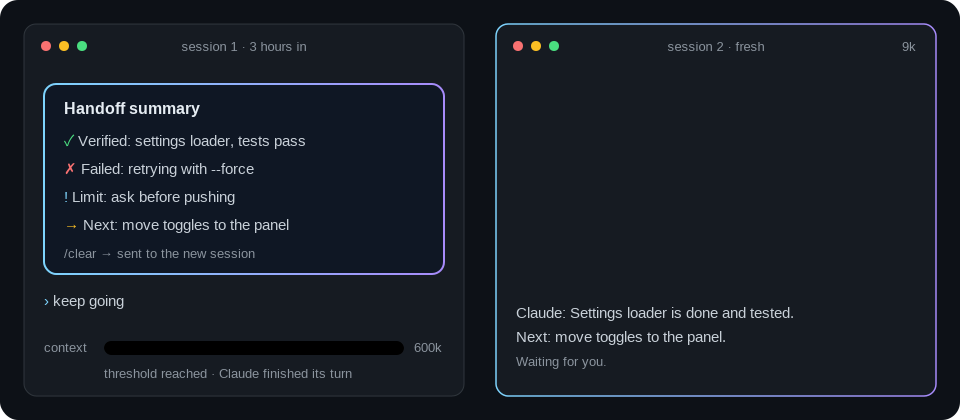
| the conversation is nearly full | You write a summary, /clear, paste it back | A summary is written, the conversation is cleared, and a fresh one continues |
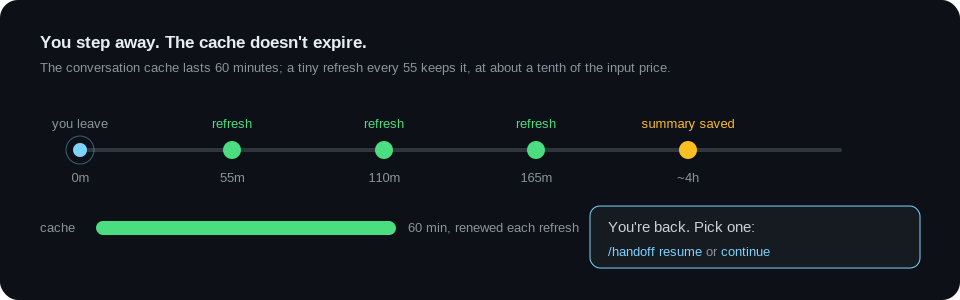
| you step away for an hour | Your next message rereads everything at full price | The cache is kept warm for up to about 4 hours |
| you repeat an instruction | The next conversation forgets it | It becomes a project note, and after 3 times a line in your repo |
you /clear or reopen Claude Code | The new conversation starts blind | It's told where the last one stopped |
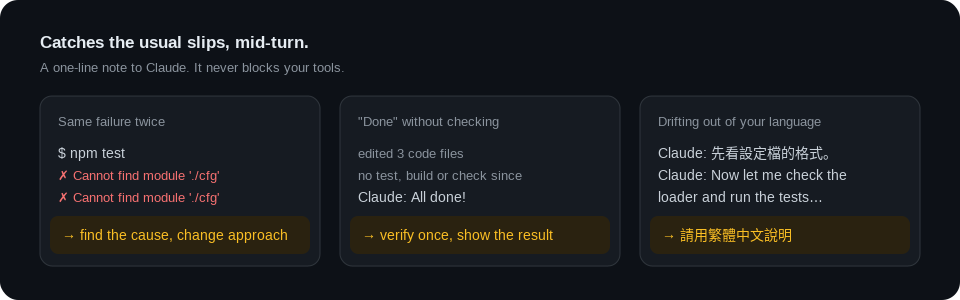
| Claude retries a failing command, or says "done" untested | You find out later | Claude gets a one-line nudge right away |
Install
Requires Claude Code 2.1.287 or later. Tested up to 2.1.302.
claude plugin marketplace add cablate/ctx-handoff-mod
claude plugin install ctx-handoff@ctx-handoff-mod
Start a new session and type /handoff. You should see:
context 12034 / threshold 600000 (window 1000000)
Cache refresh on, refreshed 0/3 this idle period, timer not started
That's it. Update with claude plugin update ctx-handoff@ctx-handoff-mod, or turn on auto-update under Marketplaces in /plugin.
[!NOTE] Built for Claude subscriptions and long sessions (for example on a 1M-context model). On an API key, Bedrock or Vertex the cache lasts only 5 minutes, so run
/handoff refresh off; everything else works. ctx-handoff is experimental, because Claude Code mods are still in early access.
What's inside
ctx-handoff is a growing toolkit for long sessions: new features for working with Claude over hours land here.
Hands off before the context fills (optional)
Off by default, so Claude Code's own compact takes over. Turn on auto_handoff in the panel's Settings tab and at 600k tokens it waits for Claude and its subagents to finish, writes a summary that keeps verified work apart from unverified changes, lists what failed, the limits you set in your own words and what was already found out, ends with one next step, clears, and continues in a fresh conversation. Anything you type meanwhile is carried over.
Keeps the cache warm while you're away
After about 50 idle minutes it sends a tiny request so the conversation cache doesn't expire (and stays ahead of Claude Code's 54-minute idle compaction on large chats), up to 3 times (about 3.5 hours); after that it saves a handoff summary without clearing, so when you return you choose to start fresh from it (/handoff resume) or stay where you were (continue).
To pause away refreshes and away summaries for just this conversation, click the button at the top of the panel or run /handoff away pause (resume restarts the timer). Notes updates keep running, and other conversations aren't affected. The panel and /handoff also show live background activity and the session's reported background token usage since this update (not a bill; requests already sent cannot be cancelled).
Learns your project, then hands it to your repo
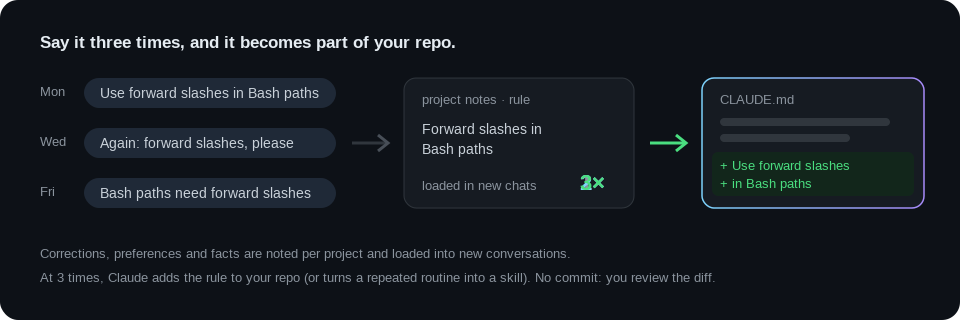
Preferences, corrections and facts become one Markdown notes file per project, loaded into every new conversation. Routines you repeat become project skills. Only the new part of the conversation is read, by Sonnet 5.5 at low effort.
If a notes update fails or gets unusable output, that slice of the conversation is kept for the next retry, without counting the same rule or procedure twice. Memories you delete come back only if you bring them up again in a new slice of conversation.
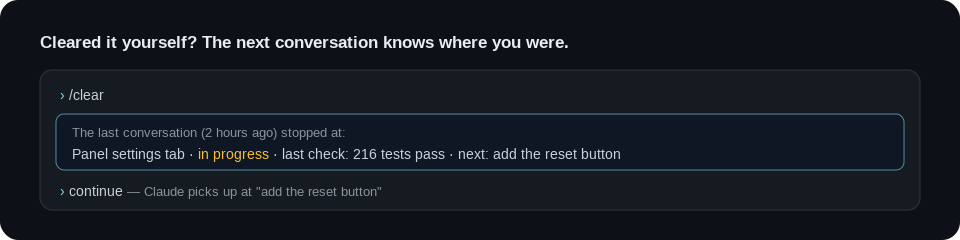
Remembers where you stopped
Catches the usual slips
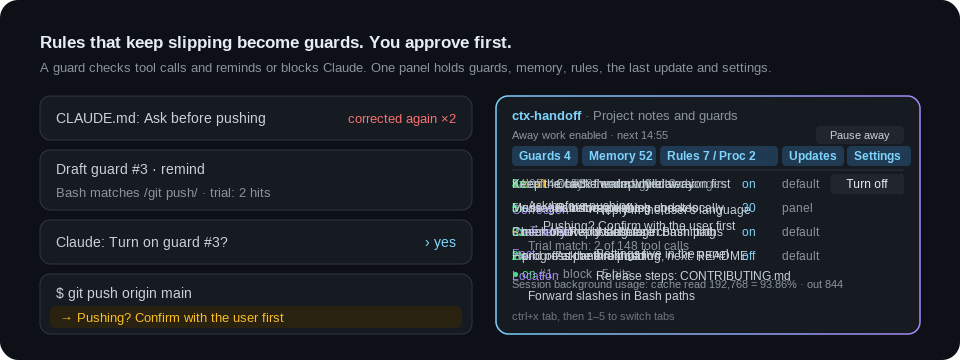
Guards you approve, one panel for everything
When a rule is already written down but keeps getting broken, ctx-handoff drafts a guard: a check on tool calls that reminds or blocks Claude. Claude asks you about it in the next conversation, and nothing applies until you say yes. /handoff panel opens a panel above the prompt for guards, memories, rules, the latest notes update and every setting.
Settings
Everything is on the panel's Settings tab (/handoff panel, then 5), with where each value comes from and a reset button. The defaults are meant to be left alone. The guide lists every setting.
Cost and privacy
- No servers of its own. It runs on your Claude Code sign-in and sends nothing anywhere but Anthropic, like the conversation itself.
- Small, predictable costs. A handoff is one request; a cache refresh reads from cache at about a tenth of the input price; a notes update sends only the new part of the conversation. The nudges cost nothing.
- Plain files you own. Notes are Markdown in
~/.claude/projects/. Check what the mod may do withclaude plugin validate; the guide explains every entry.
Documentation
- Guide: every feature in detail, settings, commands, permissions, supported environments, limitations, troubleshooting and uninstalling.
- Changelog: what changed in each version and why it's worth upgrading.
- Contributing: how to run it from source and send changes. Bug reports and ideas go in issues.
- Security: how to report a vulnerability privately.
Star history
License
Details
- Author
- @cablate
- GitHub Stars
- 135
- Sub-category
- Context & Memory
- License
- MIT
- Surfaces
- terminal
- Added
- 1 months ago
- Last synced
- today
- Events hooked
session.startsession.endturn.stepconfig.setprompt.contexttool.callui.renderturn.completeclassic.Stopprompt.submitcommand.run
Weekly Mods Digest
Top new Claude Code mods and install commands, once a week. No fluff, unsubscribe anytime.

