
Context Bar
A context window bar above the Claude Code prompt, split by what’s filling it, with one button that writes or resumes a handoff and another that runs /compact. It ships its own /handoff and /handoff-resume commands.
claude plugin validate to auditGuide →Draws UI elements or stores local mod state only. No filesystem, shell, or network access detected.
Statically scanned from hooks & source. Learn how to audit
context-bar
A Claude Code mod that puts a full-width context window bar above the prompt:
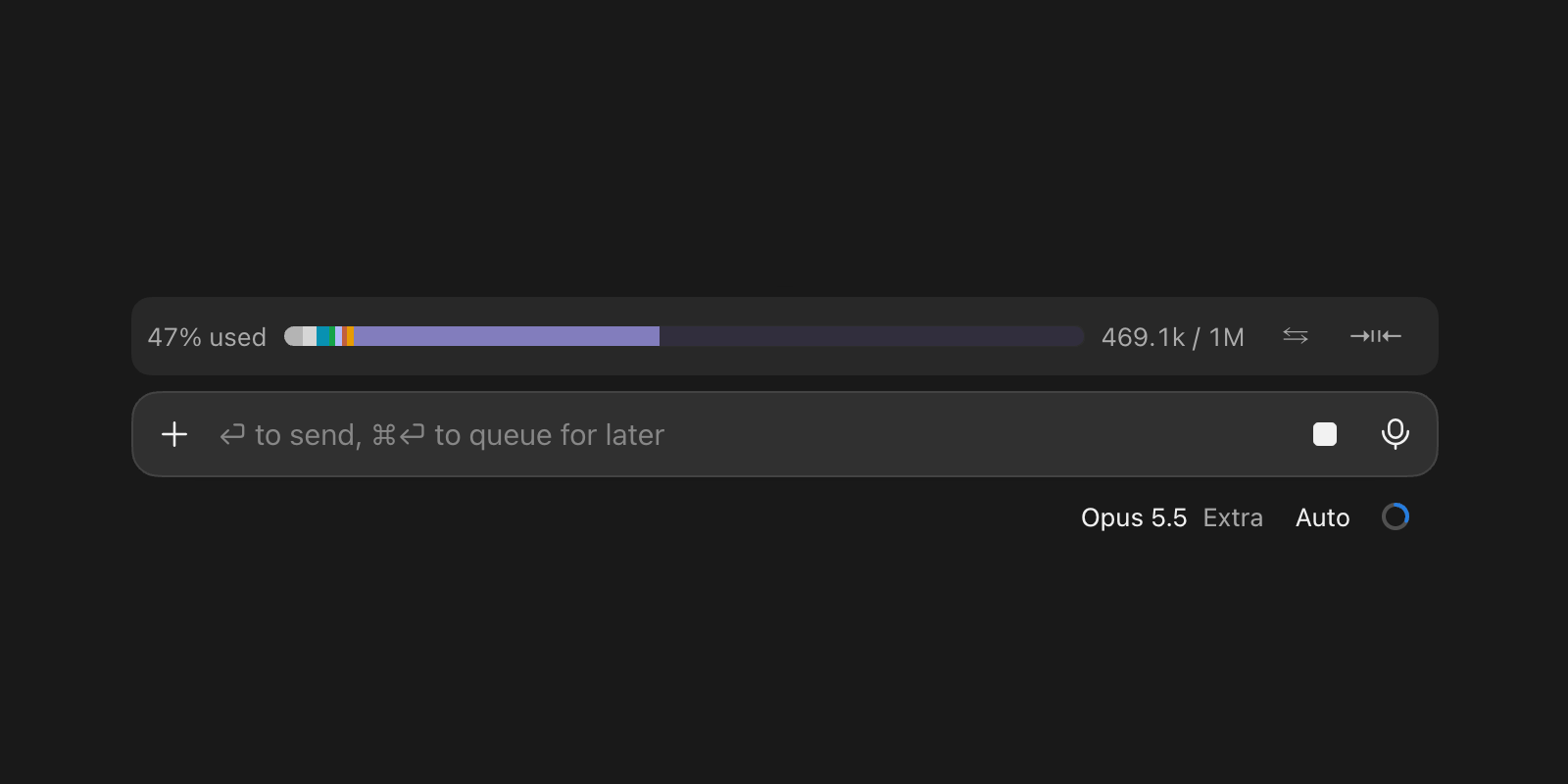
- The bar splits what's in the context window by category (messages, system prompt, tools, memory files, skills), in the colors
/contextuses, and stretches to the width of the window. - The numbers are the status line's own: percent used, then tokens used out of the model's window. The percent turns yellow at 75% and red at 90%. Right after a compaction it shows a
~estimate until the next response comes back. - ⇆ (handoff) runs
/handoff, or/handoff-resumeif a handoff was the last thing run in the session. A typical cycle: ⇆ writes a handoff, ⇥⇤ compacts, and the next ⇆ resumes from it. - ⇥⇤ (compact) runs
/compact.
Both buttons ask before they run anything. A click during a turn runs its command once the turn ends.
Install
At the prompt of a Claude Code terminal session:
/plugin install context-bar --marketplace alisorcorp/context-bar
Answer y to add the marketplace, then pick a scope (user scope loads it in every session). In the desktop app, click + next to the prompt box, then Plugins, Add marketplace with alisorcorp/context-bar, then Add plugin.
Built and tested on Claude Code 2.1.325. The mod API it uses is in early access and may change between releases.
The handoff commands
The mod ships two slash commands. As plugin commands their full names are /context-bar:handoff and /context-bar:handoff-resume; the short names work as long as no other command claims them.
/handoff [focus]writesHANDOFF.mdto the project root: goal, what's done, what isn't, failed approaches, key decisions, current state, and resume steps. It re-runs every volatile fact (SHAs, test counts, versions) rather than recalling it, audits the file before finishing, and prints a one-line audit result. Run it before/compact, or before you step away./handoff-resume [path]reads the handoff, checks for drift since it was written (new commits, a changed working tree), gives a short read-out, and continues from the first resume step once you say go. Right after a compaction it continues without waiting.
Both work outside git repositories too, minus the git checks.
Optional: warrant
With warrant installed, /handoff attaches a re-runnable check to each claim a shell command can verify (<!-- warrant: run="git rev-parse --short HEAD" contains="a1b2c3d" -->), runs them all before finishing, and saves a receipt. /handoff-resume re-runs them and reports what went STALE since the handoff was written. Without warrant, both commands skip those steps and audit by hand.
uv tool install git+https://github.com/alisorcorp/warrant
warrant runs shell commands written in a document. /handoff-resume always lists them with --dry-run first, and asks before running any that aren't read-only, so be especially careful with a handoff someone else committed.
Settings
Two settings choose what ⇆ runs. They show up as rows in /config, and on the setup screen when you install.
| Setting | Default | What it does |
|---|---|---|
| Handoff command | handoff | What ⇆ runs first, without the slash. Name your own command to use it instead. Leave it empty to hide ⇆. |
| Resume command | handoff-resume | What ⇆ runs right after a handoff. Leave it empty, or name a command that isn't installed, and ⇆ always runs the handoff command. |
⇆ hides itself when the handoff command isn't installed, and checks again after every turn.
Limits
- On the desktop app the bar is drawn as an SVG with fixed dark-mode colors, so it won't follow a light theme. The terminal draws it with your theme's colors.
- The buttons are text glyphs: a mod's buttons can hold only text, not icons.
- The app owns the band's padding, so the mod can't set the band's exact height.
- Which handoff command ran last is remembered per session.
Development
claude plugin test .       # the tests in tests/
claude plugin validate .   # manifest, hooks module, commands
claude --plugin-dir .      # run a session with this folder loaded
License
MIT
Details
- Author
- @alisorcorp
- Sub-category
- Context & Memory
- License
- MIT
- Added
- 11 days ago
- Last synced
- 3 days ago
Weekly Mods Digest
Top new Claude Code mods and install commands, once a week. No fluff, unsubscribe anytime.


