
Claude Usage
Usage, counters, forcasts. Basically everything that answer your "how many prompts do we have left" question
claude plugin validate to auditGuide →Reads local project files, settings, transcripts, or environment variables.
Statically scanned from hooks & source. Learn how to audit
📊 claude-usage
See what every prompt costs you in Claude Code: tokens, models, subagents, the prompt cache and your rate limits, live.
usage-panel is a Claude Code mod: a live Usage pane beside the conversation and a one-line band above the prompt input.





👀 Preview
The band above the prompt input, while a prompt runs:

The Usage pane beside the conversation:
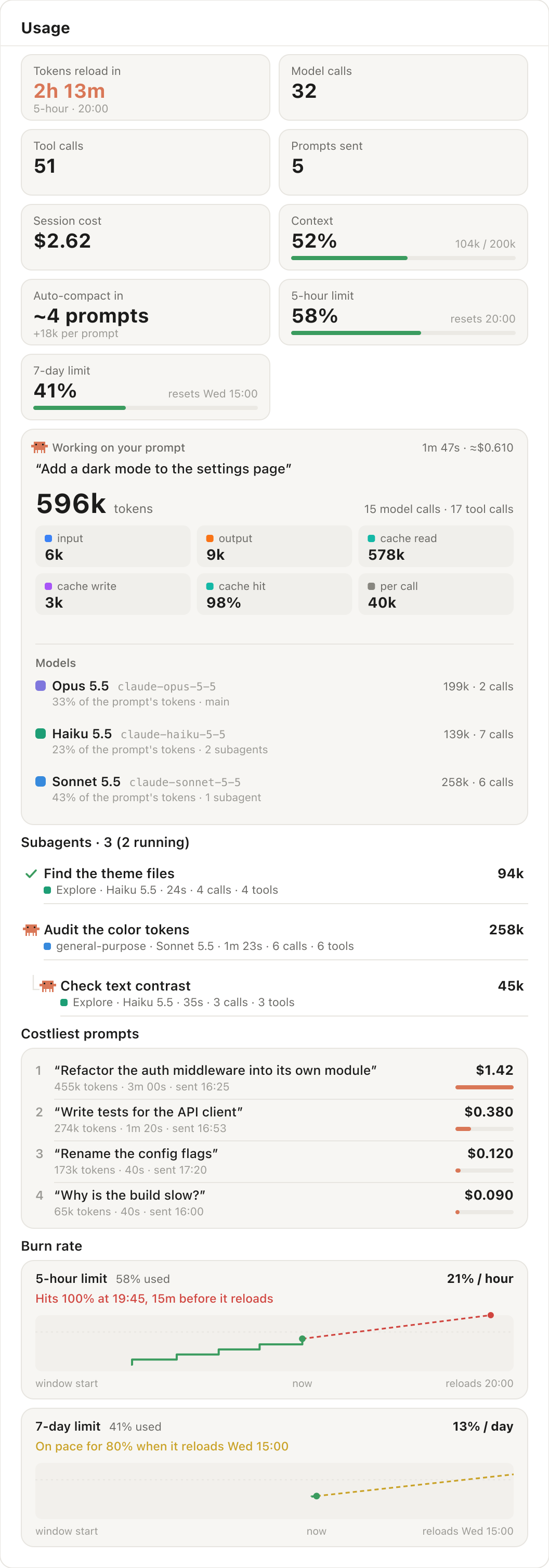
Screenshots of the desktop app, drawn from made-up demo data. A terminal gets the same figures as text.
⚡ Install
On each device, in any shell:
gh api repos/jamesnguyen1309/claude-usage/contents/install.sh -H "Accept: application/vnd.github.raw" | bash
Then start a new Claude Code session: in the desktop app the Usage pane opens on its own; in the terminal the figures sit in a framed bar above the prompt, and its Usage button (or /usage-panel) unfolds the full report inside it.
Other ways to install
Two commands, no script:
claude plugin marketplace add jamesnguyen1309/claude-usage
claude plugin install usage-panel@claude-usage --scope user
From inside a terminal claude session:
/plugin install usage-panel --marketplace jamesnguyen1309/claude-usage
Answer y to add the marketplace, then pick the user scope.
Only for one project: run the script with SCOPE=project (shared through the project's .claude/settings.json) or SCOPE=local (just you).
✨ What you get
Above the prompt input
One line for the prompt in progress (or the last one):
| Model | the main model as a chip, with its full id (claude-opus-5-5), plus a chip for each other model its subagents used |
| Tokens | the prompt's total across the main conversation and every subagent, and how many were output |
| Time · cost | how long it has run, and what it cost |
| Cache | once the prompt is done, how long the prompt cache stays warm (cache warm 3m 12s), then cache cold: a prompt sent while it is warm reads the conversation at a tenth of the price |
| Usage | a button that shows or hides the pane |
The Usage pane
| Section | Shows |
|---|---|
| Statistics | when your tokens next reload (a countdown to the soonest rate-limit reset, and which window), model and tool calls across the conversation, prompts sent, session cost, context window fill, how many prompts until auto-compact at your recent growth per prompt (~6 prompts · +20k per prompt), and the 5-hour and 7-day limits with when each resets. Meters turn amber at 70% and red at 90%. |
| This prompt | total tokens; input, output, cache reads and writes, the cache hit rate and tokens per call; each model that worked on it, with its id, calls, tokens, share of the prompt and whether it ran the main conversation or subagents |
| Subagents | each subagent the prompt started, nested under the one that started it: live status, model, time, calls, tools and tokens |
| Costliest prompts | the session's five most expensive finished prompts, costliest first: what you asked, its cost, tokens and time |
| Burn rate | for the 5-hour and 7-day limits, how fast each is being used (% per hour, % per day) and where that pace leads: Hits 100% at 14:52, 1h 22m before it reloads in red, or On pace for 71% when it reloads. A small chart shows the window so far, solid, and the pace carried on, dashed. |
Warnings
| When | You see |
|---|---|
| A rate-limit window's pace means it runs out before it reloads | a toast, even with the pane closed: 5-hour limit: on pace to hit 100% at 14:52, 20m before it reloads. Once per window, whichever session notices first. |
| A prompt had to write the whole conversation to the cache again | an amber line on its card saying why and what it cost: Cache rewritten after 12m 04s idle (the cache lasts 5m): 180k tokens, ≈$0.40 of this prompt |
| Only a couple of prompts are left before auto-compact | the forecast turns amber |
While Claude works, a little animated Claude (the orange pixel crab, stepping and waving) marks what is running: the prompt card, each subagent and the band. The desktop app draws cards, bars and chips; a terminal gets the same figures as text. /usage-panel shows or hides the pane.
🔄 Update · remove
# after a new version is pushed (the install script does this too)
claude plugin marketplace update claude-usage && claude plugin update usage-panel@claude-usage

# remove
claude plugin uninstall usage-panel@claude-usage
Start a new session afterwards for the change to load.
Installed before the GitHub account was renamed? claude plugin marketplace update will show it cloning from jamesbrad1309/claude-usage. That still works through GitHub's redirect, but to point it at the current name, add the marketplace again (this resets the mod's saved burn-rate readings and learned cache lifetime):
claude plugin marketplace remove claude-usage && claude plugin marketplace add jamesnguyen1309/claude-usage && claude plugin install usage-panel@claude-usage --scope user
📐 How the figures are counted
- Tokens come from each model call's usage as the API reports it, main conversation and subagents together. Cache reads usually dominate: each call re-reads the conversation from cache, at a fraction of the price of fresh input.
- Cost is Claude Code's own ledger, the one
/costtotals. A prompt's cost is how much the session's total grew while it ran, subagents included; subagents show tokens, not dollars. - The cache's lifetime isn't reported by Claude Code, so the mod learns it: 5 minutes to begin with, an hour once a prompt reads the cache after more than 5 idle minutes (and 5 again if one then finds it gone). It is kept across sessions.
- A cache rewrite's cost is its share of the prompt's cost, with each kind of token weighed by its price relative to fresh input (output 5×, cache read 0.1×, cache write 1.25× or 2× for the hour-long cache). Subagents on cheaper models make it a slight overestimate.
- Prompts until auto-compact compares the context with the point where it compacts, the window less the compaction buffer as
/contextshows them, at the average growth over your last few prompts. - Burn-rate readings are kept across sessions, since the limits are your account's; readings older than 8 days are dropped.
- Per session: each session shows only its own prompts, and keeps its latest 50 (Costliest prompts picks from those). Prompts sent also counts the ones sent before the mod loaded, once the conversation has drawn them.
- Nothing leaves your machine: the mod reads Claude Code's own figures, and reads or writes no files.
🛠 Develop
claude plugin validate .   # manifest, marketplace and hooks module
claude plugin test .       # behaviour tests, terminal and desktop
claude --plugin-dir .      # run a session with this working copy
| File | Role |
|---|---|
hooks/register.tsx | the hooks: bookkeeping, the pane, the band, the terminal views |
hooks/draw.ts | the desktop drawings (SVG) |
hooks/burn.ts | the burn rate and its forecast |
hooks/cache.ts | the cache countdown and rewrites, the auto-compact forecast, the costliest prompts |
types/index.d.ts | the state contract |
tests/usage-panel.test.ts | behaviour tests |
install.sh | installs or updates the mod on a device |
.claude-plugin/ | the mod's manifest and the marketplace that lists it |
To release: bump version in .claude-plugin/plugin.json, .claude-plugin/marketplace.json and the README's version badge, push, then update on each device. Installed copies only update when the version changes.
Details
- Author
- @jamesnguyen1309
- GitHub Stars
- 1
- Sub-category
- Dashboards
- Surfaces
- terminal
- Added
- 1 months ago
- Last synced
- today
- Events hooked
session.startsession.attachcommand.runsession.endsession.measuresession.appendui.renderturn.startturn.stepagent.spawnturn.complete
Weekly Mods Digest
Top new Claude Code mods and install commands, once a week. No fluff, unsubscribe anytime.

