
Claude Router
Claude Code plugin that picks the model and effort for each turn (micro, low, medium, or high tier), advised by Jev, Clef, OpenAI, or a local Ollama classifier.
claude plugin validate to auditGuide →Makes outbound network requests, calls MCP servers, or requests auth handles.
Statically scanned from hooks & source. Learn how to audit
Claude Model Router


A Claude Code Mod that chooses a model and effort for each main-conversation turn, advised by a prompt classifier: Jev; Cloudflare's Clef, Clef Flash or Clef Omni; OpenAI; or a local Ollama model.
The Mod changes only the model and effort in Claude Code's turn hook. Claude Code sends the request, streams the reply, runs tools, and reports usage. The router does not proxy model traffic or start a local server; an Ollama classifier calls an Ollama server that you run. Subagents get one model each when they start, chosen the same way: every agent whose definition names no model, says model: inherit, or sets modelRouting: auto. Their steps are never re-routed. See Subagent routing.
Providers
Use the provider that already works with Claude Code. Select its router profile, not a new endpoint:
CLAUDE_ROUTER_PROVIDER=deepseek claude --model 'deepseek-flash[1m]'
Create ~/.claude/deepseek-router.json containing {} to use DeepSeek defaults.
With CLAUDE_CONFIG_DIR, put the file in that directory instead.
| Built-in profile | Router file | Default models |
|---|---|---|
| Anthropic, the default | router.json | Haiku 5.5, Sonnet 5.5, Opus 5.5; Fable 5.2 for routes you set |
deepseek | deepseek-router.json | DeepSeek Flash, routed by effort |
zai | zai-router.json | GLM-5.3-Flash and GLM-5.3 |
minimax | minimax-router.json | MiniMax-M3.1-Flash, routed by effort |
mimo | mimo-router.json | MiMo-V2.6-Flash and MiMo-V2.6-Pro, no routed effort |
kimi | kimi-router.json | Kimi-K3.1-Pro, routed by effort |
OpenRouter, Ollama, other local servers and other compatible hosted providers use custom <provider>-router.json files.
They have no built-in model defaults. A selected file must exist and validate, or the router leaves Claude Code's model unchanged.
See Providers for default routes and activities, custom profiles, and the --settings flag alternative.
Execution provider selection is separate from classifier selection. Observed usage stays visible even when a provider's cache behavior makes savings comparisons unavailable.
Supported classifiers
The active classifier is asked at the start of each logical turn, for the tier, task goal and current phase, and again in the background every 4 requests while the turn runs (policy.reviewEveryRequests). Pick one on the pane's Classifier tab or in the selected router file; only the active one receives prompt text. With subagent routing on (the default), it is also asked once per routed subagent, with the task's description and prompt; set "subagentRouting": "off" to keep that text local.
| Classifier | Service | Credential | Prompt text goes to | How it is asked for the activity |
|---|---|---|---|---|
| Jev | typesafe.ai | Jev API key | typesafe.ai | Goal and phase choice questions in the same request |
| Clef | Cloudflare Workers AI, 27B | Cloudflare API token and account ID | Cloudflare | The same |
| Clef Flash | Cloudflare Workers AI, 9B | Cloudflare API token and account ID | Cloudflare | The same |
| Clef Omni | Cloudflare Workers AI, 30B MoE | Cloudflare API token and account ID | Cloudflare | The same |
| OpenAI | OpenAI, gpt-6-luna | OpenAI API key | OpenAI (api.openai.com) | Goal and phase choices in questions, in the same request |
| Ollama | A local Ollama model | None | Stays on this machine | Goal only in a second request; no phase or continuation answer |
Jev 1.14 is the default; a configured model override stays in force. Configuration gives the endpoints, timeouts, and how to add another service that speaks one of the supported protocols.
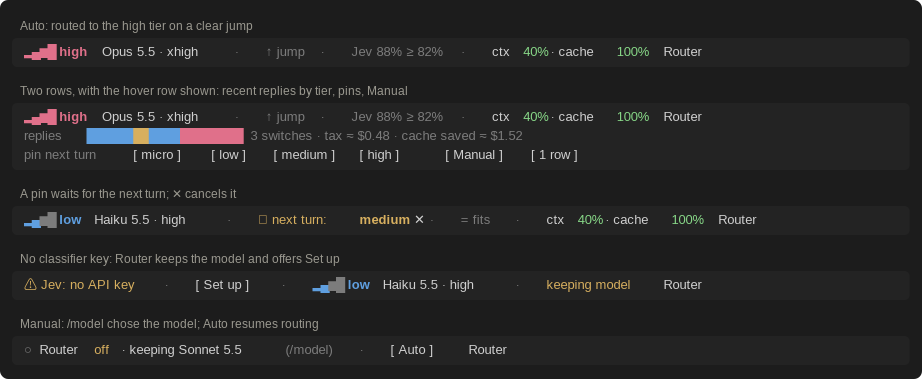
The band above the prompt shows the tier, activity, model, and reason for each turn. /router opens a pane to pin a tier, edit the model and effort of each tier, and tune the policy. See the user guide.
To move one turn without a pin, start the prompt with a keyword: morethink, highthink or maxthink for one effort level up, one tier up or the top tier, and lessthink, lowthink or nothink for the way down. The routing mode and the turn's activity still pick the route. See prompt keywords.
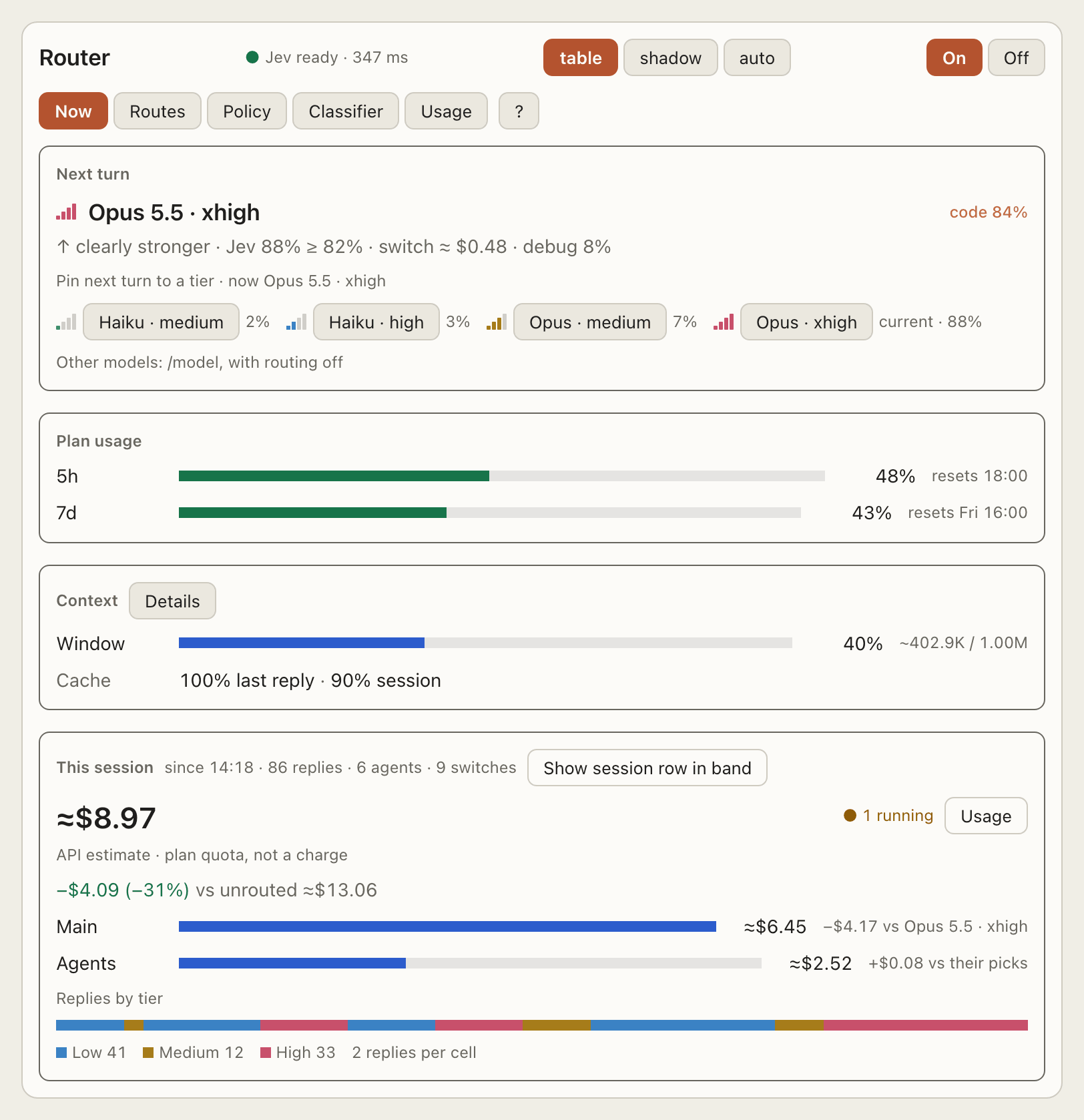
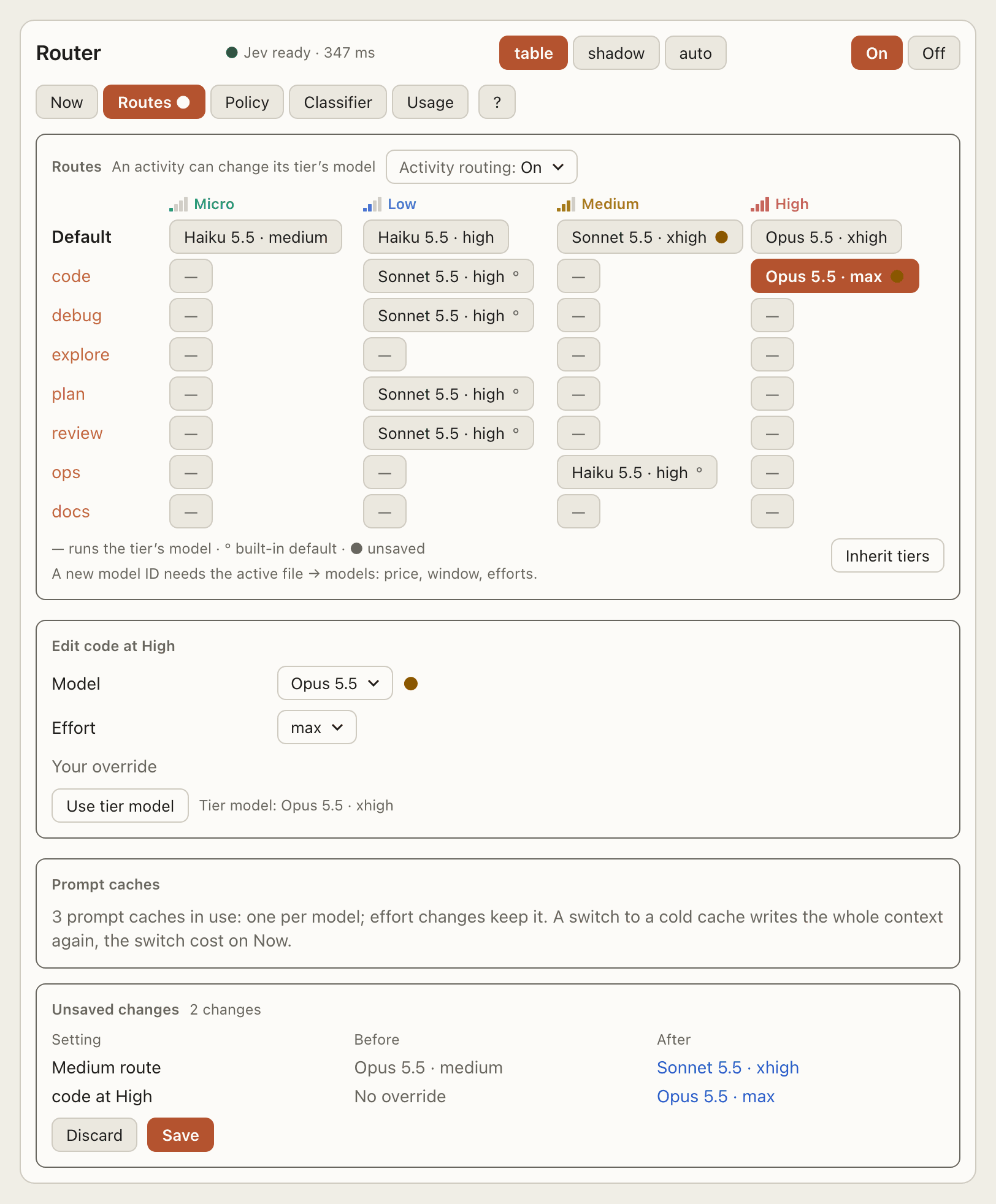
In the desktop app, VS Code and mobile, the band is one fixed row with nothing revealed on hover: a tier meter icon, the route, activity and reason on the left; the readings, a Pin to a tier dropdown and Router on the right. The pane has a header, five tabs (Now, Routes, Policy, Classifier, Usage), one warnings slot and a save bar. Colours follow the app's theme. These surfaces cannot open the plugin settings dialog, so Set up shows a card with the command that saves the classifier's key from a terminal.

Rendered from the real component tree with a browser's layout and approximate theme colours; not a screenshot of the Claude app.
|
|
In the terminal, the picture above shows the band, whose controls appear on its own row on hover; the colours follow your Claude Code theme. The pane's warnings share one slot under the tab row, and a pending pin shows on its pin button (press it again to unpin).
On every surface, a row under the band lists running subagents (press one to open its transcript; Back returns), /router completes its words as you type where the prompt box offers completions, and a quiet route line after a turn says which model ran and why (/router line off|moves|all; by default only when the route moved). A session that starts with routing unavailable shows one toast with the reason, at most once a day.
The router needs Claude Code 2.1.321 or newer. Savings are not measured. The pane's Usage tab estimates what routing cost against no routing (your own model on the main thread, Claude Code's pick for each subagent) for the same tokens at configured list prices, for this session, today, 7 or 30 days, this month or all; it is not a bill and does not judge answer quality. See the evaluation.
How it works
sequenceDiagram
  actor Dev as Developer
  participant Code as Claude Code
  participant Mod as Router Mod
  participant Cls as Classifier
  participant API as Model provider
  Dev->>Code: Prompt
  opt Subagent spawn
    Code->>Mod: agent.spawn
    Mod-->>Code: One model for the agent (on), or none (off)
  end
  Code->>Mod: Main or subagent step
  alt Main conversation, routing on
    Mod->>Cls: Bounded prompt and dialogue
    Cls-->>Mod: Tier advice
    Mod-->>Code: Selected model and effort
  else Routing off or subagent step
    Mod-->>Code: Original model and effort
  end
  Code->>API: Native request and tools
  API-->>Code: Response stream and usage
  Mod-->>Dev: Status band and router pane
The active classifier labels each new logical turn. With table or shadow, the router checks tier and activity routes as the task runs: a turn labelled ops that edits code can move up to the code route, and a background classifier review can move the tier or activity. With auto, it keeps its own demand and route state instead of using activity route-table moves. A cheaper route on the same task waits for a dwell and a checkpoint its work can show: a passed test, build or lint run, or for commands, docs and read-only work the success the router can see. A notification is treated as progress, but cannot justify a downgrade because it may belong to an older task. /router decisions lists why each turn ran where it did. When a model fails with an API error, the router holds it, or its whole account for a used-up plan window, spend limit or balance, out of routing, and runs a fallback chain you configure or the nearest tier on another model; /router holds and /router release show and end holds. See When a model fails. See Changes during a task. A local policy applies vote, context, failure, and cache-cost rules before the Mod changes the next step. Claude Code owns request construction, model credentials, tools, streaming, and the API cost ledger.
With the Anthropic profile, the base routes are:
| Tier | Default model | Effort |
|---|---|---|
micro | Haiku 5.5 | medium |
low | Haiku 5.5 | high |
medium | Opus 5.5 | medium |
high | Opus 5.5 | xhigh |
These are routing defaults. They do not claim equal model quality. Configuration gives the published results behind them and the router.json lines that restore the 1.3 Sonnet ladder.
Activity routing classifies the task's goal (code, debug, explore, plan, review, ops, or docs) separately from the current phase. Bounded verification or execution can use the ops route without relabeling the goal. A route is then picked by tier and effective activity. It is on by default since 1.7. A · cell uses the tier's own route, the base route:
The Anthropic profile uses these activity defaults. Other profiles have their own defaults.
| Activity | micro | low | medium | high |
|---|---|---|---|---|
| Base route | Haiku · medium | Haiku · high | Opus · medium | Opus · xhigh |
code, debug, plan, review | · | Sonnet · high | · | · |
ops | · | · | Haiku · high | · |
explore, docs | · | · | · | · |
/router activities off stops asking and keeps the base routes. Activity routing explains each cell and how to change it. The label is optional: on uncertain or a weak label the base route is used if the move passes the cache check, when the activity answer fails the running activity stays and the tier answer still applies, and when the classifier fails the running route stays. See Route by activity, and Evaluation for how it is checked. Its default overrides rest on published vendor results and a list-price replay of one developer's sessions, not measured savings.
Choose a routing engine
Set routingEngine in the selected profile file: table (default), shadow or auto. For example, use {"routingEngine":"shadow"} or {"routingEngine":"auto"}; omit it for table. /router on turns routing on for the session; /router engine table|shadow|auto selects the engine and saves a project override. /router off turns routing off, while /router mode cost|balanced|quality selects the routing mode.
Pane routing changes are local to the project and active profile. The Mod never rewrites the profile or project JSON. See Project routing settings for shared mode and hand-edited overrides.
table(default): uses deterministic tier-by-activity routes. The routing mode transforms those routes before the table policy.shadow: table requests remain unchanged./router decisionsshows one-stepaltproposals./router trace exportwrites bounded replay inputs; for the work profile (CLAUDE_CONFIG_DIR=~/.claude-team), from a source checkout, replay~/.claude-team/router-traces.jsonand any dated rollover files withnode scripts/replay-traces.mjs.auto: selects a model and effort from declared per-effort capabilities, classifier demand, mode margins and hard/cache constraints. Configure a classifier credential when its provider requires a key; Ollama needs none. Without classifier advice, demand cannot be updated, but a qualifying startup move may still occur. Capability declarations determine whether candidate adequacy is known. Evaluation and cutover remain pending.
See routing engines for startup, fallback and pin behavior, and routing modes for mode effects.
For mixed Anthropic and DeepSeek sessions, use the explicit model-proxy profile with a separately started local proxy. No built-in mixed-provider defaults are installed.
Install
You need Claude Code 2.1.321 or newer and credentials for one supported classifier.
claude plugin marketplace add alexei-led/claude-router
claude plugin install router@alexei-led-claude-router
For the default Anthropic profile, start on a catalog model such as claude --model claude-haiku-5-5. For other providers, select a provider profile. Run /plugin configure router and save credentials for the active classifier, or run ollama serve with a pulled local model and select Ollama. With table or shadow, a new session starts with routing on only when its model is used by a tier or enabled activity override. With auto, any model in the selected catalog starts with routing on. /router on turns routing on for the selected engine; see engine selection.
Claude Code updates the plugin at startup when auto-update is on for this marketplace. Otherwise run claude plugin marketplace update alexei-led-claude-router, then claude plugin update router@alexei-led-claude-router.
Upgrading from 0.8? Remove the gateway settings that 0.8 /router:setup wrote before the first 1.0 session, or requests go to a gateway that 1.0 no longer starts. Follow the migration steps.
Run from a checkout
Start Claude Code with this directory as a local plugin and the full Haiku baseline model:
claude --plugin-dir "$PWD" --model claude-haiku-5-5
In Claude Code, run /plugin configure router and save your classifier key in the sensitive plugin option. The Mod adds its status band and /router pane. No status-line setup or gateway environment variables are needed.
Run /router to open the pane. /router on turns routing on for the session and /router off turns it off; /router engine table|shadow|auto selects the engine, saved in the selected profile file; /router mode cost|balanced|quality selects the routing mode. Run /model to select a model (which turns routing off). See the user guide.
Before a push, run the same checks as CI. npm run setup installs Biome and TypeScript into tools/; the plugin root keeps no lockfile, so Claude Code installs nothing with the plugin. npm run validate and npm run test:plugin need the claude CLI: they load the Mod in the Claude Code engine, which refuses some faults that lint and unit tests miss.
npm run setup
npm run check && npm run typecheck && npm test && npm run validate && npm run test:plugin
Contributing
Read CONTRIBUTING.md: set-up and commands, the layer rules, test conventions and the pull request checklist. Coding agents start with AGENTS.md. Run npm run setup once, then npm run check && npm run typecheck && npm test && npm run test:plugin before you push.
Documentation
- User guide: install, use the controls, read the panel, and troubleshoot.
- Providers: provider names, router files, built-in defaults, and custom profiles.
- Configuration: router-file settings, classifier keys, cache policies, and migrations.
- Architecture: Mod event flow, state, safeguards, and runtime boundaries.
- Activity routing: the default matrix by activity, why each cell, and how to change or turn it off.
- Routing modes:
cost,balancedandquality, where the mode comes from, and every decision per mode. - Native router details: panel semantics, tuning, and accepted limits.
- Automatic routing engine: the opt-in
autoengine's inputs, rules and limits. - Provider experiments: MiniMax, MiMo and Kimi evidence behind the default routes.
- Evaluation: limits, text-free trace export and replay, and the paired benchmark proposal.
- Contributing: set up, commands, architecture rules, tests, and pull requests.
- Changelog: user-visible changes by version.
Details
- Author
- @alexei-led
- GitHub Stars
- 52
- Sub-category
- Automation
- License
- MIT
- Surfaces
- terminal
- Added
- 2 months ago
- Last synced
- 2 days ago
- Events hooked
tool.describesession.startsession.endsession.compactcommand.runturn.startturn.stepui.render
Weekly Mods Digest
Top new Claude Code mods and install commands, once a week. No fluff, unsubscribe anytime.


