
Claude Convey
Pick instead of type when filling Claude Code prompts from a form
claude plugin validate to auditGuide →Writes files, executes local shell processes, or programmatically drives Claude.
Statically scanned from hooks & source. Learn how to audit
claude-convey
A Claude Code plugin inspired by convey.
Motivation
Prompts to an agent often carry values like a branch name, a commit hash or a cluster name. They have to be exact, yet they're really just one item out of a list you could pick from. Looking them up and typing them in every time is tedious, and typos creep in.
With this plugin, you pick those values in a form to fill in the prompt.
- Choices can come from a command's output, so you just pick from values that actually exist and can't mistype them
- Prompts you use often live in templates, so you ask the same way every time
- The prompt goes into the input box without being sent, so you can check it first
How it works
- Put a template (YAML) describing the inputs and the prompt in
.claude/convey/ - Run
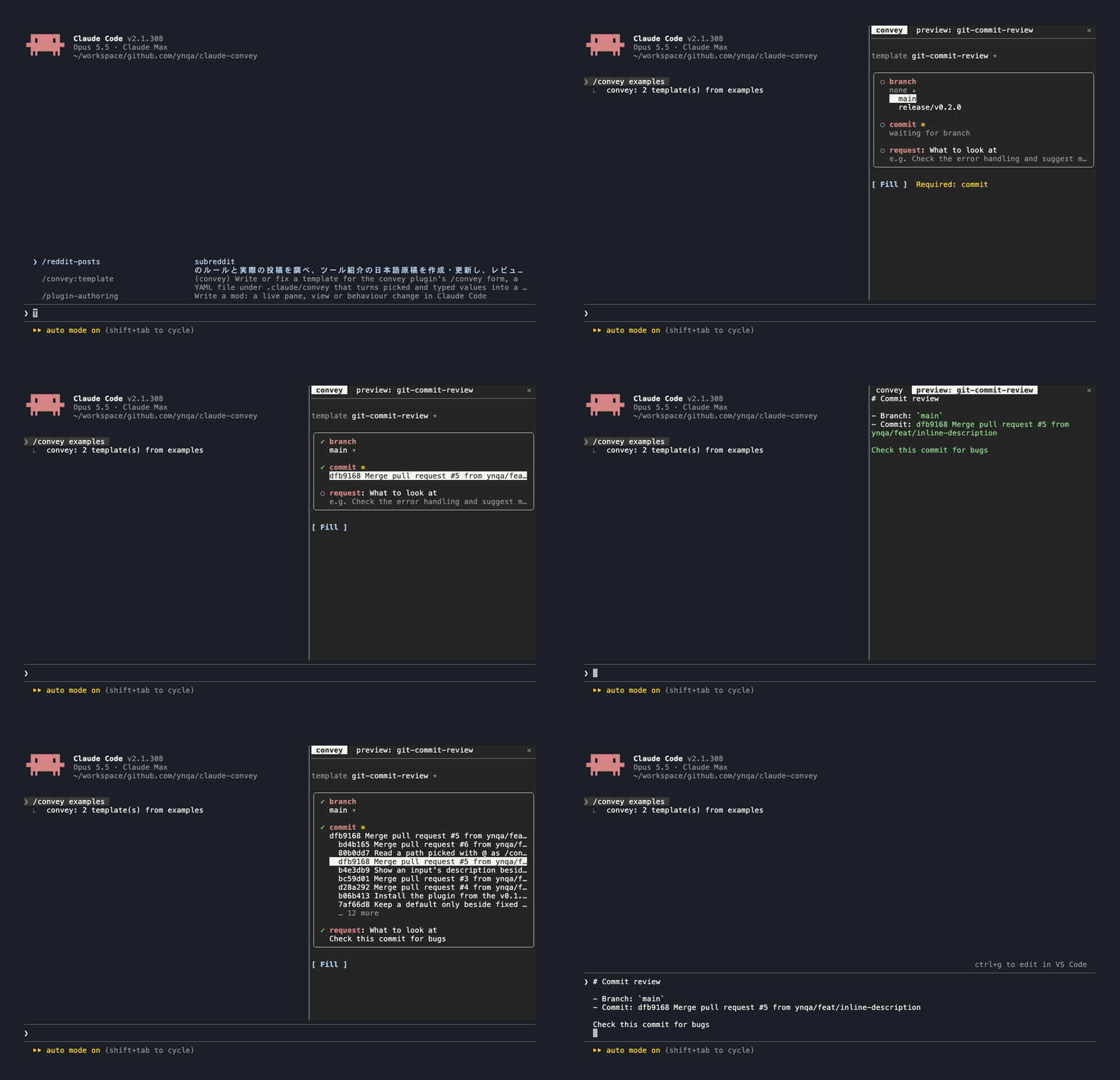
/conveyto open a form inside Claude Code - Fill in the values by picking from choices or writing text. Choices can be a
fixed list or the output of a command such as
gitorkubectl - Press Fill to put the filled-in prompt into Claude Code's input box (it isn't sent, so you can check it before sending)
Install
claude plugin marketplace add ynqa/claude-convey
claude plugin install convey@claude-convey
Inside Claude Code, you can also run:
/plugin marketplace add ynqa/claude-convey
/plugin install convey@claude-convey
Restart the session after installing to load the plugin.
Usage
Add templates and open the form
Put templates in .claude/convey/ of the project you want to use them in.
- How to write one: Writing templates
- Examples: examples/
- Have Claude Code write one: The template skill
Run /convey in Claude Code to open the form.
/convey: loads the templates in.claude/convey//convey path/to/dir: loads the templates in that directory/convey path/to/template.yaml: loads only that file
A path picked with @ in the prompt box, such as /convey @examples, works as well.
Files that can't be loaded are listed in the reply as skipped <path>: <reason>.
The form
The form opens in two tabs: convey and preview: <template name>.
- template: switches templates when there are two or more
- Inputs: a filled input shows
✓, an empty one○. A yellow*marks a required input - Command candidates
- While waiting for an earlier input it shows
waiting for …, andloading…while fetching - Picking an earlier input again clears the inputs that depend on it and fetches them again
- If fetching fails, the first line of the error and Retry are shown (
▸expands the full text)
- While waiting for an earlier input it shows
- Fill: if required inputs are still empty,
Required: …is shown next to it - preview tab: shows the text Fill will insert as you type. Filled values are
green, and missing ones show as a yellow
‹name›
Keys
| Key | Action |
|---|---|
| Tab / Shift+Tab | Next / previous element |
| ↑ ↓, Enter | Pick in a select |
| Enter (text input) | Confirm the value and move to the next input |
| ctrl+x tab | Switch tabs (convey ↔ preview) |
| Esc | Close the form (the preview tab closes with it) |
Writing templates
name: git-commit-review          # shown in the template select and the preview tab

inputs:                          # the form's inputs, in the order written
  branch:
    type: select                 # pick from choices
    candidates:
      command:                   # each line of output is one candidate
        program: git
        args: [branch, --format=%(refname:short)]

  commit:
    type: select
    allow_empty: false           # required (default true = may be empty)
    depends_on: [branch]         # waits for branch, and clears when branch is picked again
    candidates:
      command:
        program: git
        args: [log, --format=%h %s, -n, "20", "{{ inputs.branch }}"]

  request:
    type: textarea               # free text
    description: What to look at # shown after the input's name, not put in the prompt

output:
  template: |                    # Mustache; values go in as {{ inputs.<name> }}
    # Commit review

    - Branch: `{{ inputs.branch }}`
    - Commit: {{ inputs.commit }}

    {{ inputs.request }}
Fields
| Field | Description |
|---|---|
name | The template's name (required) |
inputs | Input definitions. Keys are input names; at least one is required |
inputs.<name>.type | select (pick) or textarea (write) |
inputs.<name>.allow_empty | false makes it required. Defaults to true |
inputs.<name>.description | A note shown after the input's name in the form. It isn't put in the prompt |
inputs.<name>.placeholder | Dim hint text shown in an empty textarea. It isn't a value and doesn't go into the prompt |
inputs.<name>.candidates.values | Fixed choices for a select (a list of strings) |
inputs.<name>.candidates.default | The choice picked when the form opens; one of values. Fill inserts it if left unchanged |
inputs.<name>.candidates.command | A command that produces a select's candidates (program and args) |
inputs.<name>.depends_on | Names of the selects whose values this one waits for |
output.template | The shape of the prompt (required) |
A select's candidates takes exactly one of values or command. default can
only go beside values: a command's candidates aren't known until it runs.
Any field not listed here is an error.
Command candidates
-
programis started directly, and each entry ofargsis passed as one argument. No shell is involved, so to use pipes (|),&&,$VAR,~and the like, setprogramtoshand pass the script with-c. Don't embed input values in the script; pass them as arguments and read them as"$1","$2"command: program: sh args: - -c - kubectl --context "$1" get pods -o json | jq -r '.items[].metadata.name' - sh # goes into $0 (any name works) - "{{ inputs.context }}" # $1 -
{{ inputs.<name> }}can be used inprogramandargs. Arguments that render empty are dropped -
Each non-empty line of output, trimmed, is one candidate, and that line is the value as is
-
A non-zero exit code, or running longer than 30 seconds, shows as an error with Retry
-
Every input used in
argsmust be listed independs_on.depends_oncan only name selects that come before this input
The prompt (output.template)
Written in Mustache. Values aren't escaped; they go in exactly as entered.
{{ inputs.<name> }}: the input's value. Nothing is inserted when it's empty{{#inputs.<name>}}…{{/inputs.<name>}}: shows the content only when there's a value{{^inputs.<name>}}…{{/inputs.<name>}}: shows the content only when there's no value
output:
  template: |
    {{#inputs.namespace}}
    - Namespace: `{{ inputs.namespace }}`
    {{/inputs.namespace}}
The template skill
The plugin includes a template skill for writing templates. Run
/convey:template followed by what the template should do, and it asks what
you want to pick each time, tries the commands that produce the candidates,
and then writes the template to .claude/convey/. Asking for a template
without /convey:template uses the skill too.
Example requests:
/convey:template pick a git branch and commit, and ask for a review of that commit
/convey:template pick a kubectl context, namespace and Pod in turn, and ask to investigate
why the Pod is failing. I want to write what to look into freely each time
When it's done, check that /convey .claude/convey/<name>.yaml opens it.
If it shows skipped, tell Claude what it says and it will fix the template.
Details
- Author
- @ynqa
- GitHub Stars
- 5
- Sub-category
- Automation
- License
- MIT
- Surfaces
- terminal
- Added
- 1 months ago
- Last synced
- today
- Events hooked
session.startcommand.runui.closeui.render
Weekly Mods Digest
Top new Claude Code mods and install commands, once a week. No fluff, unsubscribe anytime.

