
Claude Code Links
A mod for the Code tab of Claude Desktop that keeps the links you work with one click away, in a bar above the prompt
claude plugin validate to auditGuide →Makes outbound network requests, calls MCP servers, or requests auth handles.
Statically scanned from hooks & source. Learn how to audit
Claude Links — a links bar for Claude Desktop
English · Русский
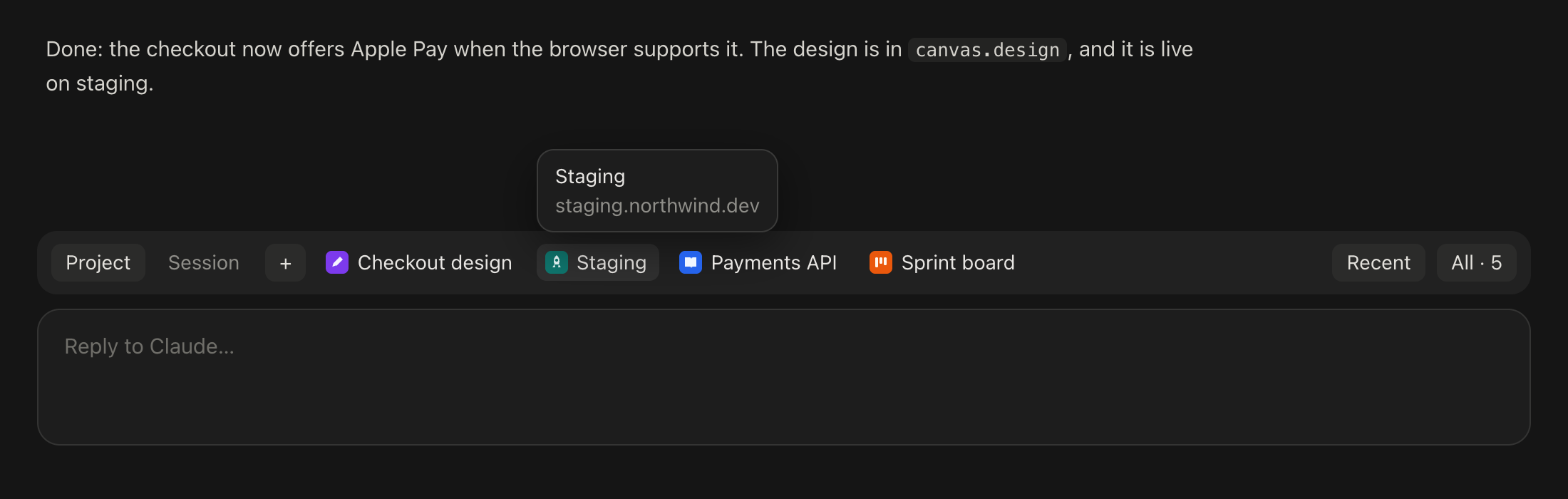
A mod for the Code tab of Claude Desktop (macOS) that keeps the links you work with one click away, in a bar above the prompt:
- Pinned links with favicons, up to 4 on the bar. Pin a link to the project (every session in that folder sees it) or to this session only; the small Project / Session switch on the left picks which set the bar shows.
- Favicons and titles found for you: the icon is read from the page itself (the icons it declares, then
/favicon.ico), and a link pinned without a name takes its page's title. A link with no name shows as its URL withouthttps://andwww.. - The links share the bar: one link takes all the free room, four a quarter each; a cut name shows in full, with its URL, when you hover it.
- + opens one row: name, link, Project / Session, Cancel, Save.
- Recent: hover it for the session's 10 latest links, from what you and Claude wrote and the pages Claude opened. Pin any of them to the project or the session, unpin, rename.
- All opens a side pane with every pinned link: search, sort by name or by link, drag to reorder (the first 4 of each list are on the bar), rename, unpin.
- Speaks your language: English, Deutsch, Français, Italiano, Español, Українська, Русский, following Claude Desktop's own language setting; English for every other language.
It is built on Claude Code's mods (plugins of function hooks), so it does not patch the Claude app: updates of Claude don't break it, and removing the plugin removes it. It shares the band above the prompt with other mods, such as Claude Tabs: the links row sits under what they draw.
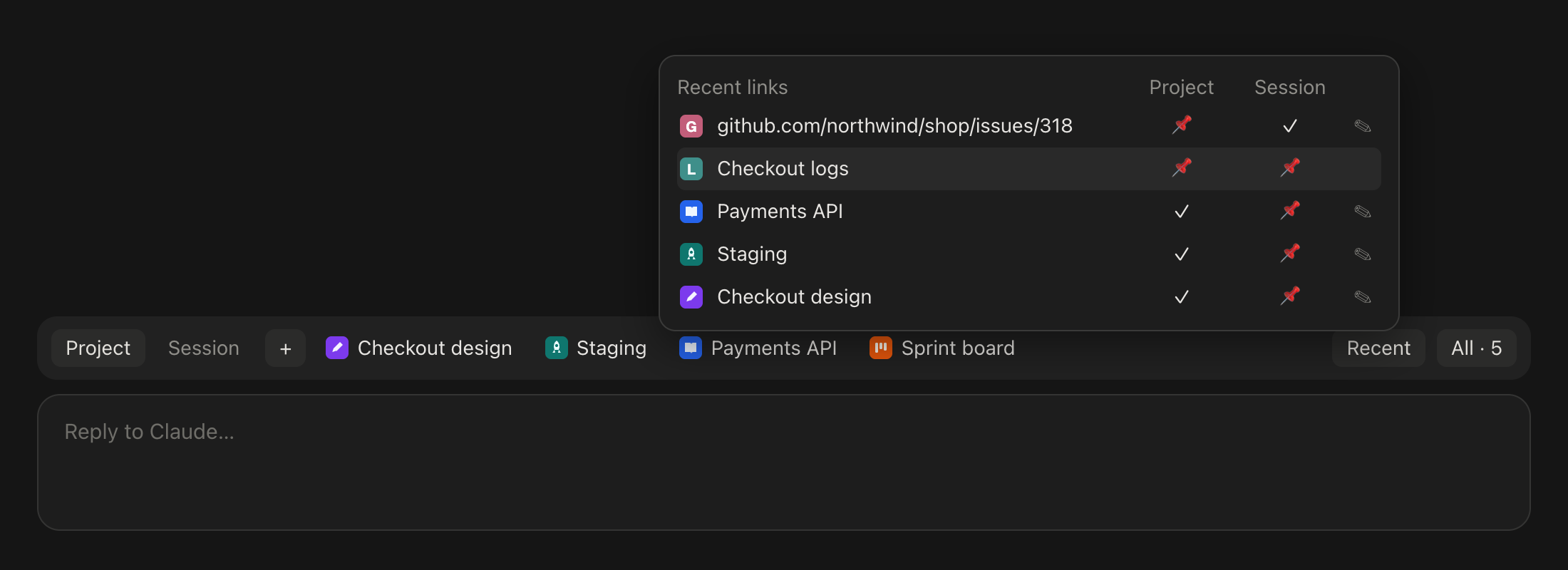
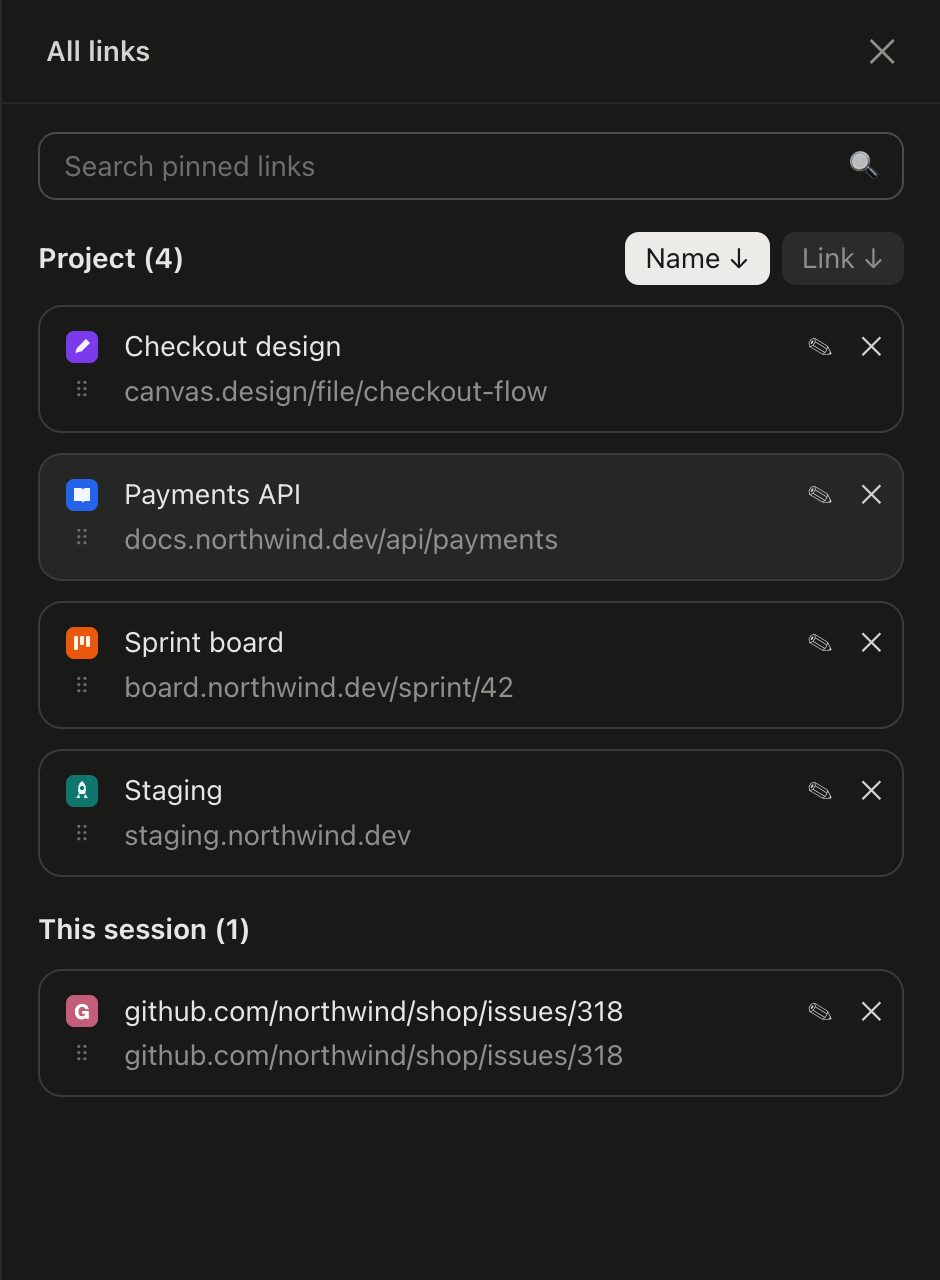

Demo links. The favicons, the letter drawn for a site without one and the words come from the mod's own code; docs/demo/render.ts renders these pictures.
Requirements
- macOS and Claude Desktop with mods support (Claude Code engine 2.1.289 or later).
curl(part of macOS) for favicons in PNG or ICO.- The mod draws in Claude Desktop's Code tab. It also loads in the terminal
claude, where it draws a simpler text version.
Install
From the marketplace (recommended)
claude plugin marketplace add tripolskiydigital/claude-links
claude plugin install links-bar@claude-links
Then open a new session in Claude Desktop (or quit Claude with ⌘Q and open it again for sessions that were already open). To update later:
claude plugin update links-bar@claude-links
From a clone
git clone https://github.com/tripolskiydigital/claude-links.git ~/claude-links
Then add the folder to env in ~/.claude/settings.json (several folders are separated with :):
{
  "env": {
    "CLAUDE_CODE_PLUGIN_DIRS": "/Users/you/claude-links"
  }
}
Use one way or the other, not both: with both, the mod loads twice.
Using it
- Press +, type a name (or leave it empty: the page's title is used) and a link, choose Project or Session, and Save. Or hover Recent and press 📌 in the Project or Session column of a link the session already mentioned.
- Click a link on the bar to open it in your default browser. Project / Session switches which pinned links the bar shows.
- All opens the side pane: type in the search field to filter, press Name or Link to sort (↓ A→Z; press again for ↑ Z→A), drag the ⠿ handle to reorder, ✎ to rename, ✕ to unpin.
The fields are the mod's own: click one to type, Enter saves, and ⌘A, ⌘C, ⌘X, ⌘V and ⌘⌫ work in them.
How it works
| What | Where it comes from |
|---|---|
| Recent links | the current session's transcript: what you and Claude wrote, and the links tools were called with (WebFetch, a browser's navigate); tool output is not scanned |
| Pinned links, the chosen sort, the switch position | the plugin's own store (Claude Code keeps it), keyed by project folder or session id |
| Favicons and titles | the link's page, fetched through the mod API's http call ($.http.fetch): its <title> and <link rel="icon">s, then the site's /favicon.ico. SVG icons come the same way; PNG and ICO ones are downloaded with curl, as the http call reads text only. Only the link's own site is asked. Favicons are kept in the plugin's store |
| Interface language | the locale field of ~/Library/Application Support/Claude/config.json, picked out by grep: the mod never reads the file itself, which also holds account data |
| Opening a link | open <url>, your default browser |
Pinned links are read again from the store every 5 seconds, so a project's links pinned in one session show up in its other sessions.
What the mod reads, writes and runs
What the mod sends, and where. To find a favicon and a title the mod requests, from the link's own site only, the page of a link you pinned or that the session mentioned, the icons that page names, and the site's /favicon.ico. These are plain GET requests for public pages: they carry no data of yours, no cookies and no credentials, and nothing read from the conversation or your files goes into them beyond the link itself. No other service is asked, and nothing else leaves your Mac.
Reads
- The current session's transcript, through the mod API (
$.session.messages). - The
localefield of Claude Desktop's settings, throughgrep(see the table above). - The clipboard, with
pbpaste, only when you press ⌘V in one of the mod's fields. - The environment variables
HOMEandTMPDIR.
Writes no file of its own outside the temp folder: pinned links, sorts, the switch position and favicons (data URIs of at most 24 KB) go to the plugin store that Claude Code keeps for every plugin. curl writes the PNG and ICO favicons it downloads to $TMPDIR/links-bar-<host>.icon, which the mod then reads (fs.read) and keeps in the store. ⌘C and ⌘X write the clipboard through the app ($.ui.copy).
Runs four programs, each by name; nothing it downloads is ever run:
| Program | Arguments | When | Why |
|---|---|---|---|
open | the link | you click a link | opens it in your default browser |
curl | the icon's address, a 6-second limit, a 24 KB limit, and the temp file to write | a pinned or mentioned link's site has no favicon in the store yet, and its icon is a PNG or ICO | downloads that picture; it is read as an image and kept in the store, never run |
pbpaste | none (UTF-8 is asked for through its environment) | you press ⌘V in one of the mod's fields | reads the clipboard to paste it |
grep | -o -m 1 and a pattern for "locale", in Claude Desktop's config.json | at session start | picks out the interface language without the mod reading the file |
Pages and SVG icons are requested through the mod API's http call, not a program.
Hooks
session.start: reads the pins, the language and the session's recent links, and starts the 5-second refresh of the pins.prompt.submitandturn.complete: read the session's links again. Neither changes the prompt or the turn.ui.renderfor the band above the prompt and for the mod's own pane;ui.message,ui.focusandui.closefor the mod's own fields, drag handles and pane.
The mod adds no commands, tools or agents for Claude, and changes nothing Claude reads.
Limits
- Mods can't style the app's own fields, links or buttons, so the mod draws its own text fields and drag handles: the cursor stays at the end of the text, and part of a text can't be selected with the mouse.
- The look follows Claude Desktop's current UI; a large redesign of the app may need an update of the mod.
- A page behind a login or a bot check gives no title and may give no icon, and a site that names no icon has none: the bar shows the link's address and the site's first letter instead.
Uninstall
claude plugin uninstall links-bar@claude-links
Pinned links and favicons go with the plugin's store. The pictures curl downloaded are in $TMPDIR/links-bar-*, which macOS clears by itself.
Development
claude plugin validate .
claude plugin test .
The module is hooks/register.tsx, helpers are in hooks/lib.ts, translations in hooks/i18n.ts, the state contract in types/index.d.ts; the mod's own text field and drag handle are hooks/text-field.tsx and hooks/drag-handle.tsx. The types of the mod API are written by Claude Code into .claude-plugin/types/ when it loads the plugin. The README's pictures and the plugin's icon are rendered by node docs/demo/render.ts (Node 23.6+ and Google Chrome). To iterate with hot reload, ask Claude in a Code session to work on the mod with the plugin-authoring skill, pointing the session's mods folder at your clone.
Issues and pull requests are welcome.
License
Details
- Author
- @tripolskiydigital
- GitHub Stars
- 1
- Sub-category
- Interface
- License
- Apache-2.0
- Added
- 1 months ago
- Last synced
- 3 days ago
- Events hooked
session.startprompt.submitturn.completeui.messageui.focusui.closeui.render
Weekly Mods Digest
Top new Claude Code mods and install commands, once a week. No fluff, unsubscribe anytime.


