
asint
A dashboard for Claude Code that lives in the terminal next to the conversation. It shows what the session is doing while it does it: the checklist, every shell command and its output, the files touched with their diffs, the whole project tree with live previews, a radar of the main agent and its subagents that you can click to give them instructions, and the project's architecture as a clickable diagram.
claude plugin validate to auditGuide →Writes files, executes local shell processes, or programmatically drives Claude.
Statically scanned from hooks & source. Learn how to audit
asint
A dashboard for Claude Code that lives in the terminal next to the conversation. It shows what the session is doing while it does it: the checklist, every shell command and its output, the files touched with their diffs, the whole project tree with live previews, a radar of the main agent and its subagents that you can click to give them instructions, and the project's architecture as a clickable diagram.
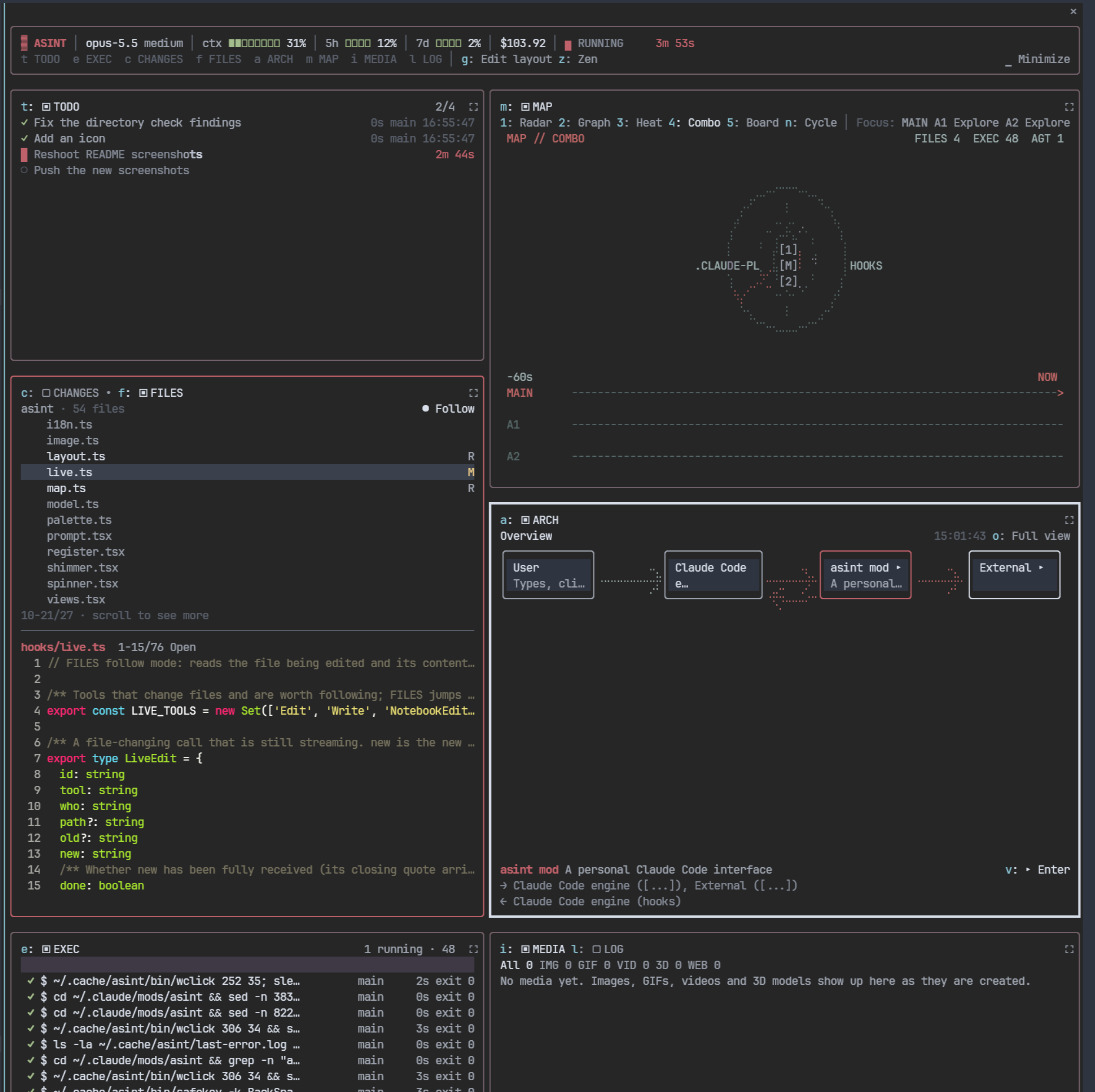
asint is a Claude Code mod (a plugin built on function hooks). It needs Claude Code 2.1.291 or newer and a terminal with the kitty graphics protocol (kitty or Ghostty) for images.
Install
/plugin marketplace add leonrlr4/asint
/plugin install asint@asint
The dashboard opens by itself when a session starts and the terminal is at least 144 columns wide. Type /asint to open it on a narrower terminal.
Update
claude plugin marketplace update asint
claude plugin update asint@asint
Restart Claude Code to run the new version. The same two steps are in /plugin: open Marketplaces, update asint, then update the plugin under Installed. Releases are listed at github.com/leonrlr4/asint/releases.
To work on asint itself, clone the repository, add the folder as a marketplace with claude plugin marketplace add <folder> and install asint@asint; edits then apply after /reload-plugins. Run claude plugin test . and claude plugin validate . in the folder before sending a change. A symlink into ~/.claude/mods is refused ("Path escapes plugin directory").
What you get
The prompt bar

One line above the prompt: the session's name, the git repository and branch (red on main, master and prod), the number of uncommitted files, the current directory, and the model, context use, rate limits and cost. The turn timer stays on the spinner line, so nothing is shown twice. Images you paste appear as thumbnails before you send them, and larger under your message after. Plain asks Claude, as a side question that does not interrupt the turn, to explain its last reply for a beginner. Arch diagram asks it to check the project's architecture diagram and create one if there is none.
Panels
| Panel | Shows |
|---|---|
| STATUS | Model, context, rate limits, cost, turn timer, checklist progress |
| TODO | The agent's checklist with start times and durations |
| EXEC | Every Bash command from the main agent and subagents, live output for background ones, the error line of failed ones |
| CHANGES | Files this session read, edited or created, with the session's diff for each |
| FILES | The whole project tree. Follow mode jumps to the file the agent is editing and shows the new text as it streams in |
| ARCH | The project's LikeC4 architecture diagram, clickable |
| MAP | Radar, graph, heat map, combined and board views of agents and files |
| ORCH | Every agent as a card with a pixel worker whose hat shows its kind, a plain-language line for what it is doing, and a bar while it works; finished agents shrink to one line. Click a card for its latest steps, and CHANGES narrows to that agent's files |
| MEDIA | Images, GIFs, videos, 3D models and web pages the session produced |
| LOG | Every other tool call and agent event |
Click the dashboard (or open it with /asint) to give it the keyboard: the letters above switch panels, and the cell you are working in gets a heavy border in the bright color. Drag the layout into any shape with g; each cell can stack several panels as tabs. ⤢ (or z) makes one panel fill the dashboard, and ▁ Minimize folds the dashboard away and keeps the prompt bar.
Keys in FILES and CHANGES
Click the tree (or the list) to hold the keyboard there. In the FILES tree j k move, l or Enter open a folder or go into a file's preview, h closes a folder or climbs to its parent, gg and G jump to the ends, Ctrl-d and Ctrl-u move half a page, and / searches file names (Enter to confirm, n and N for the next and previous match). In the preview j and k scroll and h comes back. CHANGES takes the same keys on its list. While the pane (not the tree) holds the keys, h j k l work on the card's < > ▴ ▾ buttons, b and w scroll sideways, and /asint root <folder> points FILES at another folder.
A session is saved to ~/.cache/asint/sessions/<id>.json every few seconds and comes back when the session is resumed.
Live edits
asint reads the model's tool calls while they stream. When Claude starts an Edit or Write, FILES jumps to that file, marks it ✎, and shows the replaced lines struck through in red and the new text growing in green with a cursor. When the tool finishes, the changed lines stay highlighted for a few seconds.
Agents
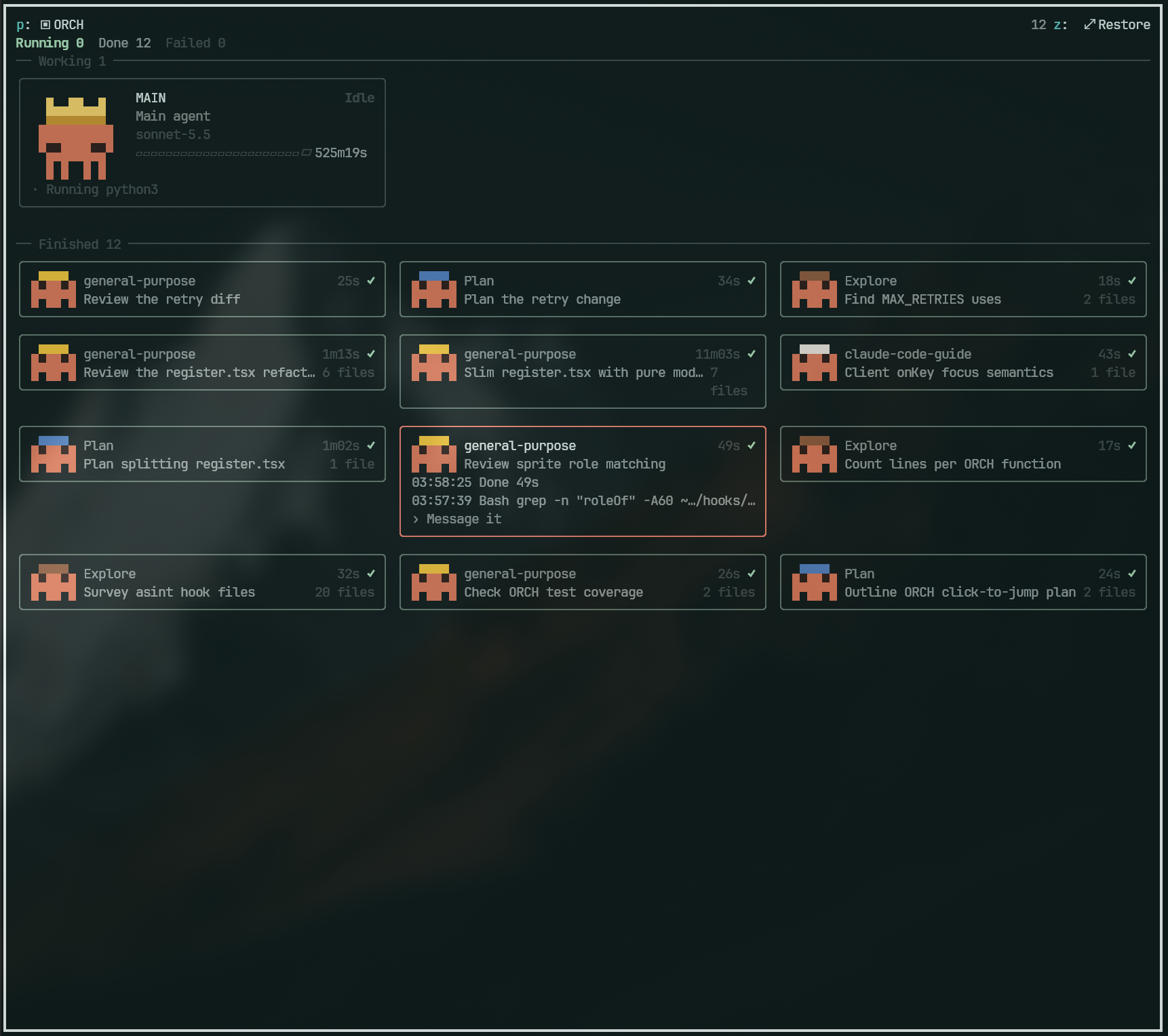
ORCH shows every agent as a card with a pixel worker whose hat says what kind of agent it is: an explorer, a planner, a reviewer, a tester, a designer, a developer, a writer and more. A running agent has a full card, a border that glows and fades, a bar that sweeps while it works and one plain line for what it is doing right now ("Reading client.ts", the description Claude gave a command). Finished agents sit below a divider as smaller cards with a check or a cross. Click a card for its latest steps; CHANGES then lists only the files that agent touched.
Talk to any agent
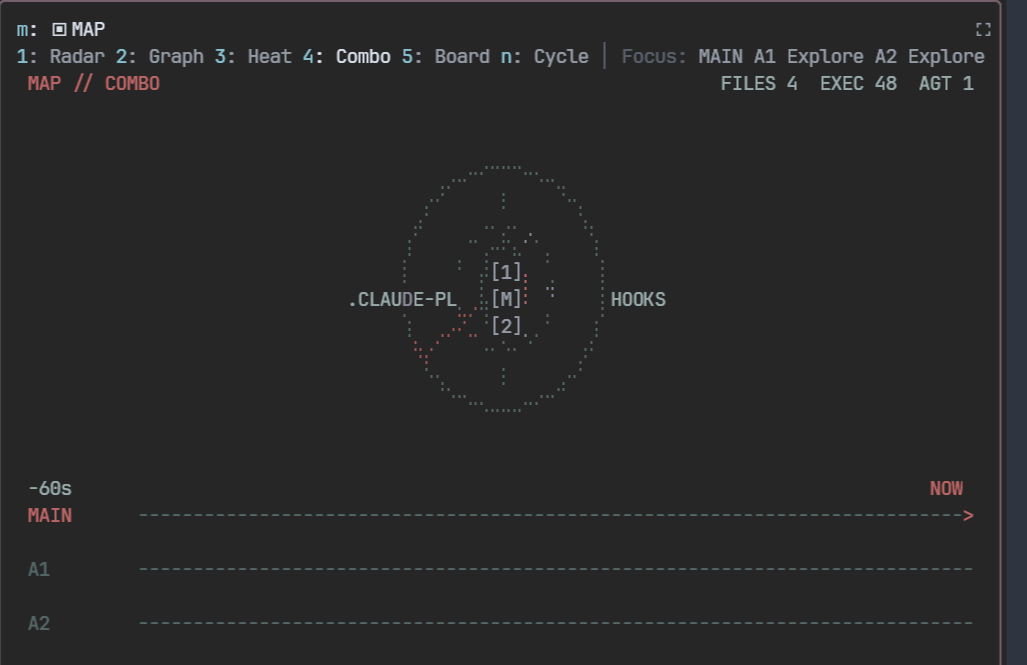
Click [M] or a subagent's [n] on the radar or the graph, type an instruction, press Enter. Messages to the main agent are queued like anything you type; messages to a subagent reach it at its next step, and a finished subagent is woken up with the message. ✉ All sends one instruction to every running subagent. The board view lists agents in Running, Done and Failed columns.
Architecture you can click
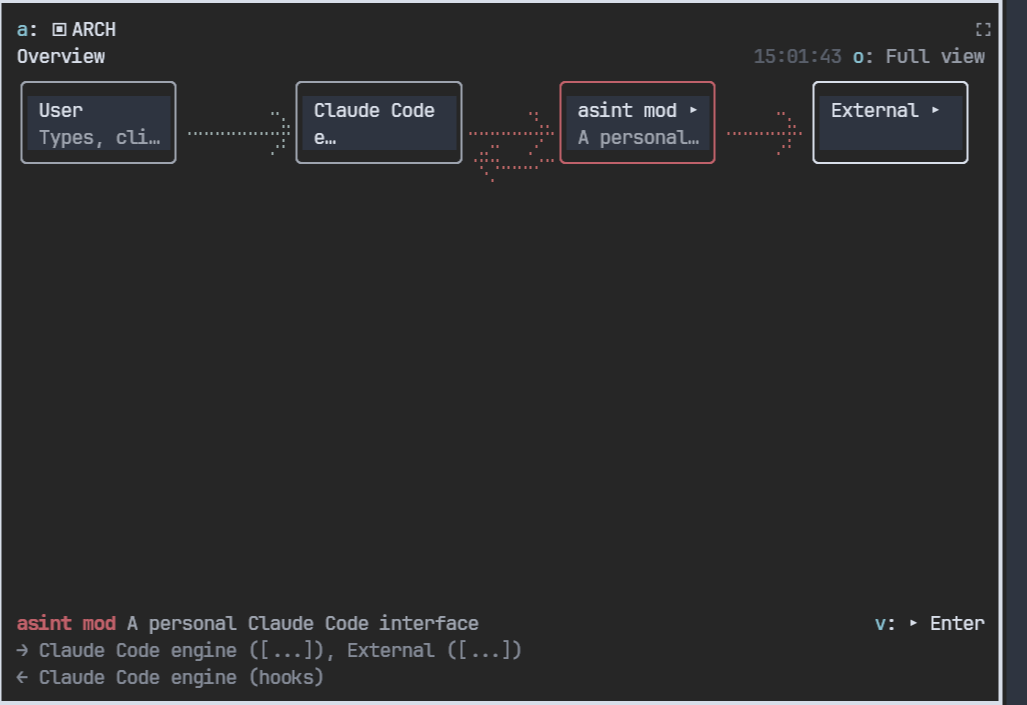
ARCH reads docs/*.c4 at the root of the current git repository. Click a box to see what it talks to; click a box marked ▸ again to open the view inside it. In a workspace that holds several repositories, asint also finds a system map in */02-Architecture/system-maps/*.c4: elements there carry metadata { repo '<path>' }, and opening one switches to that repository's own diagram, with a breadcrumb to go back up. o opens the full LikeC4 viewer in your browser for zoom and pan. When the system map lives in an Obsidian vault, asint writes a Mermaid copy of each view into views/ so Obsidian can draw it.
asint adds a short rule to Claude's system prompt whenever a diagram exists: when a change alters the architecture, Claude updates the diagram in the same turn. Nobody else decides whether the diagram needs changing.
Output stays in the terminal
asint asks Claude to write plans and reports as Markdown in its reply rather than as Claude Docs documents. When Claude publishes an HTML page as an Artifact, asint opens the local file in terminal-browser next to the conversation (or your default browser if it is not installed) and lists it under MEDIA. /html <path or url> does the same by hand; /html -b uses the system browser.
Looks
The chat column (your messages, the spinner, the line that ends each turn, the prompt bar) uses phosphor green and amber text. The dashboard takes its colors from the current Omarchy theme and switches when you change it; /skin hacker puts it in phosphor colors too. Backgrounds always come from the theme, so asint never paints a black your terminal doesn't have.
Commands
| Command | Does |
|---|---|
/asint | Open the dashboard |
/asint edit | Edit the layout |
/asint reset | Restore the default layout |
/asint arch | Ask Claude to check or create the architecture diagram |
/asint lang zh|en|auto | Interface language; auto follows your system locale |
/skin [omarchy|hacker] | Dashboard colors: follow the theme, or phosphor |
/html [-b] <path or url> | Open a page in terminal-browser, or the system browser with -b |
What asint does on your machine
asint has no server and sends nothing anywhere on its own. Everything below happens locally, and only in the places listed.
Programs it runs, always by name with arguments it builds itself:
| Program | When | Why |
|---|---|---|
git | Each prompt, and when FILES scans | Repository root, branch, uncommitted count, the file list |
find, grep, mkdir, id | Scanning the project, new media, the session title | Listing files, reading the session title out of the transcript, cache folders, the temp folder name |
likec4 (or npx likec4@1.59.4, which downloads it from npm the first time) | ARCH | export json to draw the diagram, gen mermaid for the Obsidian copies, validate |
bin/asint-likec4-view | o in ARCH | Starts likec4 start on 127.0.0.1 and opens it in your browser |
bin/media-prep (ImageMagick, ffmpeg) | MEDIA and file previews | Thumbnails and frames; a 3D model preview page loads three.js from cdn.jsdelivr.net when you open it |
bin/asint-tb, bin/asint-open, xdg-terminal-exec nvim | Opening a file or page | terminal-browser for web pages, the system default for other files, nvim for code |
Files it writes: ~/.config/asint/layout.json (the dashboard layout), /tmp/asint-arch and /tmp/asint-media (caches), ~/.cache/asint/last-error.log (the last view error), and views/*.md next to a LikeC4 system map, which are Mermaid copies of its views.
Hooks and what they change:
prompt.composeadds two rules to Claude's system prompt: keep deliverables in the reply as Markdown, and, when the project has a LikeC4 diagram, update it when a change alters the architecture.tool.callrecords each tool call for the panels and passes it on unchanged, with two exceptions: it refuses to create Claude Docs documents (deliverables stay in the terminal), and it answers calls to its ownchecklisttool, which only updates TODO.agent.spawnandsession.appendonly record agents and background task results for MAP and EXEC.
Prompts it sends for you, only when you press something:
- Plain runs
/btwwith a fixed request to explain Claude's last reply simply. - Arch diagram and
/asint archsubmit a fixed request to check or create the project's LikeC4 diagram. - A message typed in the MAP box goes to the agent you clicked, exactly as you typed it.
Requirements
- Claude Code 2.1.291 or newer.
- kitty or Ghostty for images in MEDIA, the prompt bar and file previews.
- LikeC4 for ARCH. asint uses
likec4fromPATH, orASINT_LIKEC4if set, and falls back tonpx likec4. - ImageMagick and ffmpeg for media previews.
- Optional: terminal-browser for opening pages next to the conversation; Omarchy for theme colors.
The interface is English, or Traditional Chinese when your locale is Chinese.
License
MIT
Details
- Author
- @leonrlr4
- GitHub Stars
- 1
- Sub-category
- Dashboards
- License
- MIT
- Surfaces
- terminal
- Added
- 1 months ago
- Last synced
- today
Weekly Mods Digest
Top new Claude Code mods and install commands, once a week. No fluff, unsubscribe anytime.

